
What is Axiom? Main features and how to use it
Axiom (axiom.trade) is a web trading terminal that works as a wallet and a tool for trading memecoins, tracking wallets, monitoring X and trading perps through Hyperliquid. Axiom started on Solana, then added BNB Chain, Ethereum, Base, Robinhood Chain, Ink, Arc and HyperEVM.
Pulse: catch tokens the moment they launch
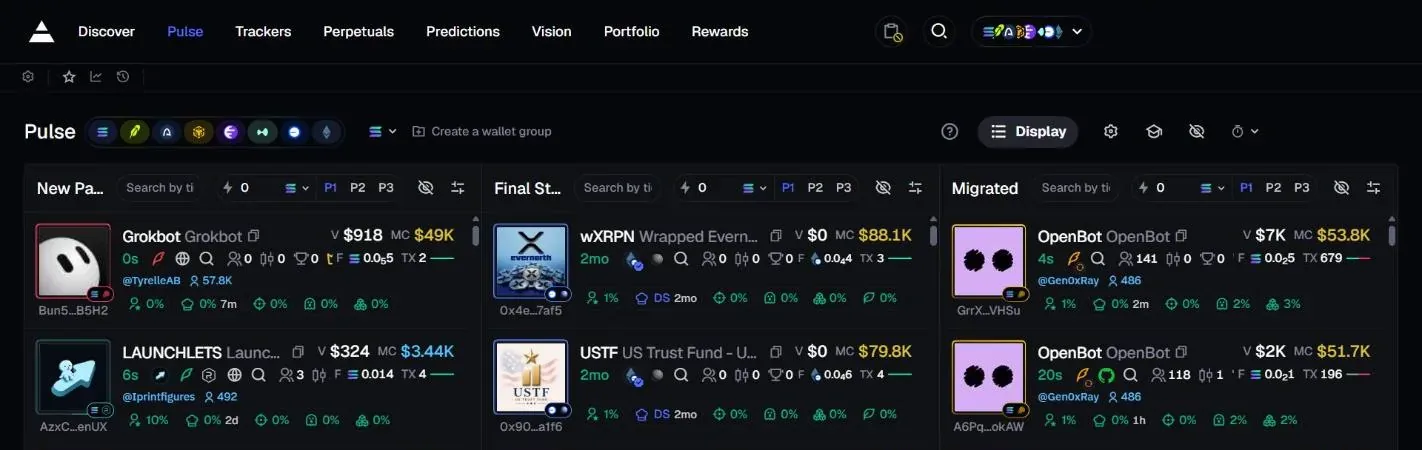
Pulse is Axiom's page for hunting new tokens, split into three columns: New Pairs (tokens just created on a launchpad such as Pump.fun), Final Stretch (bonding curve almost full, about to hit a DEX) and Migrated (just moved to a DEX pool, newest on top). Click the lightning icon on a card to buy instantly without opening the token page.
Each column has its own filters: token age, how much the top 10 holders hold, how much the dev holds, sniper share, insiders, bundled wallets, holder count, Pro Traders, liquidity, volume, market cap, and number of buys and sells. Since July 2026, Pulse is merged with Wallet Tracker, so whatever your tracked wallets buy shows up right on Pulse.
Discover: which tokens are pulling in money
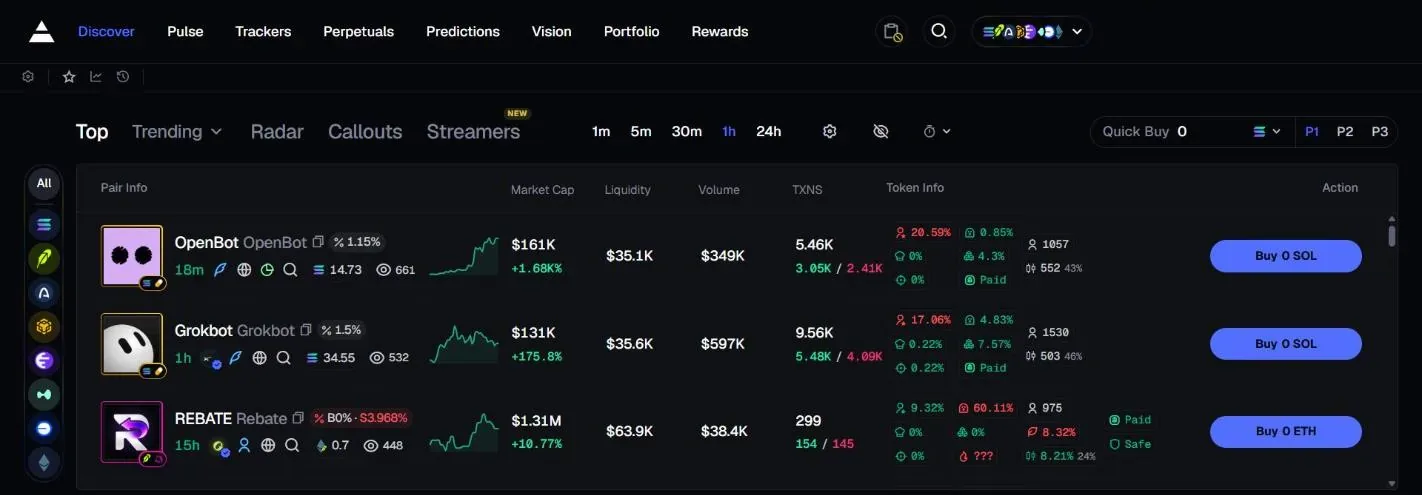
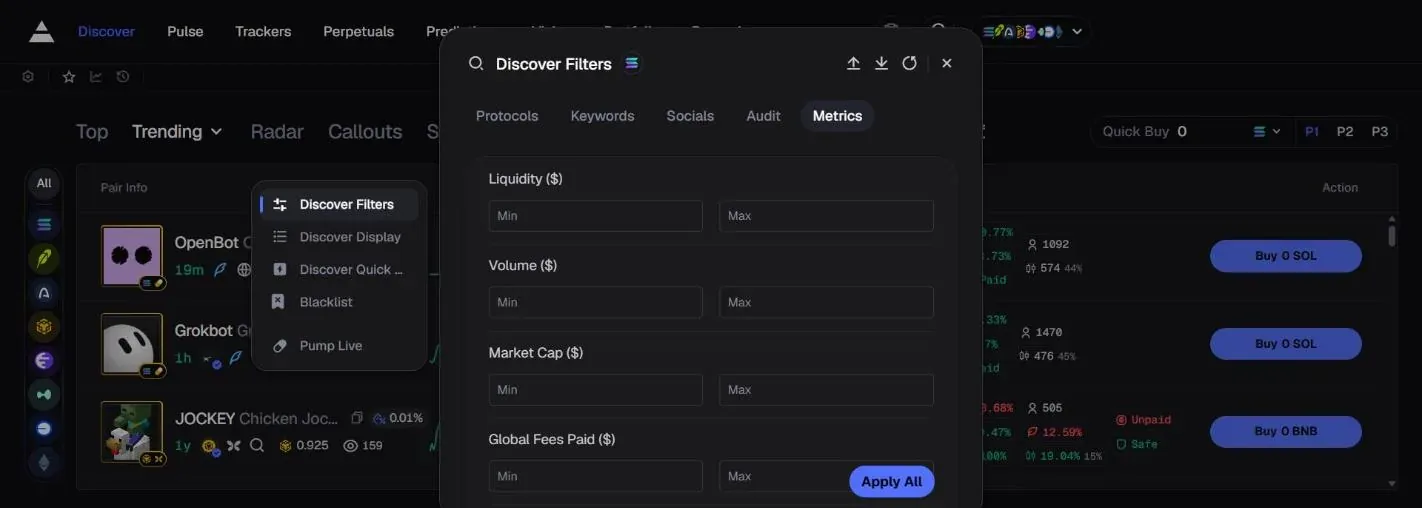
When we took our screenshots, Discover had the tabs Top, Trending, Radar, Callouts and Streamers. Trending ranks tokens by trading activity over the timeframe you pick (1m, 5m, 30m, 1h, 24h); Callouts collects calls from many sources plus a 30-day Top callers board. The filters (Discover Filters) cover DEX Paid (the token has paid for a DEX listing), top 10 holder share, liquidity, volume, market cap and transaction count. Axiom itself warns that not every high-volume token is real: some have wash-traded volume.
Click the star next to a token's name to add it to your Watchlist, and open it again from the star at the top. The search box has Pump Only and OG Mode buttons (filters for older, highest-cap tokens, the kind that often get pumped again).
Token page: chart, Trader Scan and Bundle Checker
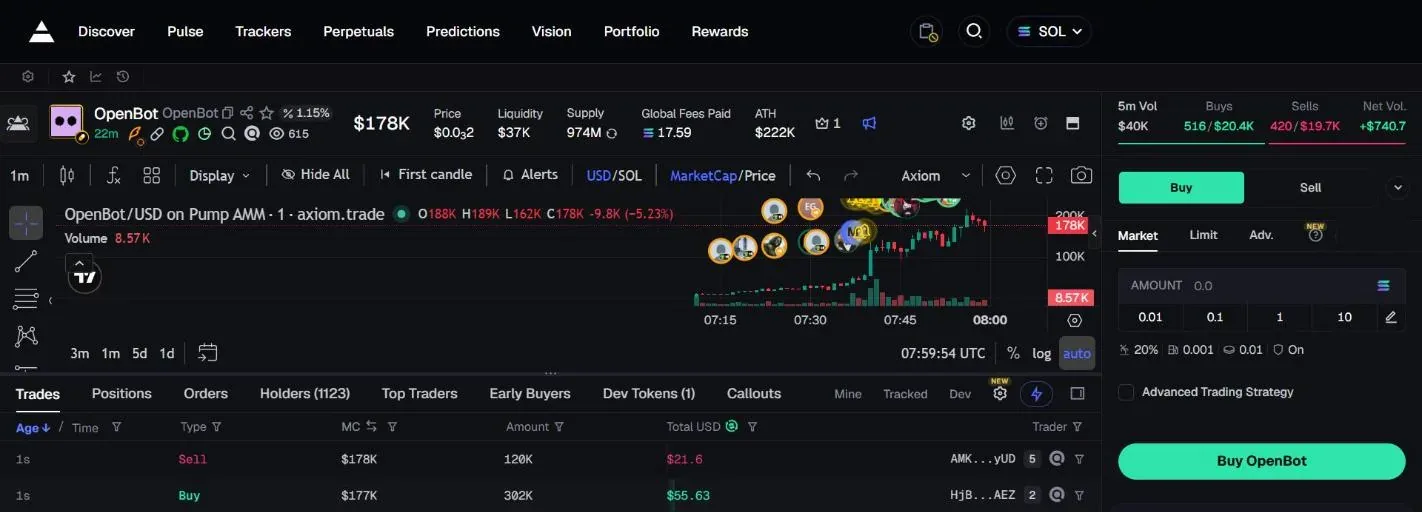
Click a token to open its detail page: a TradingView chart, trade history, holders and the trading panel on the side. Trader Scan sits right in the trades table: for each wallet that traded this token, you see how much it bought and sold, how much it still holds, realized profit and how long it held, so you know who is accumulating and who is dumping.
Bundle Checker flags groups of buys packed into the same block (4 or more transactions) at any time, not only at launch. Axiom states clearly that no detection method is 100% accurate. Since May 2026 there is also Atlas Maps, a wallet map provided by InsightX.
Trading: Market, Limit and Instant Trade
The order panel has Market (buy or sell right away at the current price) and Limit (set a price, the order fills when the price reaches it). You set limit orders with the slider in the order panel or by dragging a price line straight on the chart.
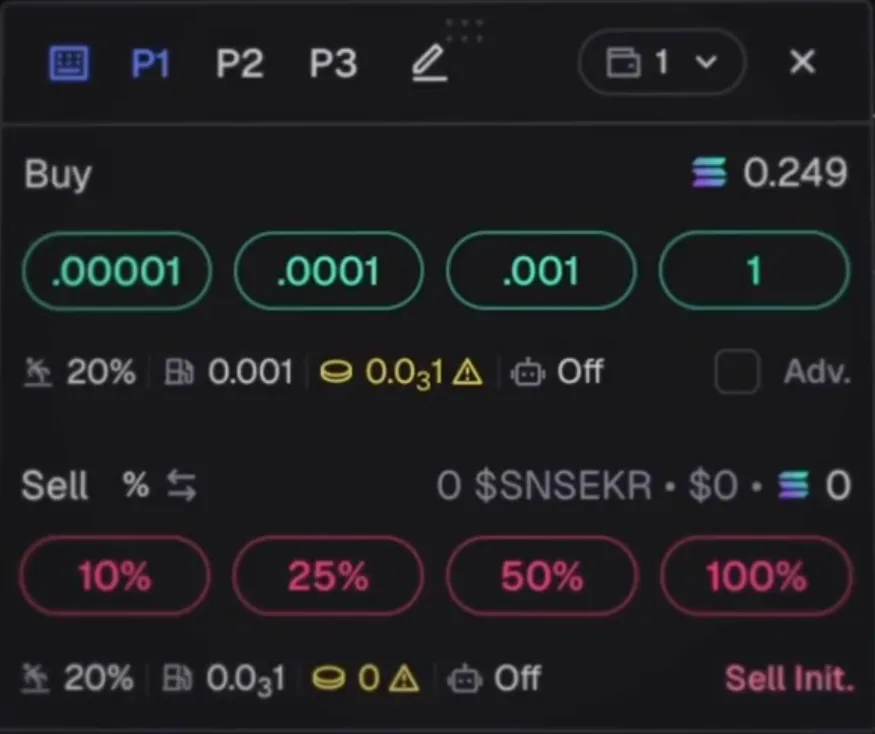
Instant Trade is a small floating panel next to the chart: preset buy buttons in SOL and preset sell buttons for 10%, 25%, 50%, 100%, one click and done. There are 3 setting presets, P1, P2 and P3, for quick switching. Turn on the hotkey toggle to trade from the keyboard: press Space plus the key you assigned.
To dodge price swings, click the wallet button and then Swap to convert to USDC right inside Axiom.
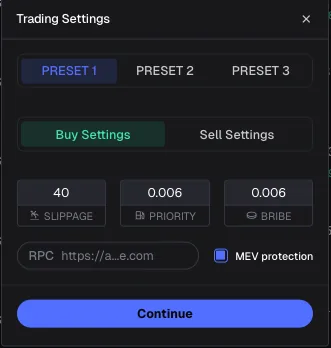
Priority fee, slippage and MEV protection
- SlippageThe maximum price difference you accept. For very volatile tokens raise it so orders don't fail; if MEV protection is off, keep it low so you don't get sandwiched.
- Priority and BribeThe priority fee paid to validators and the bribe that gets your order in faster, 0.001 SOL each by default. Axiom suggests a level based on network conditions.
- Three MEV modesOff: no protection. Reduced: sent through Jito, some risk remains. Secure: waits for a validator on a trusted list, slower but safest; Axiom recommends Secure.
- Buy and sell presetsEach preset stores separate settings for buys and sells, so you can switch quickly when the market changes.
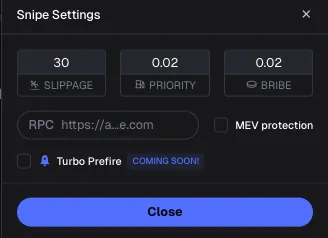
Migration Actions: buy or sell the moment a token hits a DEX
Instead of using an outside sniper bot, Axiom has Migration Actions built in. With Sniper Buy, you set the fees for the snipe (slippage, priority, bribe), click Snipe and wait: Axiom buys the moment the token leaves the Pump.fun bonding curve for a DEX pool, running through Axiom's own nodes.
The other direction is Sniper Sell: go to Sell, choose Advanced, then Migration, and enter a sell order to exit exactly when the token migrates. This is useful when you realize you bought a copycat token.
Wallet Tracker: see what good wallets are buying
The Trackers section has Wallet Tracker for following any wallet: click Add Wallet, pick an emoji, give it a name and paste the wallet address. If you used BullX or another platform before, there is an import button to bring in your whole wallet list at once.
From then on, these wallets' trades show directly on the chart and on Pulse, so you see right away which token a KOL or smart money just entered, and whether several wallets are buying the same token.
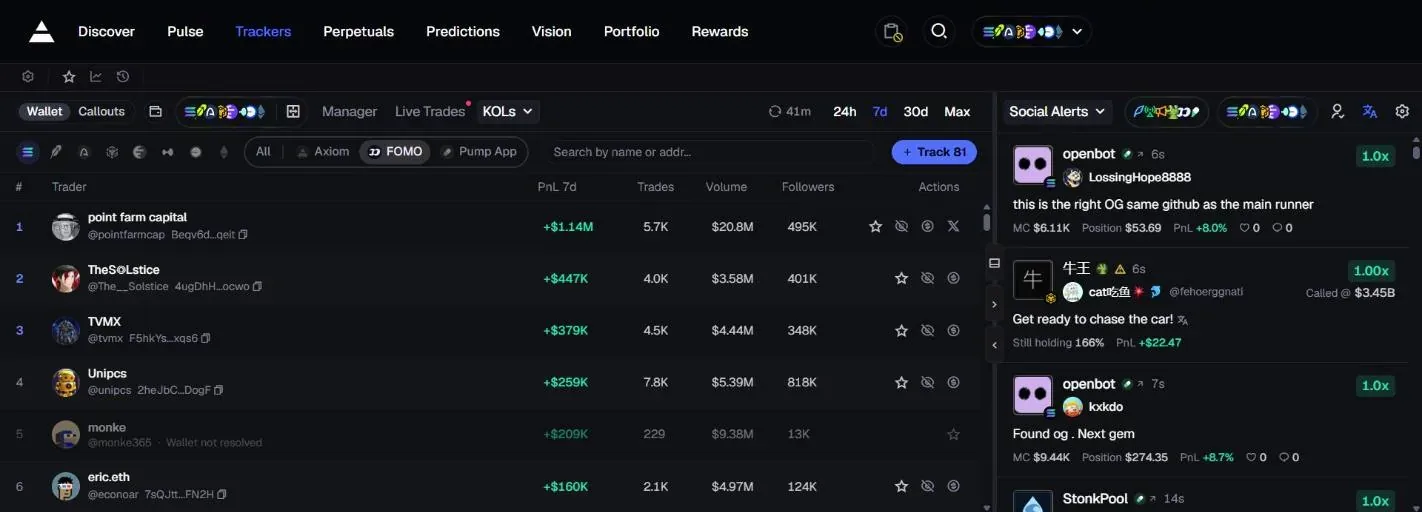
When we took our screenshots, Trackers had the tabs Manager (your wallet list), Live Trades (new trades from those wallets), Transfers, Monitor and KOLs: a board of KOL wallets with PnL, trade count and volume, and a button to track each wallet. The right column is Social Alerts, call posts shown with the poster's position and PnL.
Twitter Monitor: news on X reaches you first
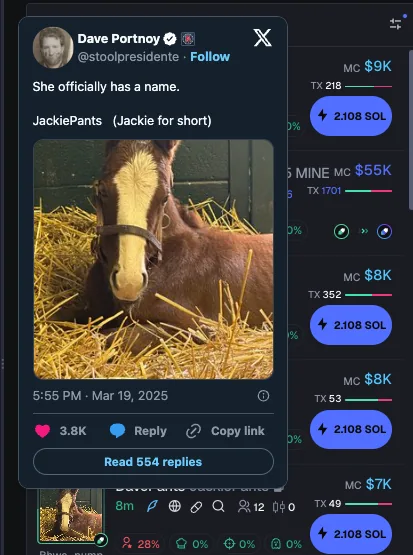
Also in Trackers, Twitter Monitor scans X accounts that matter to crypto in real time, with no outside tool or paid plan needed. It is free for anyone who has traded 5 SOL or more in total on Axiom. You add the X accounts you want to follow and choose which alert types you receive.
On Pulse, tokens that link to an X post get a Twitter Preview: read the post right there without opening X. The preview only appears for post links, not for profile links.
Vision: a leaderboard of KOL wallets
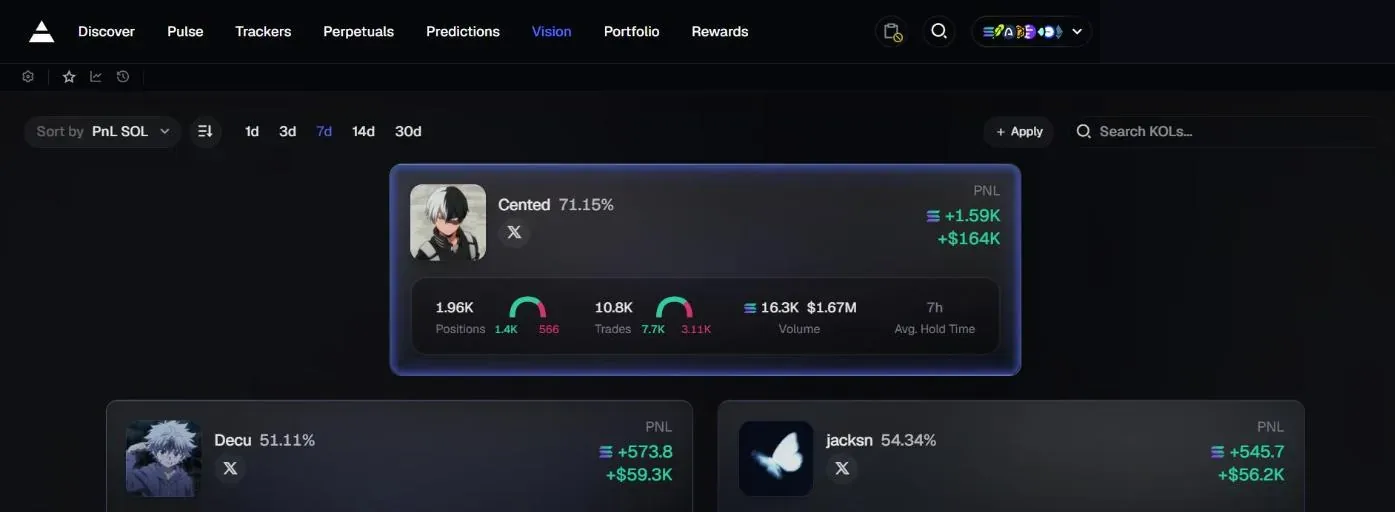
Vision sits in Axiom's main menu. It launched at the end of July 2025 to find KOL and insider wallets. When we looked, it was a KOL leaderboard ranked by trading results: the top three appear as large cards, and everyone else is in the Traders table below.
Each KOL has a name, X link, win rate, PnL (SOL and USD), number of winning and losing positions, number of buys and sells, volume and average hold time. Pick the 1d, 3d, 7d, 14d or 30d window; Sort by ranks by PnL, volume, wins, losses, buys, sells or hold time. The Search KOLs box searches by name.
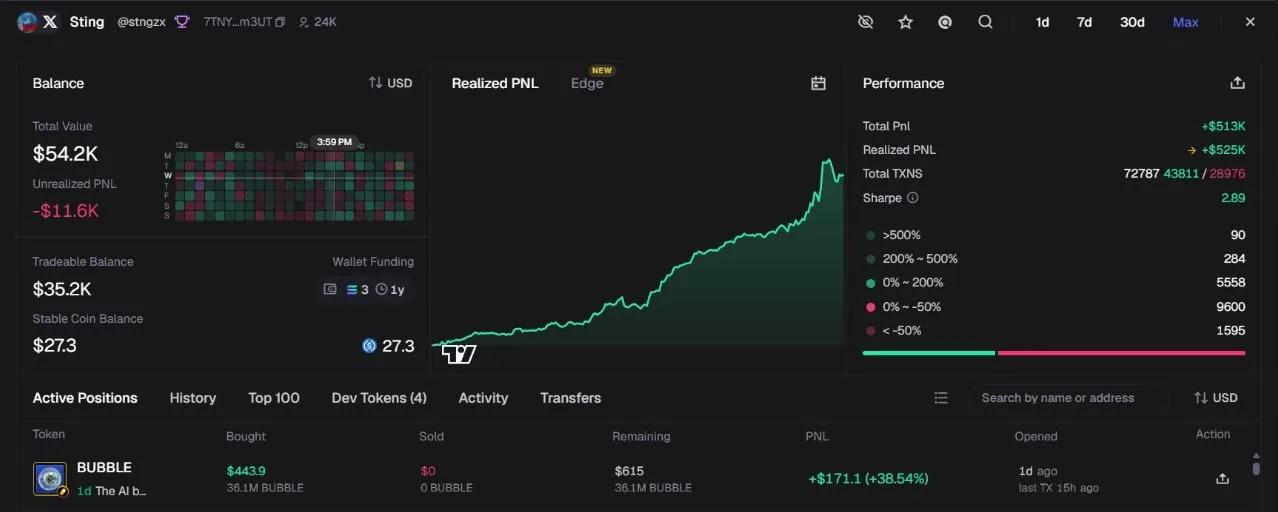
Click a row to open that KOL's wallet profile: balance, realized PnL chart, trade stats by profit level, open positions, trade history, tokens the wallet has created (Dev Tokens) and transfers. At the top of the profile there is a star button to add the wallet to your tracked group, a button to open it on Solscan and a button to hide the KOL from the trade bubbles on the chart.
The Apply button opens the Add KOL form: choose your wallet, enter your X account (required), Twitch, Kick or Discord. It is for anyone who wants their wallet on the board.
Multiple wallets and private trading
- Multi-walletOne panel showing all your Solana wallets: balances, pending orders, recent transactions. Switch wallets without logging out.
- Wallet namesLabel each wallet by how you use it, for example a scalping wallet, a long-term wallet, a memecoin wallet.
- Spread the riskAccording to Axiom, splitting funds across several wallets means a problem with one wallet doesn't affect the others, and your trades are harder to track.
- Private tradingAxiom integrates private trading from Vanish (since November 2025) and Husher (since August 2026).
Perps on Hyperliquid and Prediction Markets
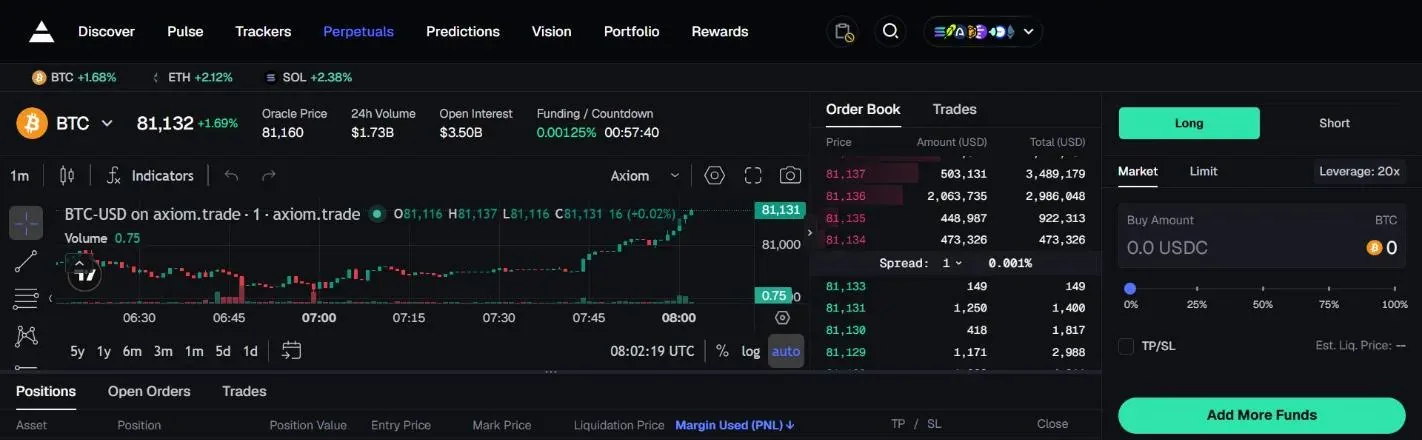
The Perpetuals section runs on Hyperliquid: pick a pair, choose Long or Short, enter the USDC amount, set the leverage (the docs list up to 50x) and click Long or Short. Positions, open orders and history are in three tabs: Positions, Open Orders, Trades.
To deposit, click the SOL – USDC button at the top right, choose Swap and convert SOL to USDC on Hyperliquid. To withdraw, do the reverse; the USDC reaches your Solana wallet in about 5 minutes. The Axiom docs list Axiom's own perps fee as 0.01% per trade, on top of Hyperliquid's own maker and taker fees.
Since June 12, 2026, Axiom has Prediction Markets: trade on the outcome of upcoming events, right inside Axiom.
Yield and staking: put idle money to work
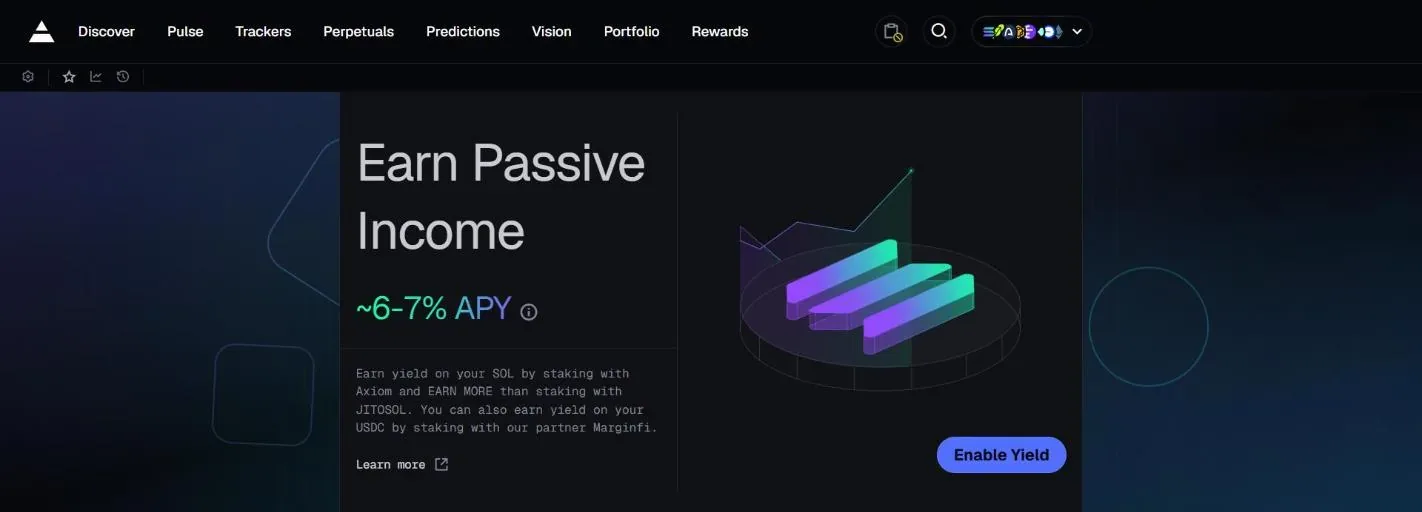
Yield lets your unused balance earn interest through partner Marginfi, with instant withdrawals. When we took our screenshots, the Yield page showed about 6–7% APY for staking SOL through Axiom; rates change with the market.
With Staking, you stake SOL directly with Axiom's validator (0% commission, full staking and MEV rewards; you can find it in the staking section of Phantom and Ledger) or stake on the website to get axiSOL, a liquid staking token. axiSOL takes 5% of rewards and 0.1% on withdrawal.
Portfolio: spot and perps PnL
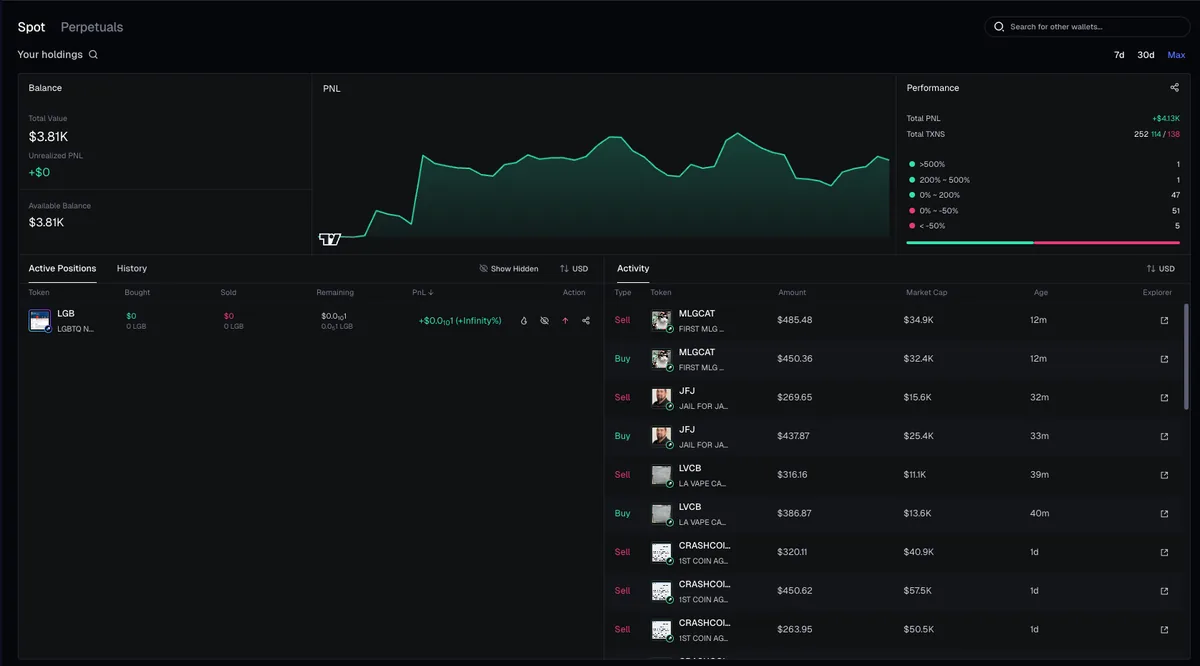
Portfolio is split into Spot and Perpetuals, so you know which side your profits come from. The Spot part shows total assets, available balance, unrealized PnL, a PnL chart over 7 days, 30 days or all time, trade stats by profit level, open positions and trade history with Solscan links.
The Perpetuals part shows account value and open positions with entry price, mark price, liquidation price, margin and TP/SL. The search box lets you view another wallet's portfolio. Portfolio V2 launched at the end of August 2026.
Rewards: fee rebates, points and commissions
Every trade on Axiom gets part of its fee back in SOL depending on your tier, and your tier rises with your total trading volume: from Wood (effective fee 0.95%, 0.05% back) through Bronze, Silver, Gold, Platinum, Diamond up to Champion (effective fee 0.75%, 0.25% back). You also earn points for each trade and each referral, with a leaderboard.
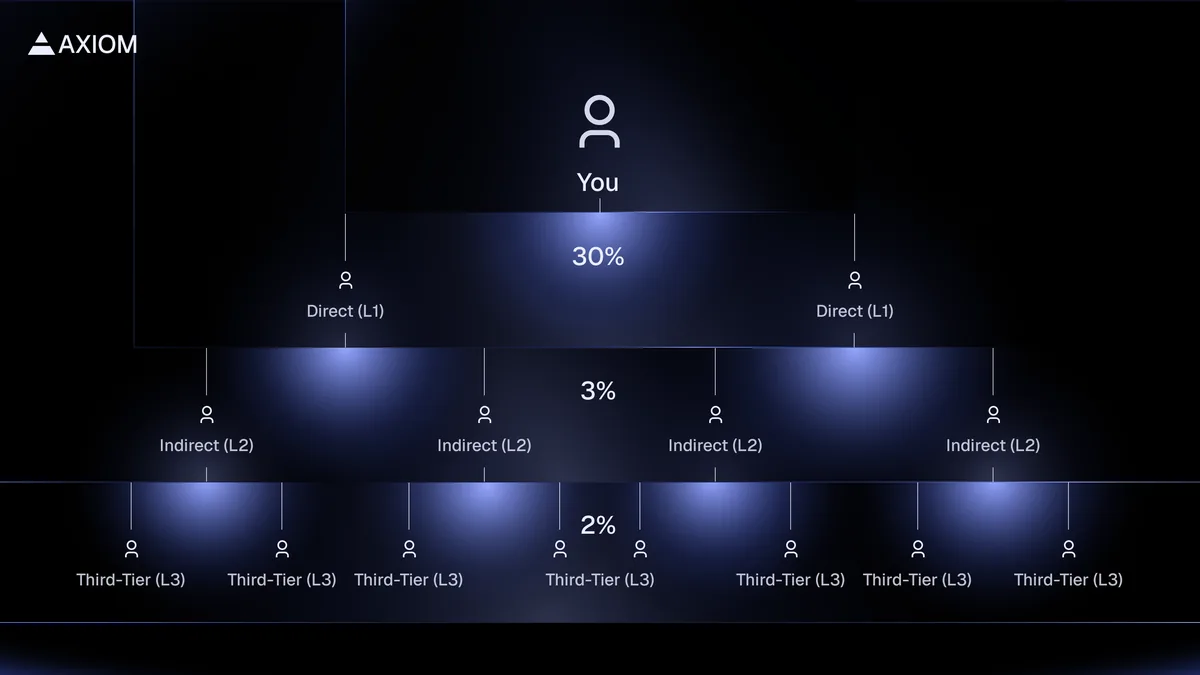
The referral program has 3 tiers: 30% of the net fees Axiom earns from people you invite directly, 3% from the people they invite and 2% at the third tier, with no cap. People who sign up through a referral link get 10% off trading fees.
Supported chains and how to deposit
Axiom started with Solana, then added BNB Chain (October 2025, BNB V2 since September 2026), Ethereum (May 2026), Robinhood Chain (July 2026), Base, Ink and Arc (September 2026), plus HyperEVM (listed in the app's chain picker when we looked). Per the docs, referral commissions and fee rebates are counted on Solana, BNB Chain and Ethereum.
There are two ways to deposit: send SOL to the Axiom wallet address shown, or click the arrow button at the top right, choose Deposit and then Buy to buy SOL through Coinbase, with no KYC for up to 500 USD per week.
Fees and safety
Axiom charges 1% per buy and sell order, going down to 0.75% with the rebate tiers, and another 10% off if you sign up through a referral link. On top of this fee you pay network fees (priority fee, bribe) and the token's launchpad fee, if any.
- Axiom wallets are non-custodial and use Turnkey's wallet infrastructure. At signup Axiom shows you a recovery phrase (you can view it again in Settings); import it into a wallet such as Phantom so you can always reach your funds yourself, and never give it to anyone.
- Support is only through tickets in the official Discord. Ignore any DM claiming to be support; Axiom advises turning off DMs from server members.
- When buying, set MEV to Secure mode; if MEV protection is off, keep slippage low.
- In February 2026, ZachXBT alleged that an Axiom employee used an internal customer support tool to look up users' wallets. On February 26, 2026 Axiom confirmed that a team member had misused the tool, revoked their access and continued investigating. No user funds were reported lost; the issue was exposed wallet information.
- The trading wallet signs trades for you: keep only the funds you plan to trade with, and move profits to your own wallet.
Get started with Axiom
- Open AxiomGo through our link: no extra cost, and you get 10% off trading fees.axiom.tradewizbot.pro
- Sign up with email, Google or PhantomClick Sign up and choose email (enter the one-time code sent to your inbox), Google or a Phantom wallet. Create a password and store the recovery phrase Axiom shows you somewhere safe.
- Deposit a little SOL, start smallSend SOL to your new wallet or buy it through Coinbase, set MEV to Secure, then try Pulse or Discover with small amounts before adding more.
Screenshots taken on October 28, 2026; the interface may change. Not investment advice: memecoins are high-risk, only use money you can afford to lose.
Lobbies and Communities: trade with friends
Lobbies (since December 2025) let you join a shared room and trade with friends right on Axiom. Communities (since May 2026) are trader communities that share calls directly inside Axiom, with no need to move to a Telegram or Discord group.