
What is Banana Gun? Main features and how to use it
Banana Gun is a memecoin trading toolkit made up of the Telegram bot @BananaGun_bot, the Banana Pro web terminal (pro.bananagun.io) and the Banana Predict prediction market terminal. The bot runs on Ethereum, Solana, BNB Chain, Base, MegaETH, Robinhood Chain, Stable, HyperEVM, Arc and even NEAR, and is best known for sniping new tokens.
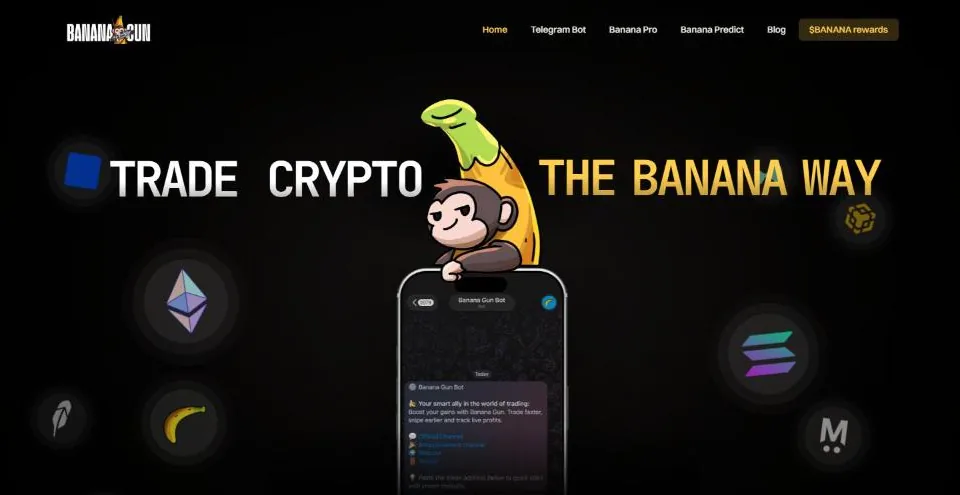
Telegram bot: one bot for every chain
Since March 2026, Banana Gun has merged its old bots into a single bot, @BananaGun_bot: buying, selling and every chain in the same chat. Just paste a token address, a Pump.fun link or a DEX Screener link; the bot detects the chain and opens the right Buy, Sell or Sniper panel (if trading hasn't opened yet).
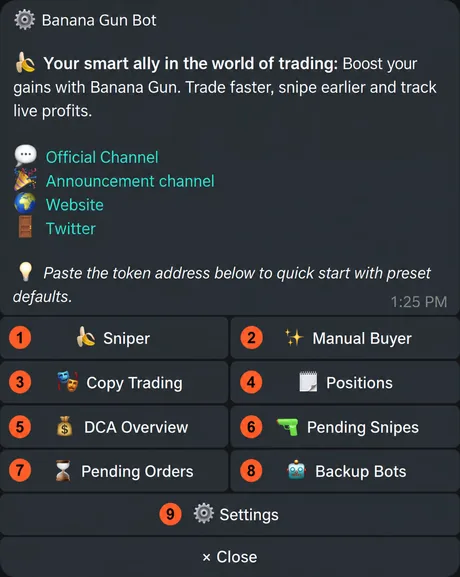
Type /start to open the menu: Sniper, Manual Buyer, Copy Trading, Positions, DCA Overview, Pending Snipes, Pending Orders, Backup Bots and Settings. Back goes back, Close closes the panel to keep the chat tidy.
Chains and wallets
According to the home page, Banana Gun supports ETH, SOL, BNB Chain, Base, Robinhood, Stable, HyperEVM and MegaETH on both the Telegram bot and the web. In July 2026 Banana Gun announced Arc; on October 1, 2026 NEAR came to the Telegram bot with a temporary 0% fee. For now it only has buy, sell and swap; limit, DCA, snipe and copy trade are coming later.
- Go to Settings → Wallet Settings → Wallet Setup, choose EVM or SOL, then Create Wallet or Import Wallet with a private key.
- An EVM wallet uses the same address on every EVM chain, but each chain has its own balance.
- Banana Gun doesn't let you view the private key again after creation. Save it as soon as you create the wallet; if you lose it, it can't be recovered.
- Wallet Settings also lets you transfer tokens between wallets, bridge between chains, rename and delete wallets.
Trading: the Buy, Sell and Positions panels
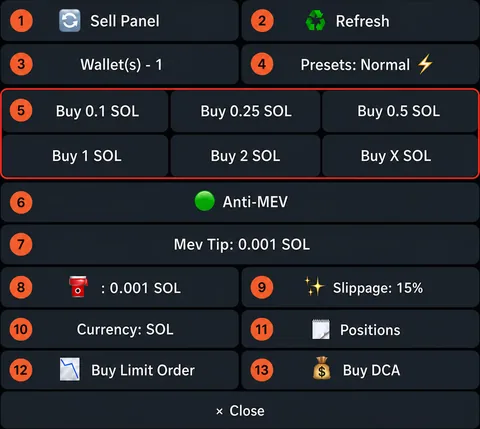
The Buy panel shows the token name, DEX, market cap, liquidity, price, taxes, suggested tip, your balance and quick links to Banana Pro, DEX Screener and DEXTools. Below that you pick the wallet and preset, and there are preset buy buttons, Anti-MEV, MEV tip, gas, slippage, the payment currency, Buy Limit Order and Buy DCA.
You pay with the native coin or a stablecoin such as USDC, USDT or USD1; the bot routes through several swaps if needed. The Sell panel shows PnL and average entry, and lets you sell by %, sell from one wallet only and create a PnL card. Positions lists the tokens you hold by chain and wallet, with a Watchlist, hiding of small positions and import of position history.
Copy trade: automatically follow another wallet
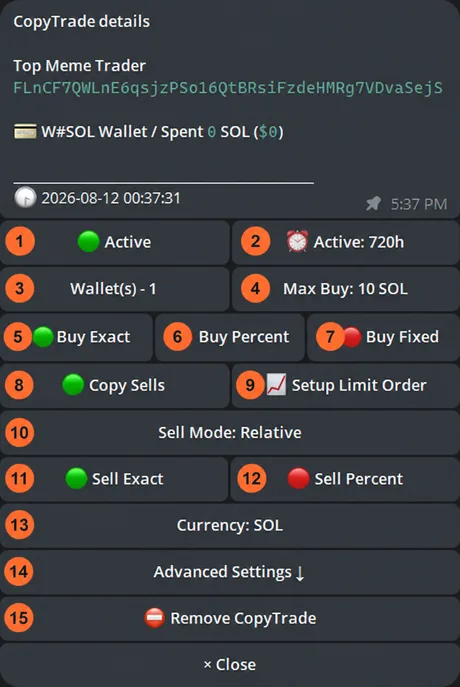
Choose Copy Trading or type /copytrade, click New Copy Trade and enter the wallet you want to follow. Copy trade runs on Solana and the EVM chains; on EVM there is no Anti-MEV button.
- How it buysMax Buy is the cap per trade. Choose Buy Exact (buy the same amount the source wallet bought), Buy Percent (a percentage) or Buy Fixed (a fixed amount). Set the run time, the wallet to use and the currency to buy with.
- How it sellsTurn on Copy Sells; Sell Exact sells the same % the source wallet sells, Sell Percent sells a share of that. You can also attach take-profit and stop-loss limit orders.
- FiltersTax limits, Buy Only Once (only the first buy, blocks the token for 7 days), Spending Limit, minimum and maximum market cap and token age, skipping funded buys, minimum trade size of the source wallet, minimum liquidity.
- Block tokens, block devsBlocked Tokens excludes tokens from copying; Token Creator Filter allows or blocks by the wallet that created the token. Pause All Copy Trades stops everything.
Sniper: buy the moment a token gets liquidity
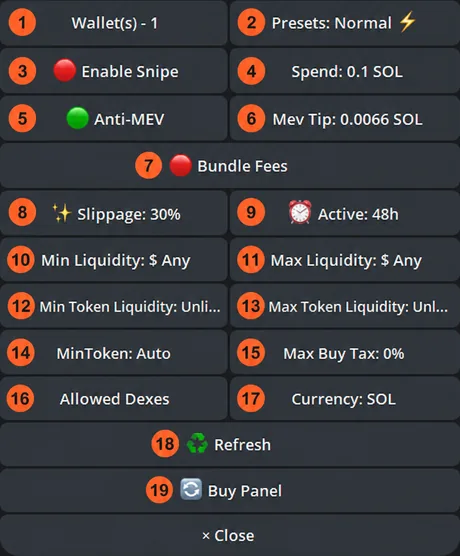
Sniper automatically buys a new token the moment liquidity is added to the pool. You need the token address in advance; Banana Gun has a Banana SOL Deployer channel that posts newly deployed contracts, but states clearly that most of them are scams and you have to do your own research.
Open Sniper or paste the address of a token that hasn't opened trading yet. Set the amount (Spend), preset, Anti-MEV and tip, slippage, delay, SOL and token liquidity range, minimum tokens received, maximum buy tax and allowed DEXes. Turn on Enable Snipe and you're done; view, edit or cancel in Pending Snipes.
Limit orders and DCA
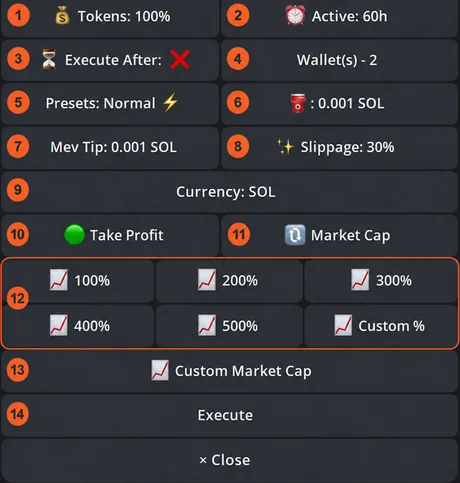
- Buy LimitBuy when market cap or price hits your level: quick picks -10%, -20%… -75% or enter a number. Has an expiry and Execute After (waits a while before it can fill).
- Sell LimitThree types: Take Profit, Stop Loss and Trailing Stop Loss (moves the stop up as the price rises). Choose the % of tokens to sell.
- DCA buys and sellsThe total amount is split evenly over intervals (minutes, hours, days) within a time window, with price range, market cap and tax limits.
- Pending OrdersEach order shows its trigger level, time left, and the high and low since it was placed. Edit or cancel orders one by one, or cancel a whole chain.
Presets and settings
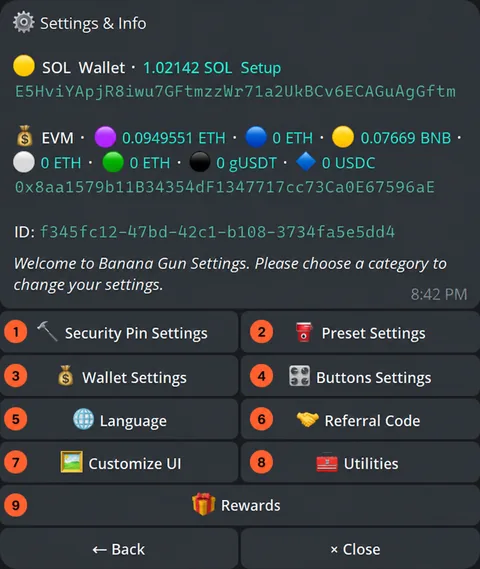
Each chain has three presets for buying and selling: Normal (lowest gas and tip), Fast and Insane (highest, for when everyone is racing to get in). Each preset has its own gas, slippage, Anti-MEV, MEV tip and price impact limit; editing these in the Buy or Sell panel also edits the selected preset.
Settings also has Security Pin, wallets, default buy and sell buttons, language, referral code, display options, Rewards and Utilities: claim Pump.fun cashback to your SOL wallet, and Incinerator closes unused token accounts to get the rent SOL back.
Banana Pro: the web trading terminal
Banana Pro (pro.bananagun.io) is the web version. You log in with Google, X or Telegram through Privy; always use the same login method as the first time, because a different one creates a new account. Then create a wallet (the private key is shown only once) or import one such as Phantom or Solflare.
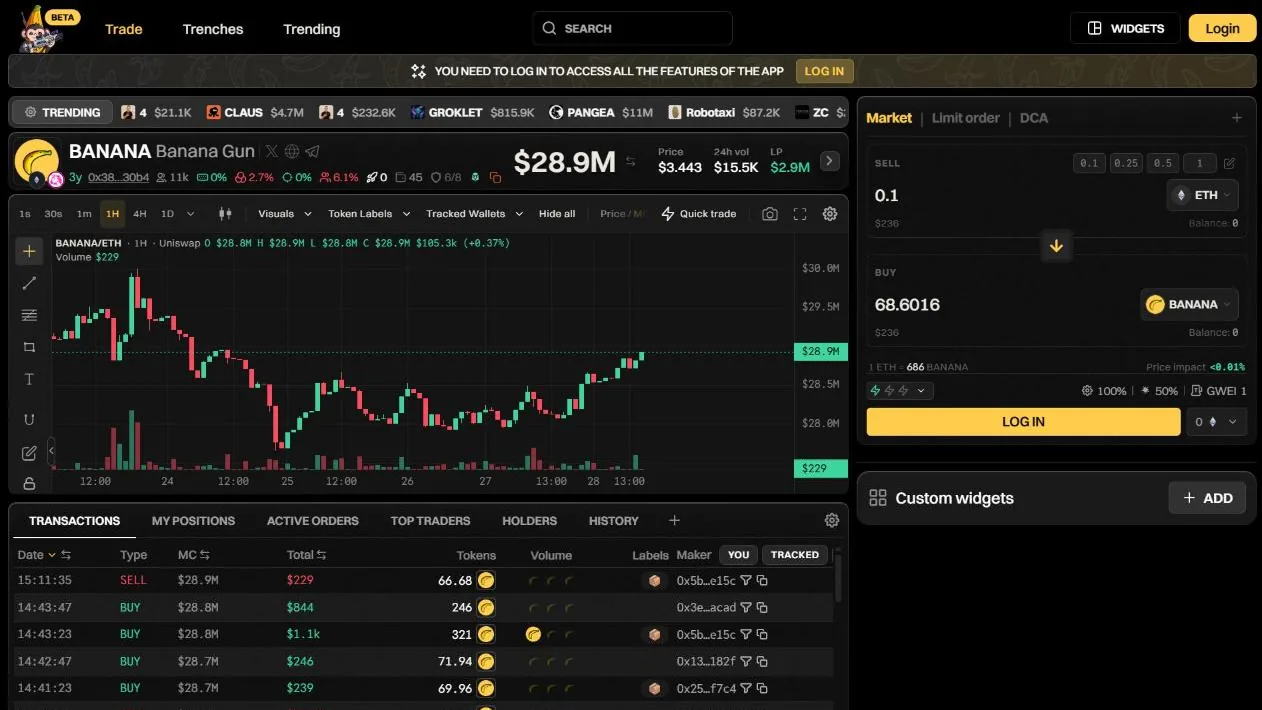
The Trade page is built from drag-and-drop widgets: TradingView chart, buy and sell, snipe, limit, positions, wallets, watchlist, Bubble Map (clusters of linked wallets), Top Holders and Top Traders (the token's 50 most profitable wallets, tagged as dev, bundler or sniper). You can save several layouts and switch between them in seconds. Banana Pro started with Solana, then added Base, BNB, Ethereum, MegaETH, Stable and Arc; when we took our screenshots, the chain picker also had Robinhood and HyperEVM. Data syncs with the Telegram bot.
The Trenches: new tokens on launchpads
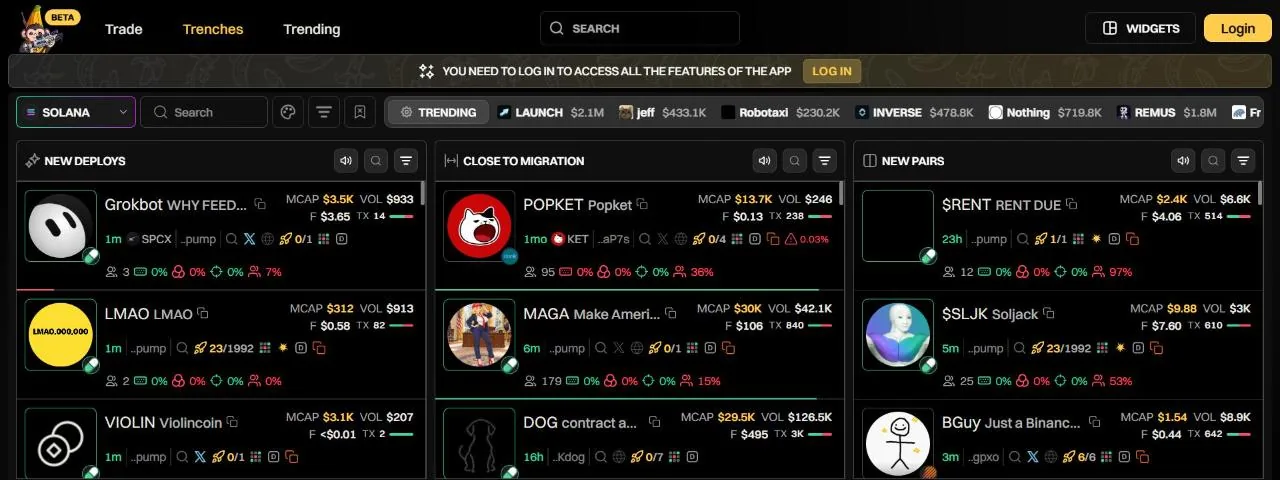
The The Trenches page in Banana Pro has three columns: New Deploys (just created), Close to Migration (bonding curve almost full) and New Pairs (just listed on a DEX). Each card shows token age, holder count, dev holdings %, bundled wallets, snipers, top 10, market cap, volume and an instant buy button.
Filters apply to the whole page or to a single column: launchpad, socials, bonding curve %, % held by tracked wallets, liquidity, number of buys and sells, token age and more. Hover over a column to pause it so it's easier to read.
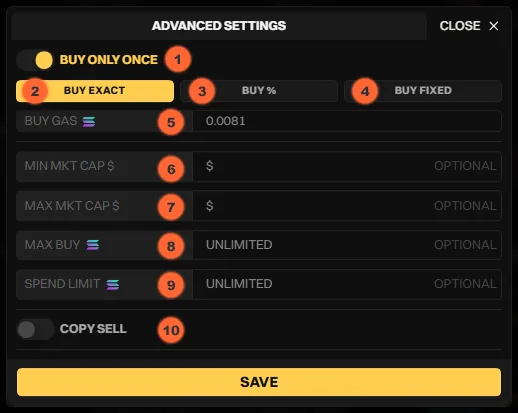
Copy trade on Banana Pro
The COPY TRADE widget has three modes: Simple (enter the wallet, Max Buy, Spend Limit, slippage, run time), Advanced (Buy Only Once, Buy Exact, Buy %, Buy Fixed, minimum and maximum market cap, Copy Sell) and Presets to save settings for reuse. Turn on LIMIT ORDER to attach take profit and stop loss.
The Copy Trade Overview page lets you pause, resume and edit each wallet, see the history of tokens bought and sold, and the list of blocked tokens. In Top Traders, hover over a wallet and a copy button appears.
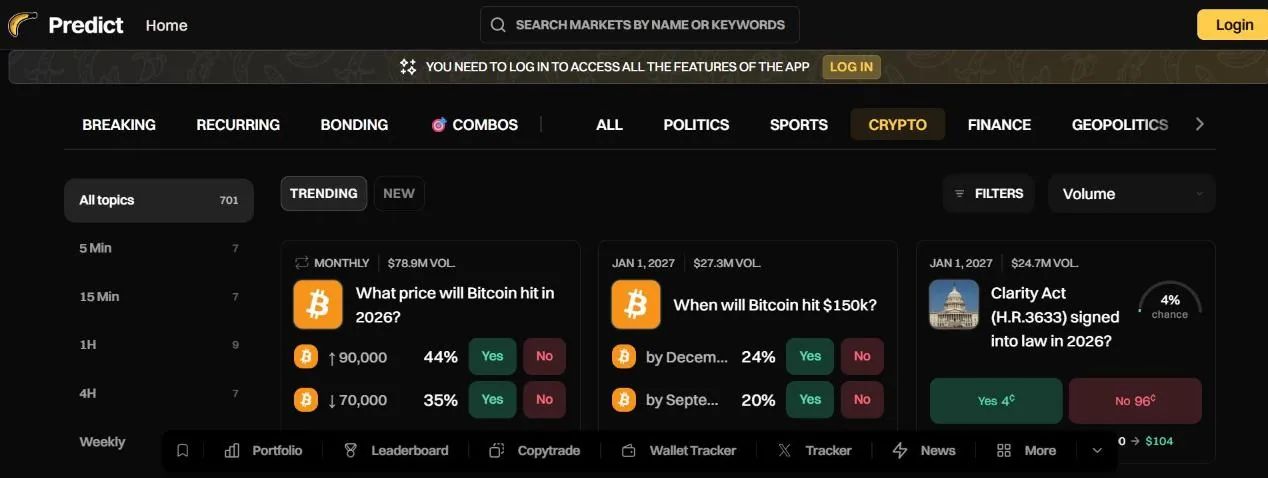
Banana Predict: trading prediction markets
Launched on July 7, 2026, Banana Predict (predict.bananagun.io) is Banana Gun's own terminal for Polymarket. You buy Yes or No on questions about crypto, events and sports. It has wallet tracking and copying, a leaderboard of top traders, and tracking of X accounts and news related to the market you're viewing.
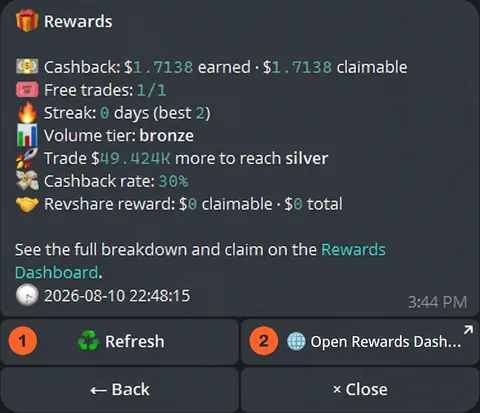
Cashback, free trades and referrals
Since July 2026, Banana Gun refunds fees based on lifetime volume: under 50,000 USD gets 15% back, up to 250,000 USD 20%, up to 1 million USD 25%, over 1 million USD 30%; new users get the 30% rate in their first month. Cashback is counted in USD and paid in BANANA tokens on Ethereum.
Each month there are free trades (100% fee refund) for regular orders from 25 to 50,000 USD, not for limit, copy trade or DCA; trading 7, 14 or 30 days in a row earns 1, 3 or 6 extra. Hold 50 BANANA or more to get holder rewards.
Referring friends earns 10% of their fees for life, plus an extra 10% in the first 30 days and 5% from day 30 to 90. Anyone whose referral volume tops 1 million USD within 30 days gets an extra 5–10%.
Fees and safety
According to the Banana Gun home page when we checked, the fee is 0.5% for manual trades and 1% for snipes, charged only when the trade succeeds; NEAR is currently 0%. On top of that you pay gas, MEV tip and the token's taxes (if any).
- Save the private key as soon as you create a wallet: the bot won't export it again. The Banana Gun team will never ask for your key.
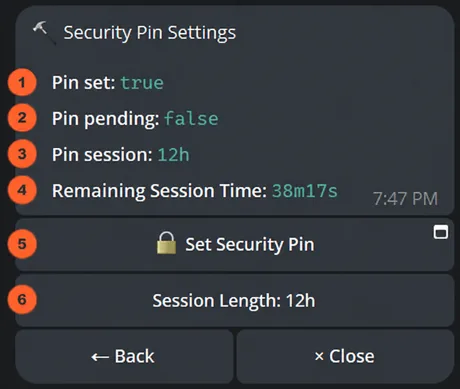
- Set a Security Pin: the bot locks after each session. Changing the Pin takes 8 hours and resetting a forgotten one takes 7 days, so an attacker can't change it right away.
- Turn on 2-step verification for the Google, X or Telegram account you use to log in to Banana Pro; be careful logging in to Telegram with a QR code on an unfamiliar device.
- Use only the official links: bananagun.io, pro.bananagun.io, @BananaGun_bot and the t.me/bananagunannouncements channel.
In September 2024, an attacker exploited a vulnerability in the "Telegram message oracle" the bot used and drained about 3 million USD from the wallets of 11 users. Banana Gun paused the bot, patched the bug, added a 2-hour delay on transfers and two-factor authentication, and announced it would fully compensate users from the project's treasury. When we checked, we found no official announcement confirming the payout was complete.
Get started with Banana Gun
- Open Banana GunGo through our link, at no extra cost.bananagun.tradewizbot.pro
- Create a wallet, save the keyIn the bot, go to Settings → Wallet Settings → Wallet Setup, create an EVM or SOL wallet and save the private key right away. On the web, log in to Banana Pro and click Generate Wallet.
- Deposit a little, start smallSend SOL, ETH or BNB to the wallet, paste a token address to make a small test buy, and set a Security Pin before using the sniper or copy trade.
Screenshots taken on October 28, 2026; the interface may change. Not investment advice: memecoins are high-risk, only use money you can afford to lose.