
What is MevX? Main features and how to use it
MevX (mevx.io) is a web terminal for trading memecoins, with a Telegram bot and a Chrome extension. One account covers Solana, BNB Chain, Base, Ethereum, Robinhood Chain and Monad: find new tokens, copy wallets, snipe, set automatic orders and get signals.
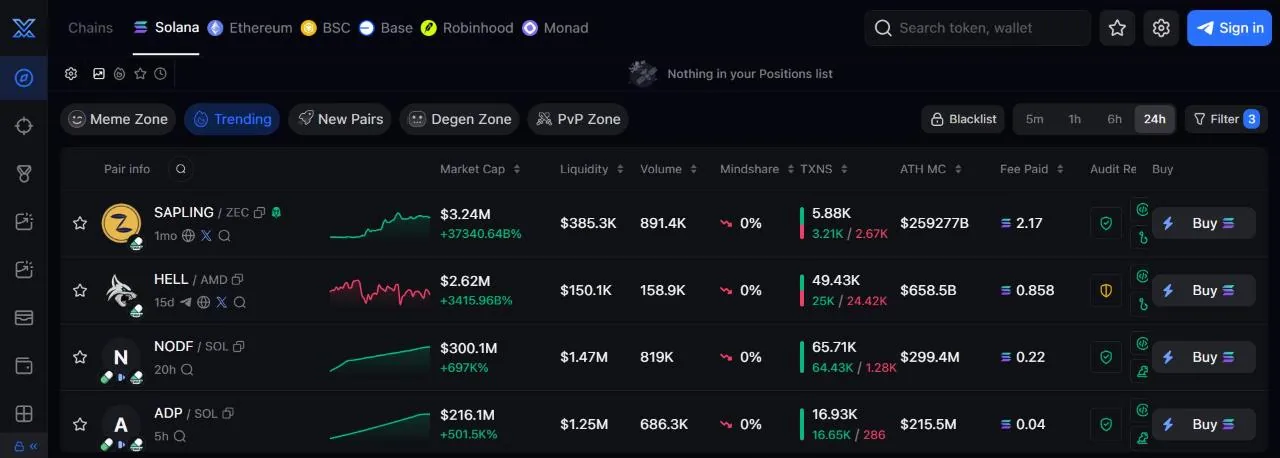
Discover: find tokens that are running and new tokens
The mevx.io home page is Discover; pick the chain in the top bar. The Trending tab ranks pairs getting attention (pool age, market cap, liquidity, volume, number of trades), and the New Pairs tab lists newly created pairs with safety checks, plus a separate filter for tokens paired with stocks (NVDAx, TSLAx…) on Solana.
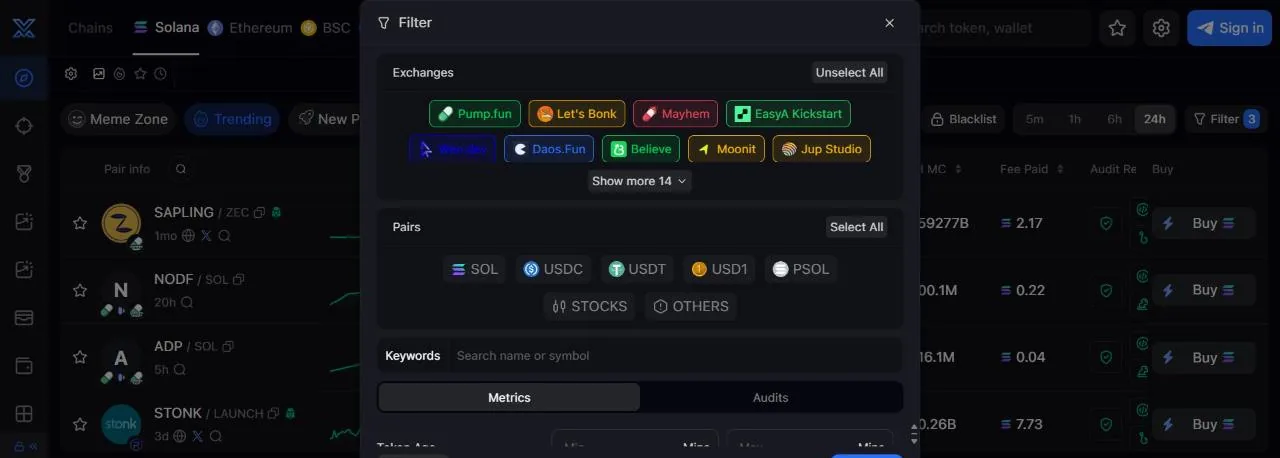
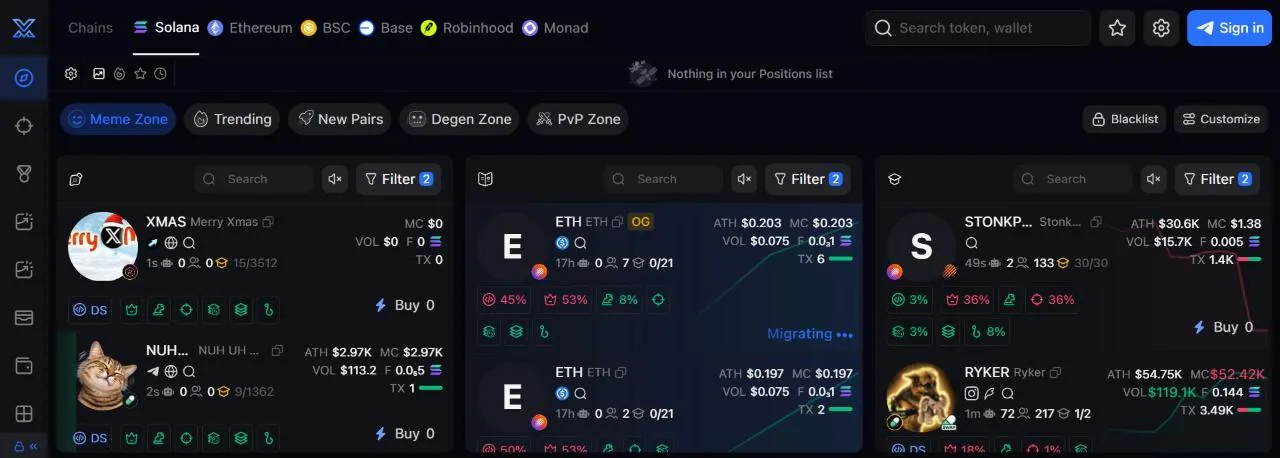
Meme Zone splits launchpad tokens into three columns: New Creations (just created), About to Graduate (bonding curve almost full) and Graduated (already on a DEX). You can filter by launchpad (Pump.fun, Boop.fun, LaunchLab, Let's Bonk, Bags…), token age, bonding curve %, whether the dev still holds or has sold everything, and how much the top 10 holders hold. Meme Zone can also open as a side panel (Side Panel) so you can watch a chart and new tokens at the same time.
Degen Zone collects tokens whose volume spikes over a short period (Solana, BNB Chain, Base), with Auto Buy that buys from this list automatically using the TP/SL, MEV protection, tip and priority fee you set. MevX itself labels this a high-risk zone.
PvP Zone: compare tokens with the same name
PvP Zone is the fifth Discover tab (mevx.io/?tab=pvp), introduced by MevX in December 2025. "PvP" is when many memecoins with the same name, riding the same trend, fight for the same money. PvP Zone gathers them in one place, across every chain, so you can compare volume, holders and momentum in real time and pick the one that's winning.
Type a name or ticker into the Search Token Name or Ticker box and MevX lists every matching token. When we tried the keyword "pepe", the results included tokens on Ethereum, Solana and Robinhood Chain. Each card has the chain icon, token age, holder count, market cap (MC), volume (VOL), total trading fees (F), number of trades with a buy/sell ratio bar, a top 10 holder % label and a Buy button for quick buys.
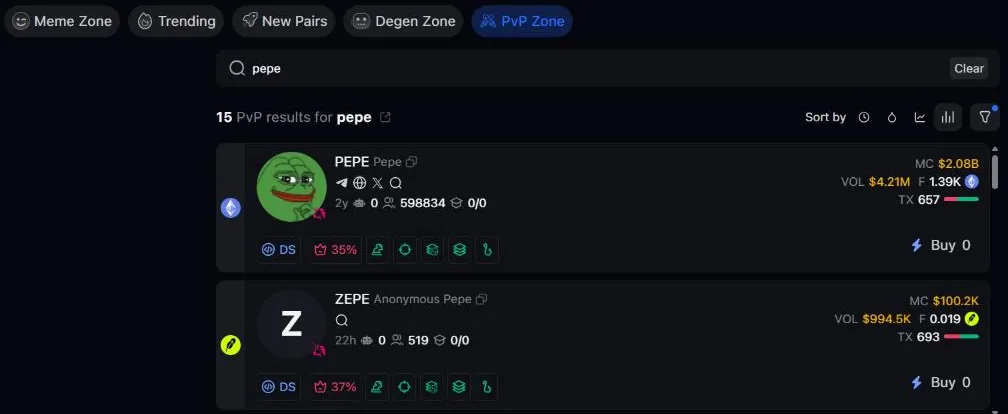
- Sort bySort results by age (Age), liquidity (Liquidity), market cap (MC) or Volume.
- FiltersPick the chain, show only tokens already on a DEX (Migrated), hide low-liquidity tokens (Hide low liquid, on by default).
- Open it elsewherePvP Zone is also a tab in the search box at the top, and has a button in the bottom bar: click it to open a floating panel and compare tokens while viewing another page.
MevX says that since January 6, 2026, opening PvP Zone or the search box shows the 10 most searched keywords of the past 24 hours. When we looked (not logged in), the box stayed empty until we typed a keyword.
Token page: chart, holders and pool selection
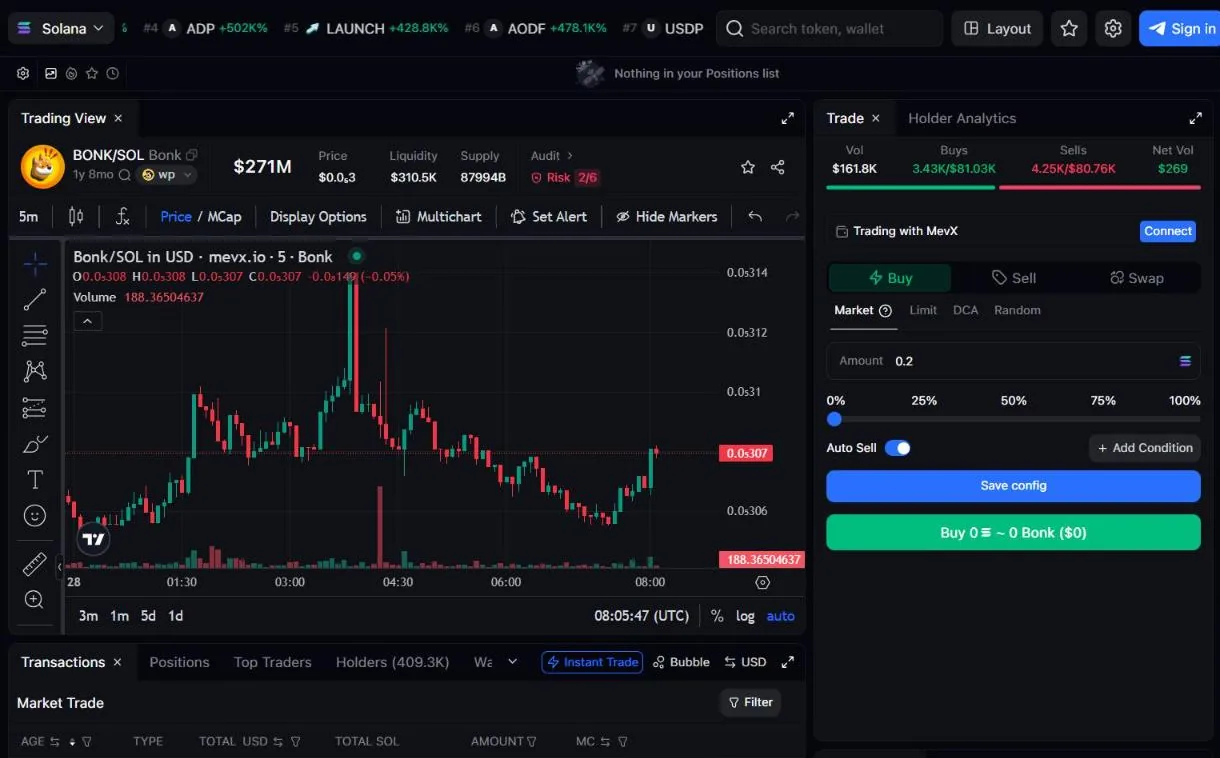
Click a token to open its detail page: chart, the Buy/Sell panel on the right, trade history and holder info. Holder Maps opens a wallet map through BubbleMaps, InsightX or CabalSpy; the holder section shows the average cost of the top 50 holders, an analysis of the big wallets holding the supply, token lock info (Streamflow) and who is receiving fees on Pump.fun tokens.
Multi Chart shows up to 10 charts on one screen, and you can trade and set limits right in each panel. Since October 28, 2026 there is Dynamic Pairs: for tokens with several pools, pick the pool right under the token name, including meme/stablecoin and meme/meme pairs.
Fast trading, Auto Mode and MEV protection
The order panel has quick-buy buttons for preset amounts and sell buttons by %, plus Sell Initials to sell exactly your initial investment. Instant Trade shows a preset panel right on the chart so you can buy and sell with one click, without a confirmation step.
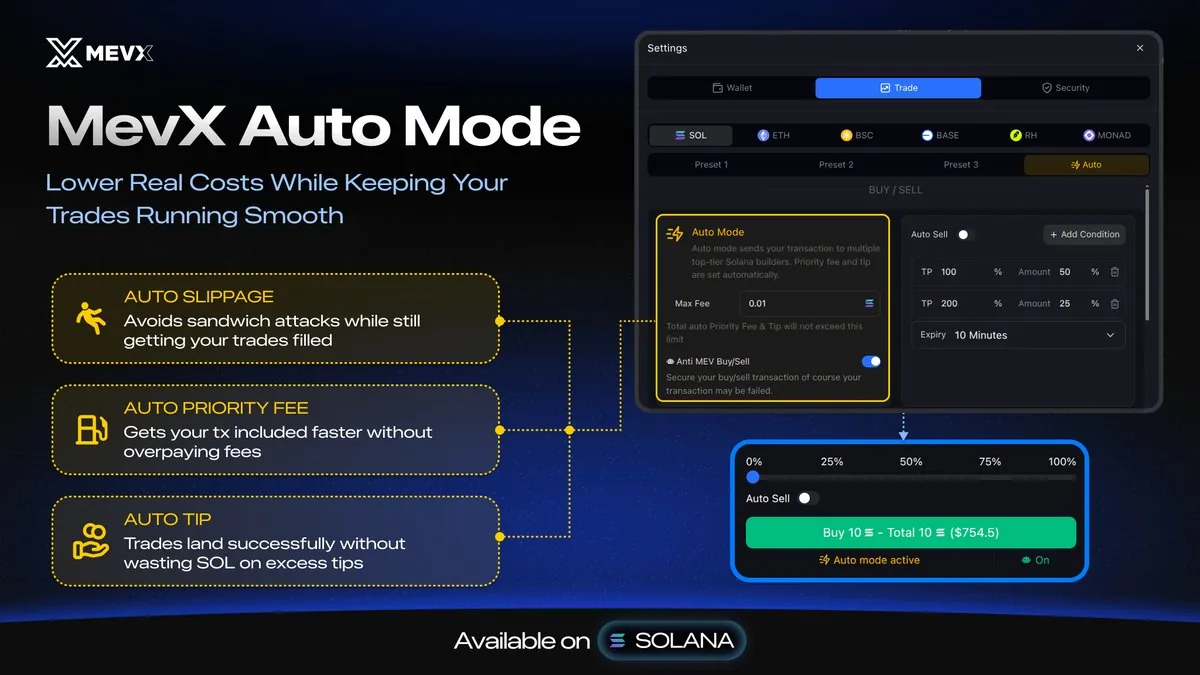
In Settings → Trade, each chain has 3 presets for slippage, tip and priority fee, and an Anti-MEV toggle (protects against sandwiches, but can make orders fail more often). Auto Mode (the Auto preset, Solana only) picks slippage, priority fee and tip for you; you only set Max Fee, the cap on total priority fee plus tip.
Copy trade: automatically follow another wallet
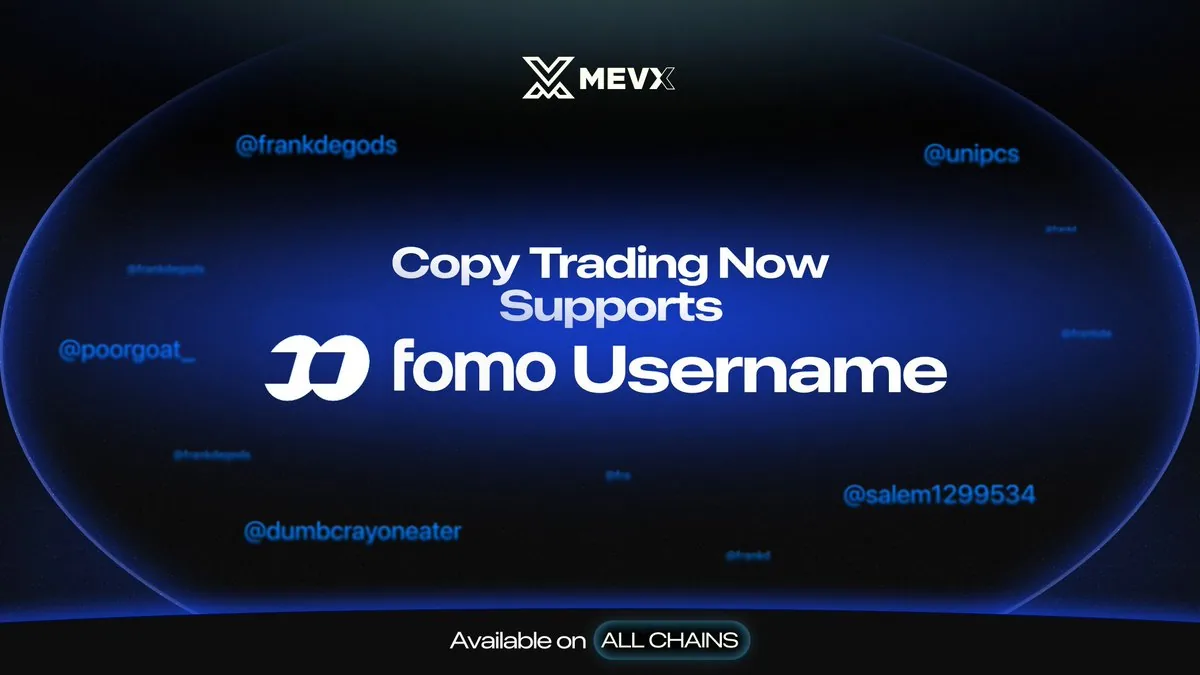
Go to Copy Trade in the menu, pick your wallet, paste the address of the wallet you want to copy (or choose from the Top Degens board of KOLs, whales and smart money) and give it a name. Since October 20, 2026 there is also a FOMO tab: enter a fomo.family username instead of a wallet address.
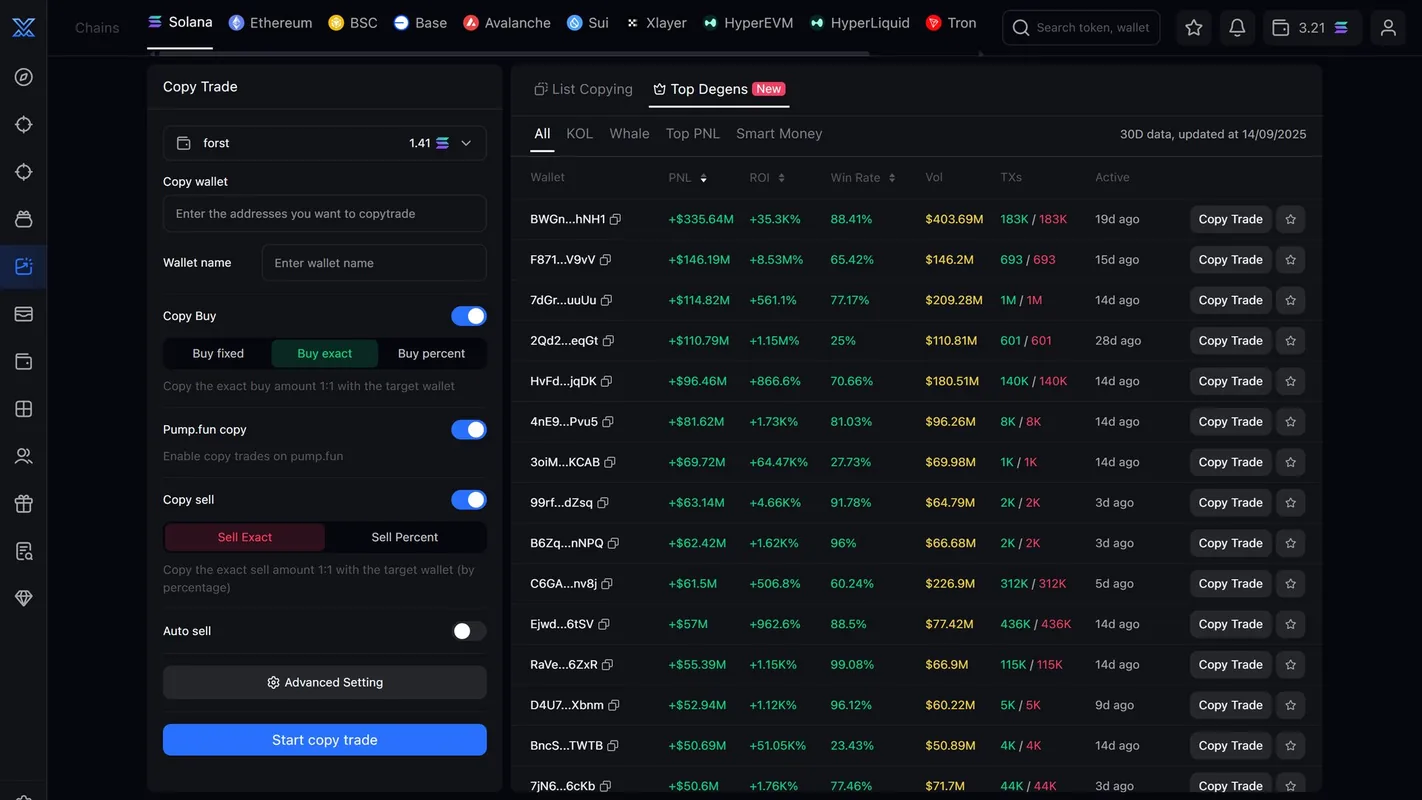
- How it buysBuy Fixed: a fixed amount per trade (no more than Max Buy). Buy Exact: buy the same amount the source wallet buys. Buy Percent: buy a % of the source wallet's trade. Turn on Pump.fun Copy to also copy trades on Pump.fun.
- How it sellsSell Exact: sell the same % the source wallet sells. Sell Percent: choose the % to sell yourself. Auto Sell: take profit and stop loss in %, with an expiry.
- ProtectionSpending Limit per token, minimum liquidity, minimum and maximum market cap, Buy Only Once (each token bought once per 7 days). Copy Trade Protect filters by the token's mint and freeze authority and holder %, and blocks tokens that have rugged.
Wallet Tracker, KOL Tracker and Portfolio
Wallet Tracker is a real-time wallet tracking panel: the Live Trading tab (wallets you track, the Smart Money list, Top PNL), Holdings (what those wallets hold, and their cost) and Alerts, filtered by buys, sells, transfers, volume, market cap and token age. For alerts on Telegram, use the @MevxTrackerBot bot with the commands /watch, /list, /remove, /export.
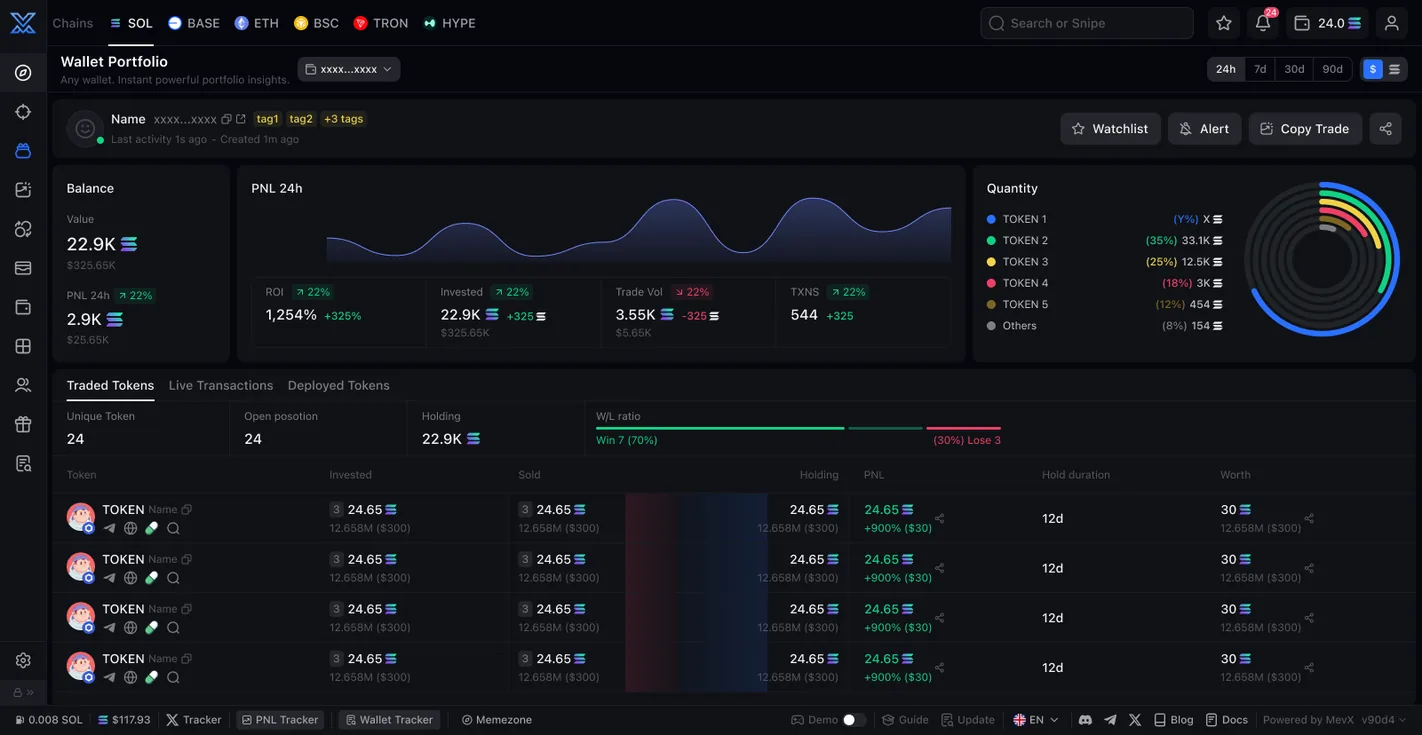
KOL Tracker collects KOLs' posts, reposts, replies, bio changes and mentions of token addresses; choose from the KOLs and Master Traders lists or add your own, and track up to 10 accounts. Portfolio looks into any wallet: balance, PnL, ROI, every token traded, live trades, tokens the wallet created and related wallets, with Watchlist, Alert and Copy Trade buttons.
Sniper: buy new tokens early
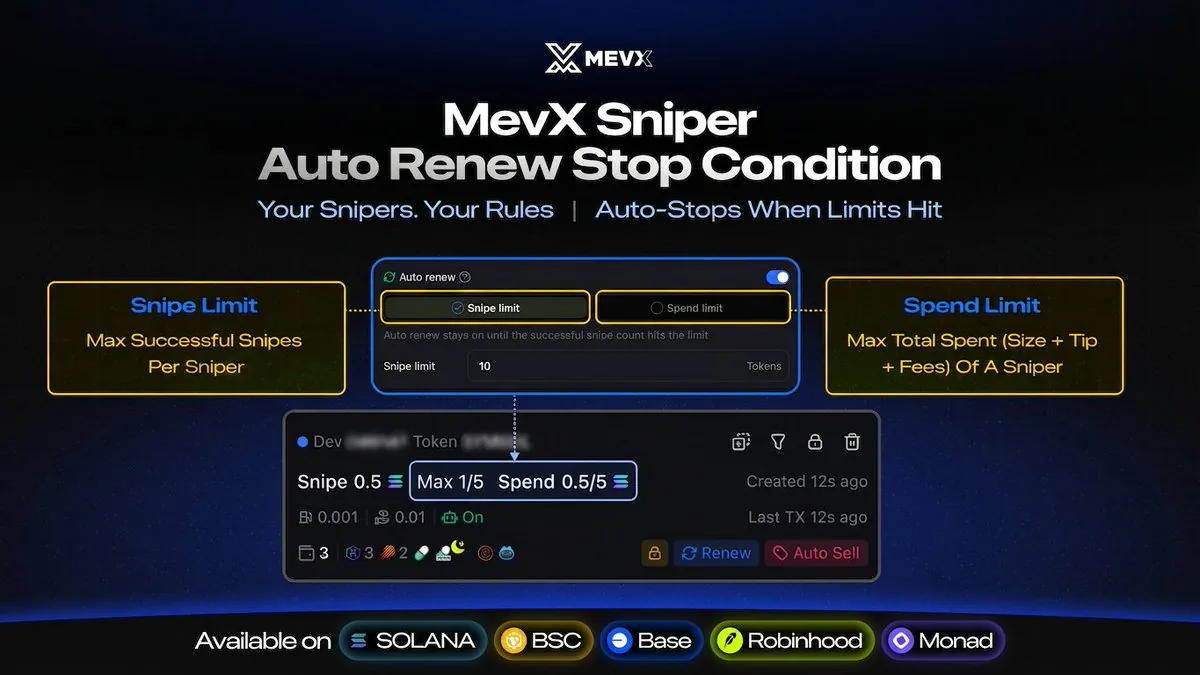
Sniper brings sniping on Raydium, Meteora, PumpSwap, Pump.fun, LaunchLab, Moonshot and Boop.fun into one panel. There are two modes: Targeted aims at a dev wallet, ticker or token address; Mass buys every new token on the platforms you pick (with a blocked keyword list). Turn on Launchpad Migrations Only to snipe only when a token moves from the launchpad to a DEX.
You set the amount, slippage, tip, priority fee, MEV protection, Auto Sell (TP/SL right after a successful snipe) and Auto Renew so the order runs again, stopping once it hits the number of snipes or the total spend you set. On Telegram, use /sniper or /newsniper targeted / /newsniper mass.
Limit, DCA, TP/SL and trailing stop
- LimitSet a price or market cap (USD) to buy or sell; drag the order on the chart to edit it.
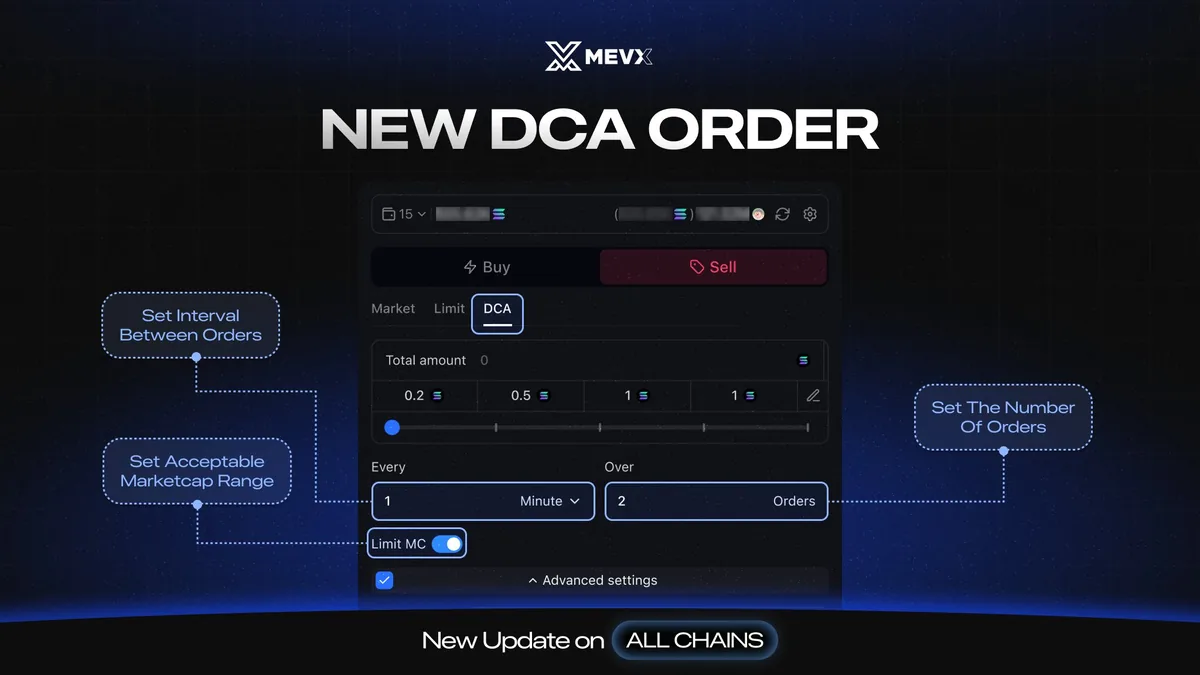
- DCASplit an amount into several orders (at least 2), spaced by minutes, hours or days; they only fill when market cap is within your range.
- Auto TP/SLTurn it on before buying: once the buy fills, take profit and stop loss in % are already in place.
- Trailing Stop LossA stop loss that follows the price peak at a % distance (Trailing Delta), with an expiry and a market cap level at which it starts.
- Dev SellSells automatically when the dev sells everything or sells more than a % you set.
AFK Trade: automatic trading with If → Then rules
AFK Trade (mevx.io/afk-trade, available since May 27, 2026) lets you chain blocks together: Trigger (when to start), Filter (what conditions the token must pass), Watcher (wait until a condition is true) and Action (buy, sell). It runs in the background even when your computer is off.
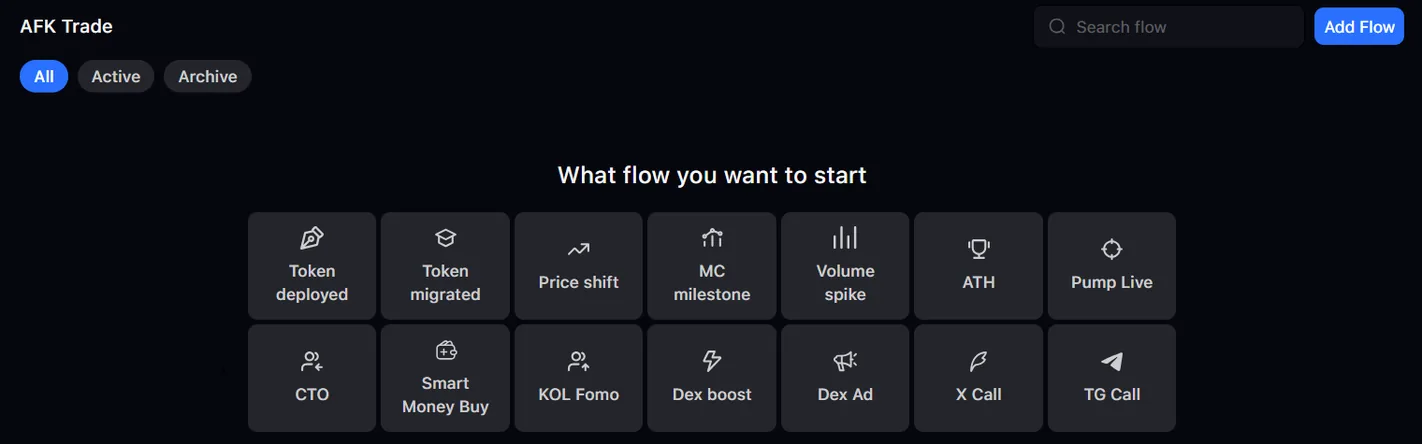
- TriggerNew token created, token listed on a DEX, market cap milestone hit, new high, price or volume spike within 5 minutes, ads or boosts bought on DEX Screener, CTO, Pump Live, Smart Money or KOL buys, an X account or Telegram channel posting a token address. Multiple triggers are joined with "or".
- FilterName, ticker, exchange, market cap, liquidity, volume, holder count, sniper count, dev %, top 10, and holdings of snipers, insiders and bundlers… All conditions must be true at the same time.
- ActionBuy on one or more wallets with TP/SL and trailing stop; sell a % of the tokens just bought.
MevX Signal: signals on the web and Telegram
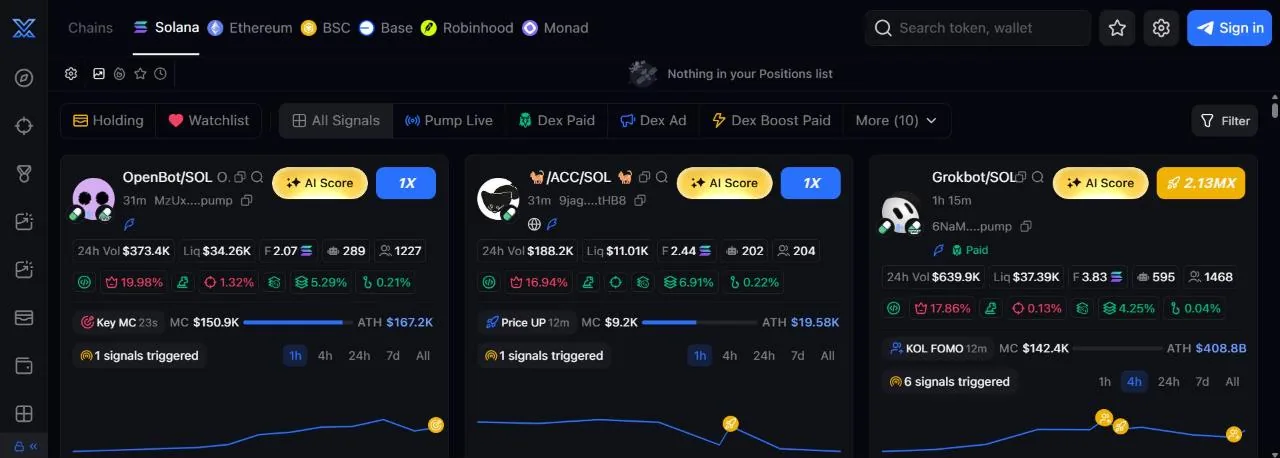
The Signal page (mevx.io/signal) flags tokens based on events: Pump Live, DEX Screener ads bought, several KOLs buying, Smart Money buying, called in groups, just listed on a DEX and more, with an AI score and a quick-buy button. By default it has an anti-rug filter: mint and freeze authority revoked, LP burned, over 150 holders, top 10 holding under 40%, and enough 24-hour volume.
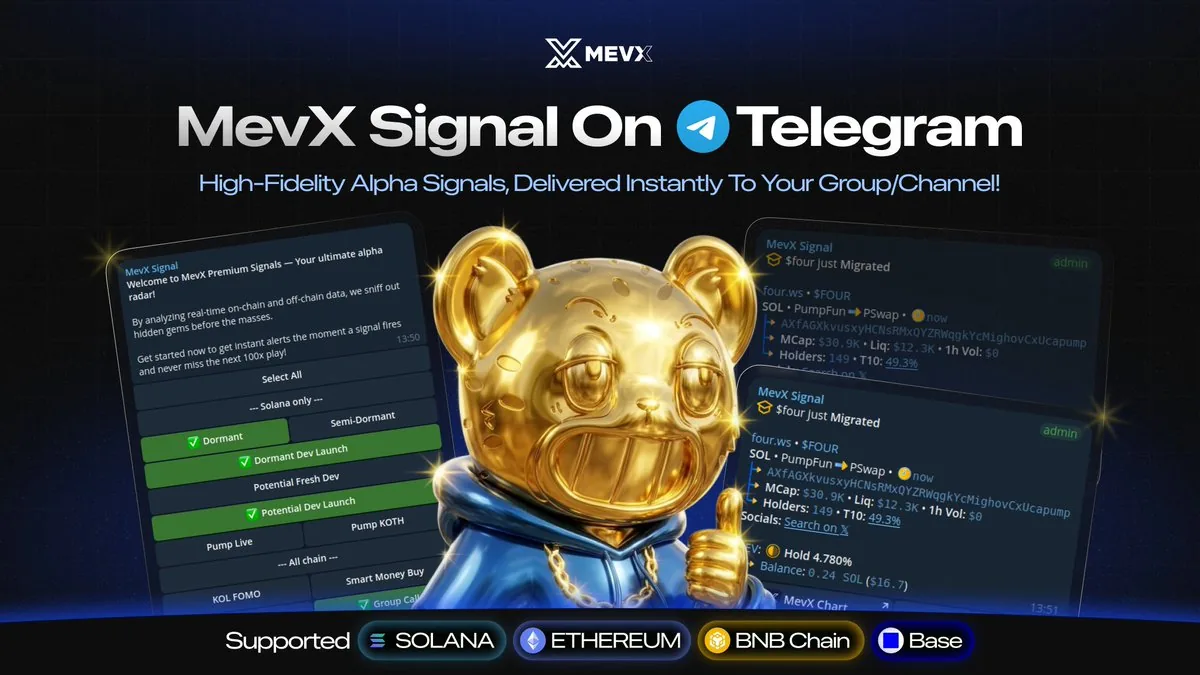
Telegram group owners can add the @mevxsignalssbot bot to their group to post signals (Solana, Ethereum, Base, BNB Chain); each signal automatically includes the group owner's referral link.
Multiple wallets and wallet groups
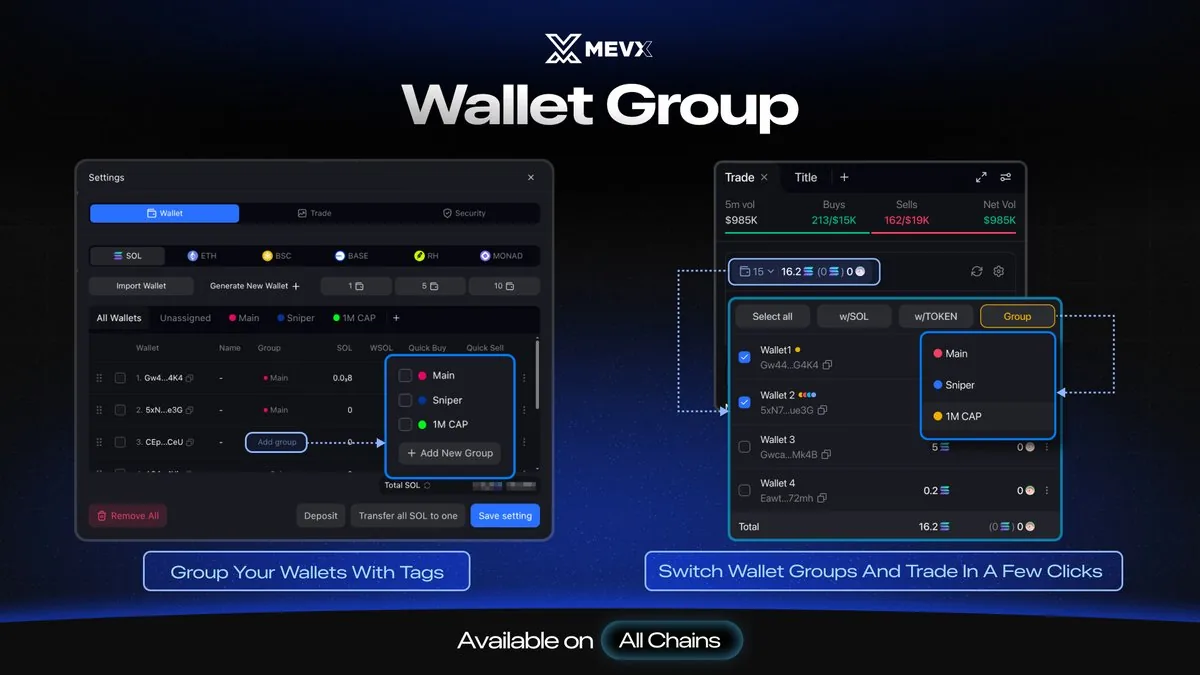
Go to Settings → Wallet: import a wallet with a private key, quickly create 1, 5 or 10 wallets, send SOL or tokens to several wallets at once, gather SOL into one wallet, and convert SOL/WSOL. Each chain has its own wallet list.
Wallet Group (since August 4, 2026) tags wallets into groups such as Main or Sniper, so you can pick a whole group to trade right on the token page. Multi-Wallet Mode shows a combined portfolio, trades a token across several wallets at once and creates a combined PnL card.
Swap and bridge between chains
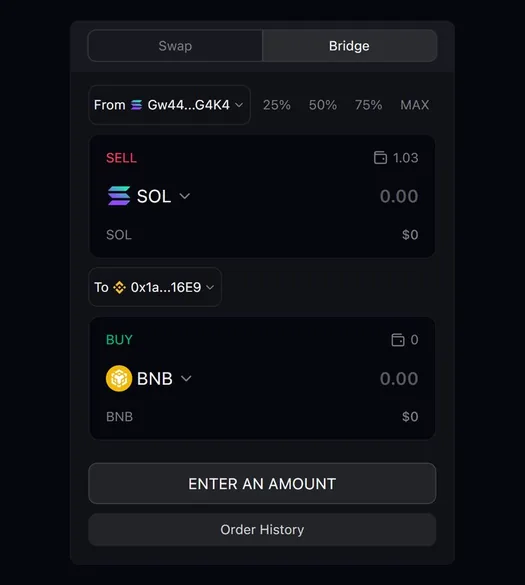
On the Swap page (mevx.io/swap), the Bridge tab moves funds between chains: pick the source chain and wallet, the destination chain and wallet, the token you want to receive (native coin, stablecoin or a pasted token address) and enter the amount. MevX finds the route and shows the expected amount, fees and time. Since September 25, 2026 cross-chain swaps and bridging run through Relay; Robinhood Chain has had bridging since July 23, 2026.
Telegram bot, Chrome Extension and Demo Mode
MevX's official Telegram bots are @mevx and @MevxTradingBot, sharing your account with the web. Type /selectchain to switch chains, and paste a token address to see a chart preview right in the chat; the bot has a PNL Calendar by day, week and month, and lets you claim referral commissions.
MevX Extension for Chrome adds Buy/Sell and Snipe buttons and a Trade on MevX button to X, Photon, BullX Neo, GMGN, Pump.fun, DEX Screener, Dextools, Solscan, Telegram Web and Discord Web. On X, any tweet with a Solana or EVM token address shows a trading panel right below it.
Ranking, cashback and referral commission
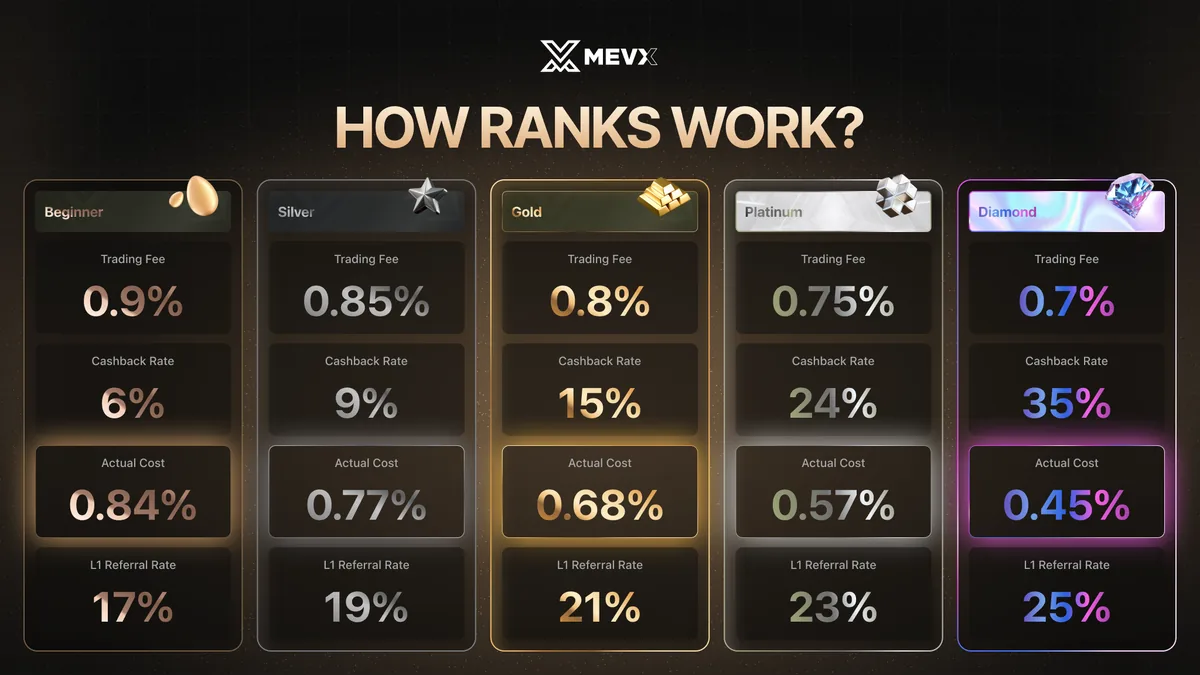
MevX ranks users in 5 tiers: Beginner, Silver, Gold, Platinum, Diamond. Points come from trading, referrals and Challenges (daily, weekly and seasonal quests); the Race board awards points to the highest-volume traders each round. Ranks are reviewed after every 30-day cycle, and you drop a tier if you're short on points.
The higher your rank, the lower your fee (0.9% down to 0.7%), the more cashback you get (6% to 35% of fees paid) and the higher your tier-1 referral commission (17% to 25%). Cashback and commissions are shown in USDC and can be claimed any time; according to the MevX docs, unclaimed referral commissions are reset after 1 month.
Fees and safety
MevX's trading fee depends on your rank and is the same on every chain: 0.9% at Beginner, down to 0.7% at Diamond. On top of this fee you pay network fees, priority fees and the tips you set (or let Auto Mode choose).
- When you log in with Telegram or Google, MevX creates a trading wallet and shows the private key only once: store it somewhere safe and never give it to anyone.
- Turn on 2FA with Google Authenticator in Security: sending funds to a wallet outside your whitelist or editing the whitelist then requires a code. Keep your backup codes safe.
- If you log in with a wallet (Phantom, OKX Wallet, MetaMask, Rabby), MevX creates a secondary wallet for trading, so your main wallet's private key is never exposed.
- Only use mevx.io and the @mevx and @MevxTradingBot bots. The MevX team has completed KYC with Assure DeFi.
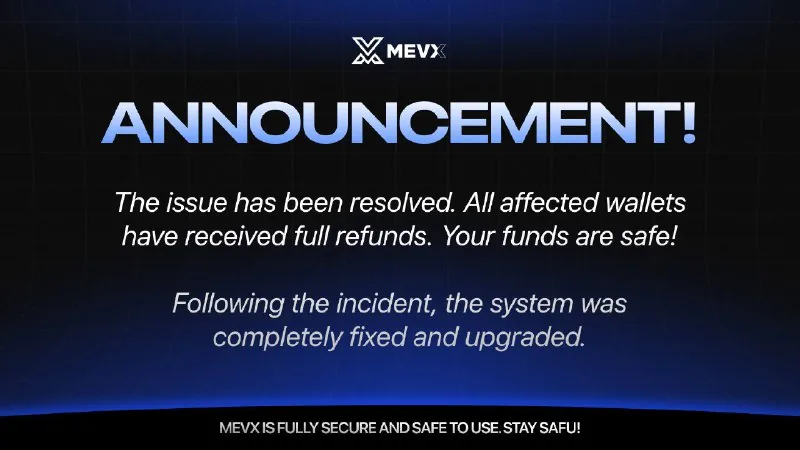
On October 25, 2025, MevX announced it had patched a vulnerability in a third party's transfer API and promised to compensate affected users 100% within 24 hours, with a public list of the affected wallets and a refund request form; the image attached to the post said these wallets had been fully refunded. MevX did not state how much was lost.
MevX later said it was being audited by Verichains and waived trading fees for 2 weeks (November 1–15, 2025) for affected wallets. MevX did not post links to the refund transactions, so we haven't been able to verify them on-chain ourselves.
Get started with MevX
- Open MevXGo through our link, at no extra cost.mevx.tradewizbot.pro
- Log in, save the private keyClick Connect Telegram (the bot sends a Log in button), or log in with Google or a wallet. MevX creates a trading wallet and shows the private key once: save it, then turn on 2FA in Security.
- Deposit a little, start smallDeposit SOL, BNB or ETH on the right network into the wallet, then try Demo Mode, or one buy or one copy trade wallet with a small amount before adding more.
Screenshots taken on October 28, 2026; the interface may change. Not investment advice: memecoins are high-risk, only use money you can afford to lose.