
What is Pepeboost? Main features and how to use it
Pepeboost is a set of Telegram bots for trading memecoins, running since 2023 and well known in the Chinese-speaking community. Paste a token address into the chat and you can trade, plus copy wallets, set pending orders, automatic take profit and stop loss, and snipe new tokens. The multi-chain bot runs Solana, BNB Chain, Ethereum, Base and other EVM chains; Tron has its own bot.
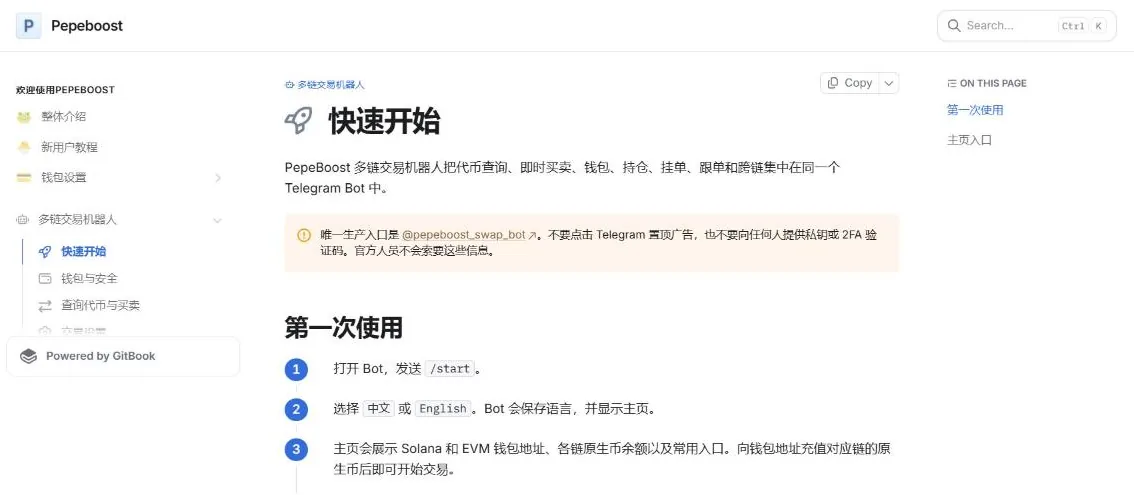
One multi-chain bot and separate bots per chain
Pepeboost isn't a single bot but a whole set of Telegram bots. The newest is the multi-chain bot @pepeboost_swap_bot: one place for Solana, BNB Chain, Ethereum, Base, Robinhood Chain, HyperEVM, X Layer and Arbitrum. Pepeboost's docs state that this is the only official address of the multi-chain bot (the old Ethereum bot moved to @pepeboost_swap_old_bot).
There are still separate bots for each chain: @pepeboost_sol_bot (Solana), @PepeboostBsc_bot (BNB Chain), @PepeboostBase_bot (Base) and @PepeboostTron_bot (Tron, which also lets you rent energy to cut network fees). The Solana bot has a few extra features of its own: sniping when a pool opens, DCA, and burning empty token accounts to get the rent SOL back.
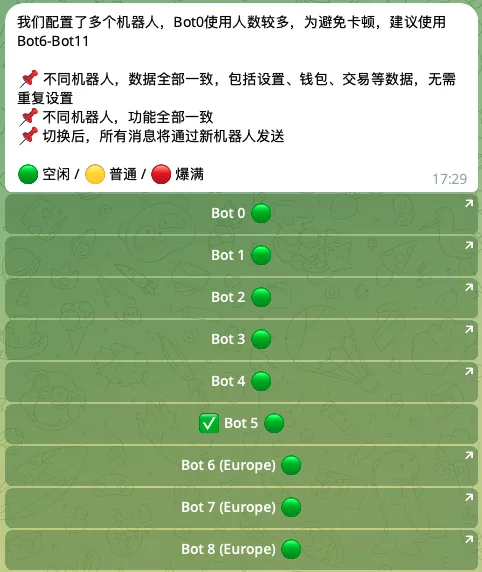
The Solana bot has many users, so it has many backup bots. Type /bots to see which bot is free and tap to switch; your wallets, settings and trade history stay the same.
Home screen and commands of the multi-chain bot
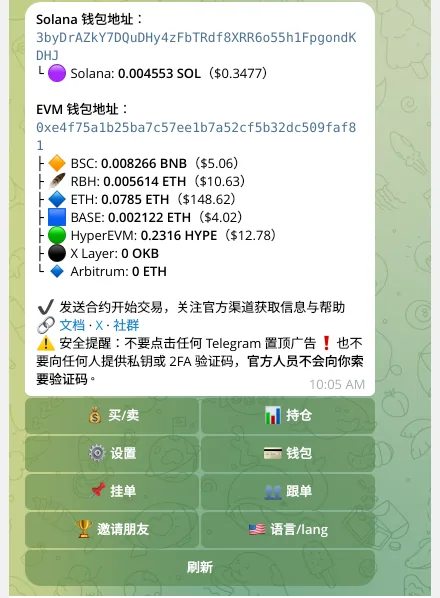
Type /start and choose Chinese or English. The home screen shows your Solana wallet address, your EVM wallet address (shared across all EVM chains) and the balance on each chain. Deposit to the right address and you can trade right away.
Below are the buttons: buy/sell, positions, settings, wallets, pending orders, copy trade, invite friends, change language and refresh. Each button also has a matching shortcut command.
- /start, /menuOpens the home screen to see your balances and deposit addresses.
- /assetTokens held on each chain, PnL and quick sell buttons.
- /walletsCreate, import and rename wallets, set the default wallet, withdraw funds.
- /orders (or /limit)Pending orders and automatic sell orders.
- /copytrade (or /follow)Create and manage wallet copy tasks.
- /bridge, /bridgesMove funds between chains and check the status of transfers.
- /settingsSeparate settings for each chain.
- /inviteInvite link, commissions and fee rebates.
- /twofa, /exportTurn on 2-step verification, export private keys.
Trading: paste a token address to get the order panel
Send the token's contract address (CA) to the bot, and it detects the chain and opens the order panel. The older bots also accept Birdeye, DEX Screener and Dextools links that contain the token address.
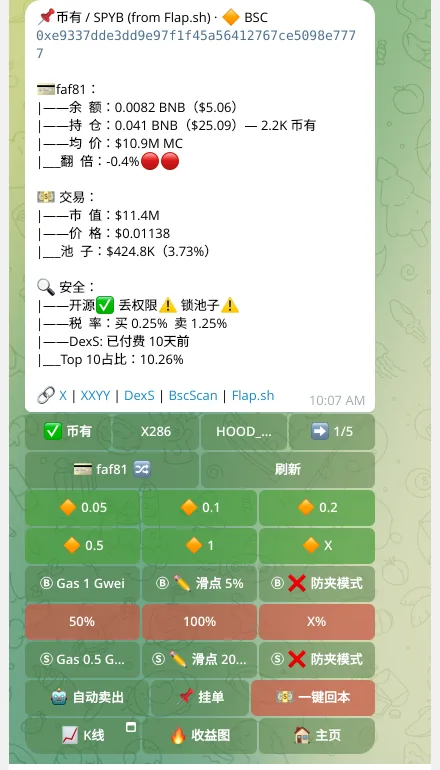
The order panel shows your wallet balance, how many tokens you hold, your cost basis, market cap, price and pool depth. The safety box shows whether the contract is open source, whether ownership is renounced, whether the pool is locked, buy and sell taxes, whether the token has paid for DEX Screener, and what percentage the top 10 wallets hold. At the bottom are links to X, XXYY, DEX Screener and the chain explorer.
- BuyTap a preset buy amount (green buttons) or the X button to enter any amount. If you turned on double confirmation, the bot asks again before sending the order.
- SellSell 50%, 100% or a custom X%. A separate button works out how much to sell to get back exactly what you put in.
- Adjust right on the panelSwitch the wallet for this order, adjust the priority fee and slippage, and turn on MEV protection separately for buys and sells.
- Other buttonsAuto sell, pending orders, candlestick chart, a PnL image for the token and a share link for the token with your invite code.
Settings: slippage, priority fee and MEV protection
Type /settings, choose a chain and adjust. Each chain stores its own settings: priority fees for buys and sells, slippage for buys and sells, quick-buy amounts, quick-sell percentages, MEV protection, double confirmation, risky trade warnings and auto sell.
Pepeboost has two order-sending modes. Speed mode is the fastest but can be sandwiched by other bots. Anti-MEV mode sends orders through a private route, so it's safer, but may be a little slower.
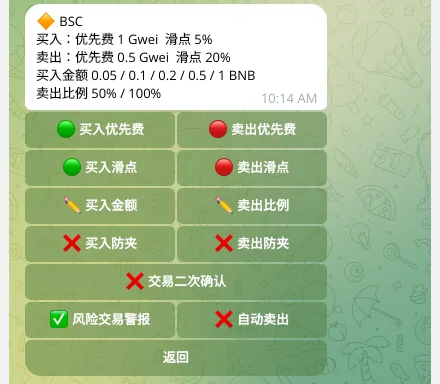
- Suggested slippageThe docs recommend 10–15% in speed mode; 100% (no limit) in anti-MEV mode so orders fill easily; and about 30% for tokens still on the Pump.fun or Moonshot bonding curve.
- Priority fee on SolanaSuggested 0.005 SOL for normal orders, 0.01 SOL for fast orders, and 0.02 SOL or more if you need it really fast. A higher fee doesn't guarantee the order succeeds.
- Smart Gas and buy on CA pasteThe Solana bot has Smart Gas, which adds extra fee based on network conditions, and a mode where sending a CA buys right away with your preset amount.
Copy trade: automatically follow another wallet
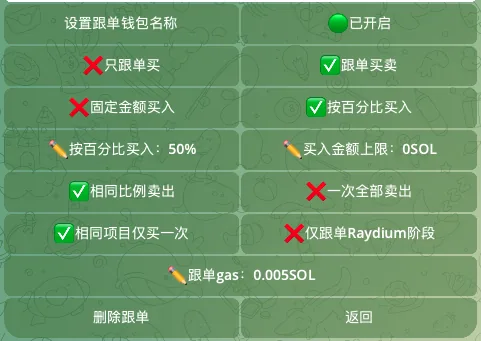
Type /copytrade (or /follow), tap add task, choose your wallet and paste the address of the wallet you want to follow. The bot checks for duplicates and the chain before creating it. On the older bots, sending a wallet address straight into the chat shows a copy button, and you can follow up to 10 wallets.
- How it buysA fixed amount, for example 0.1 SOL every time the source wallet buys; or a percentage of the source wallet's trade (set 50%, and when the source wallet buys 1 SOL you buy 0.5 SOL), with a cap.
- How it sellsDon't follow sells (you sell yourself), sell the same proportion the source wallet sells, or sell everything the first time the source wallet sells.
- FiltersBuy each token only once. On Solana there's an option to copy only once the token is in a DEX pool (the docs call it Raydium; it skips the bonding curve stage); on BNB Chain the same with PancakeSwap.
- Gas per walletSet the fee for each followed wallet. On the old Ethereum bot, the default is the source wallet's gas times 1.1 so your order gets priority, with a gas cap.
Pending orders, automatic take profit and stop loss
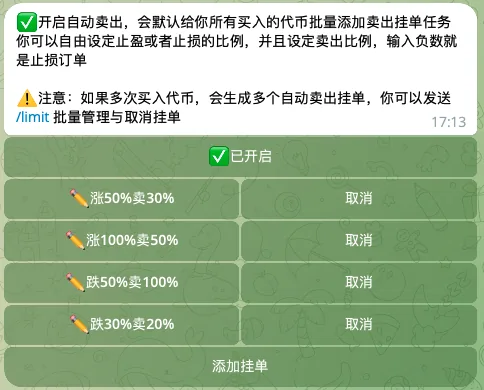
Create a pending order from the pending order button on the token panel, or type /orders. Choose buy or sell, a condition based on price, % change or market cap, then enter the amount (or sell percentage) and expiry. On the older bots, entering "30,50" means sell 50% when the price is up 30%; if the first number is negative, it becomes a stop loss.
Auto sell is a take-profit and stop-loss template applied to every buy. Turn it on and add steps, for example sell 50% at +100%, sell everything at -50%. After every successful buy, the bot takes the real fill price and creates the sell orders from the template.
Turning auto sell off only affects later buys; sell orders already created keep running until you cancel them in /orders. The Solana bot also has DCA to split buys into smaller ones.
Sniping and Pump.fun tokens on the Solana bot
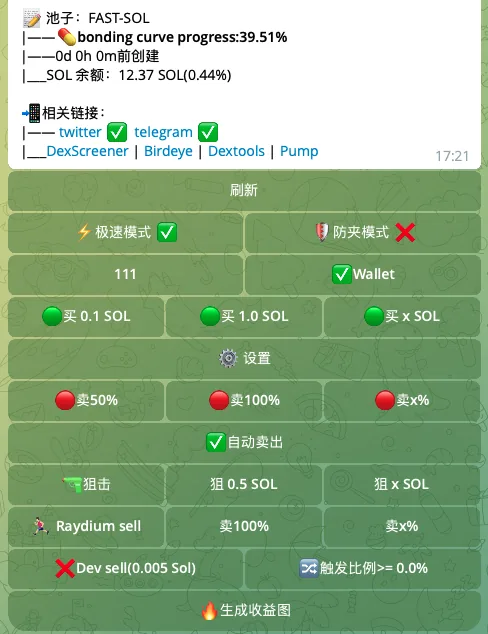
On @pepeboost_sol_bot, send the CA of a token that's about to open trading, set the SOL amount you want to snipe and turn on anti-MEV if needed. As soon as the DEX pool opens, the bot buys. The docs suggest a snipe priority fee of 0.01 SOL or more. Type /snipe to view, refresh or cancel snipe tasks.
Tokens still on the Pump.fun bonding curve (or Moonshot, Makenow) trade as usual, with their own slippage and fees. There are two extra buttons: Raydium sell (the button's name dates from when Pump.fun tokens moved to Raydium; now it's PumpSwap) presets a partial sell the moment the token leaves the bonding curve for a pool, and Dev sell sells everything automatically when the dev wallet sells up to a share you choose, for example 25%.
Wallets, multiple wallets, 2FA and cross-chain transfers
Type /wallets and use the arrows to pick a chain. From here you can create a new wallet or import one with its private key, set the default wallet, rename, export private keys, remove wallets and withdraw funds. The old Solana bot allows up to 10 wallets, the old Ethereum and Base bots up to 5.
An EVM wallet uses the same address on every EVM chain, but each chain has its own balance. When buying, you can switch the wallet for that order right on the token panel.
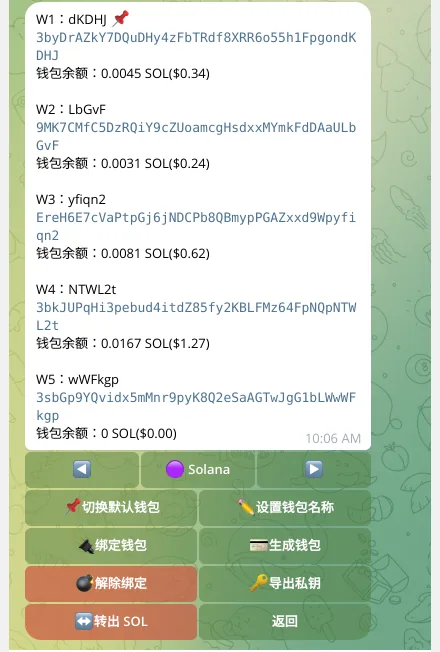
- 2-step verification/twofa turns on codes from an authenticator app. Once on, withdrawals and private key exports both need a 6-digit code.
- Export private key/export lets you pick a wallet and export its private key. The bot tries to delete the message with the key after a few seconds, but you should still check.
- Cross-chain/bridge: choose the source chain, destination chain, sending wallet and receiving wallet, enter the amount, review the quote (expected amount, minimum amount, fees) and tap to transfer. /bridges shows the status.
Positions and PnL
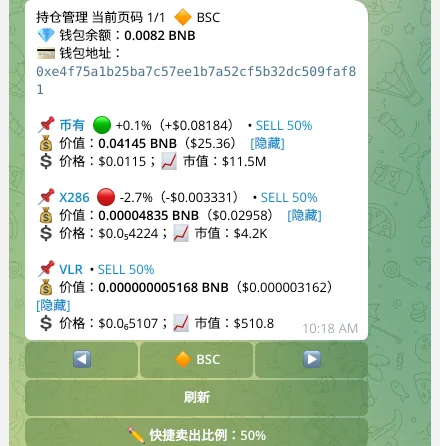
/asset lists the tokens you hold on each chain: value, PnL %, price, market cap and a quick sell button (50% by default, changeable). Hide dust tokens you don't want to see; you can bring them back in the management section.
After each filled order, the bot sends a report: amount, number of tokens, price, market cap at fill and remaining balance, plus a PnL table for that token with total bought, total sold, amount held, profit multiple and hold time.
The XXYY web app and Chrome extension
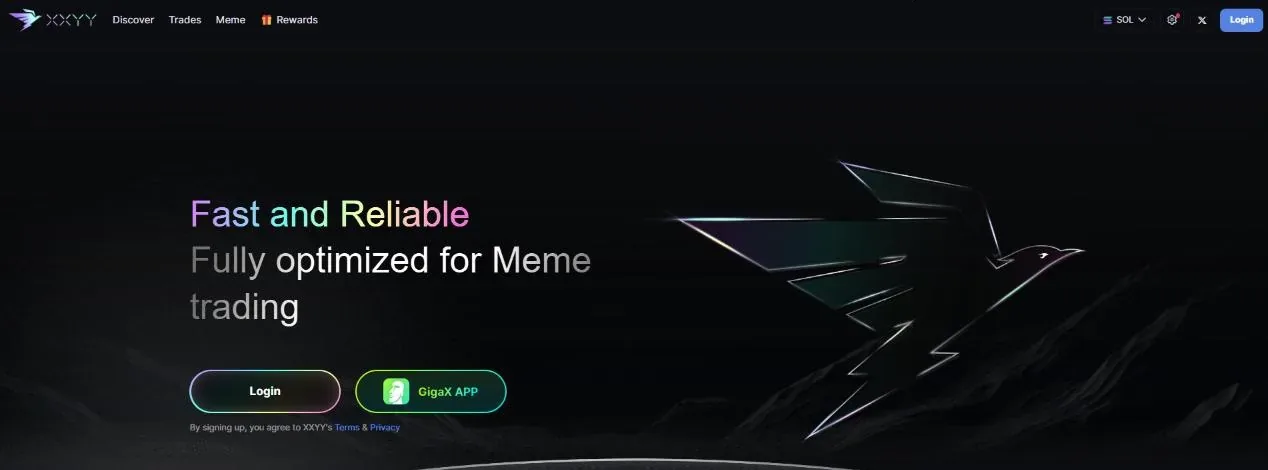
For trading on the web, Pepeboost's docs point to XXYY (xxyy.io), which shares the referral program with the bot. According to Pepeboost, XXYY has a real-time new-token scanner with many filters, X post tracking, a list of preselected KOL wallets to follow, and trading with auto sell across several wallets. XXYY runs on Solana, BNB Chain, Ethereum and Base, and can be added to your phone's home screen like an app.
Pepeboost also has a Chrome extension, Unified Trading (privacy policy effective from August 17, 2026). It adds an order panel to gmgn.ai, pump.fun, dexscreener.com and axiom.trade; when you click buy or sell, the order is sent to your Telegram bot account to run, and the result shows back on the page. The first connection is made through a Telegram link. According to the policy, the extension doesn't hold private keys or sign transactions itself; the wallet stays on the server, as when using the bot.
Referral commission and fee rebates
Type /invite (/referral on the older bots) to get your invite link. According to the docs, you earn a share of your referrals' trading fees for life: 25% on Solana, 35% on BNB Chain, 30% on Tron, 20% on Ethereum and Base. People with their own community can fill in a form to apply for a higher rate, up to 40%. Withdrawals start at 0.01 SOL (or BNB, ETH), once every 24 hours.
Invited users must tap Start for the first time through the link. The docs warn not to open the bot from Telegram's search box, because the invite code will be lost; open the link from a browser or X instead.
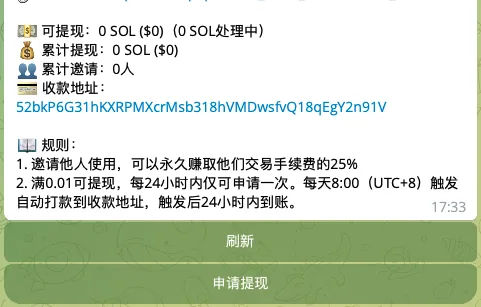
- Fee rebatesUsers of the Solana bot and BNB Chain bot, and people who join the multi-chain bot through an invite link, get 10% of their trading fees back. Trading more automatically raises this to 15%, 20%, 25%, up to 30%, with no sign-up needed.
- Lookup bot for groupsAdd @xxyy_query_bot to a Telegram group and send a CA to get the token's info. Link your invite code with /bind: anyone who clicks through from the group to trade counts as your referral. There are also /lb (a profit board for the CAs looked up), /calls and /pnl.
Fees and safety
Pepeboost's trading bots charge 1% per buy and sell order. On top of that you pay network fees: gas, priority fees and tips for the anti-MEV route. The 10–30% rebates above are paid back out of this 1% fee.
- The only official multi-chain bot is @pepeboost_swap_bot. Get there from the docs or the official group, and don't tap pinned ads on Telegram.
- Never give your private key or 2FA code to anyone; Pepeboost staff will never ask. Commission support, airdrops or compensation are never a reason to hand over your key.
- Turn on /twofa so withdrawals and private key exports always need a code from your authenticator app.
- Before depositing to an EVM wallet, check the receiving network: the address is the same, but each chain's balance is separate.
- The bot wallet is signed by the server on your behalf: keep only the funds you plan to trade with, and move profits to your own wallet.
When we checked (October 28, 2026), no hack involving Pepeboost had been confirmed.
Get started with Pepeboost
- Open PepeboostGo through our link, at no extra cost.pepeboost.tradewizbot.pro
- Type /start, choose EnglishThe home screen shows your Solana and EVM wallets. Export your private keys with /export, store them somewhere safe, and turn on /twofa.
- Deposit a little, start smallDeposit SOL, BNB or ETH on the right network, paste a token's CA and make a small test buy before copying wallets or placing big orders.
Screenshots taken on October 28, 2026; the interface may change. Not investment advice: memecoins are high-risk, only use money you can afford to lose.