🎯 Sniper
Automatically buys newly listed tokens at launch, enabling users to secure early low-price positions and reduce holding risk
Platforms Support
- Launchlab/Bonk
- PumpFun
- Meteora DBC
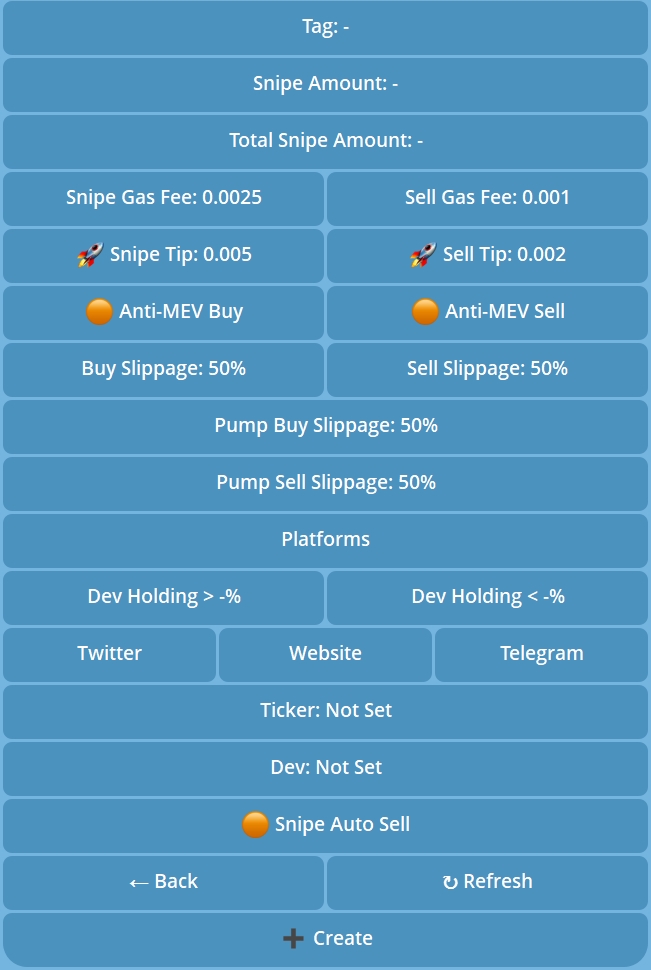
Module function explanation of Sniper
| Module | Explanations | Position/Sugges |
|---|---|---|
| Tag | Custom name for your sniper setting | |
| Snipe Amount | The amount spent per buy | |
| Total Snipe Amount | The total budget for this sniper setting | |
| Snipe Gas Fee | Gas fee for buy transactions | The newly created token has large price fluctuations, it is recommended to increase the value |
| Sell Gas Fee | Gas fee for sell transactions | |
| Sniper Tip | Tip amount for buy transactions | |
| Sell Tip | Tip amount for sell transactions | |
| Anti-MEV Buy | Prevents MEV attacks when buying | |
| Anti-MEV Sell | Prevents MEV attacks when selling | |
| Buy Slippage | Slippage tolerance for buy orders | |
| Sell Slippage | Slippage tolerance for sell orders | |
| Platforms | Select platforms to monitor | |
| Dev Holding | Set the acceptable range for developer holdings | |
| Social Media | Whether the token has linked social media accounts |  |
| Ticker | Enter the name of the token you want to snipe | |
| Method | Exact - matches exactly what you enter (entering "A" will only snipe tokens named "A"). Contains - matches any name containing your input (entering "A" will snipe tokens named "AB", "AC", etc.). |  |
| Dev | Enter the developer's wallet address. The sniper will target tokens created by this address |
Tradewiz Sniper tutorial
Notes
- blacklist: Add up to 50 tokens to the blacklist
- If both the
TickerandDevoptions are configured, the trigger will only be activated when both conditions are satisfied - The related settings for selling, such as slippage and gas, are used for the sell orders in autosell