
What is Bloom? Main features and how to use it
Bloom (bloombot.app) is a memecoin trading toolkit in three parts that share one account: a Telegram bot, the Bloom Manager website and a Chrome Extension that sits on top of terminals such as Axiom and GMGN. Bloom runs on Solana, Ethereum, BNB Chain, Base, Robinhood, Arc, HyperEVM and Ink.
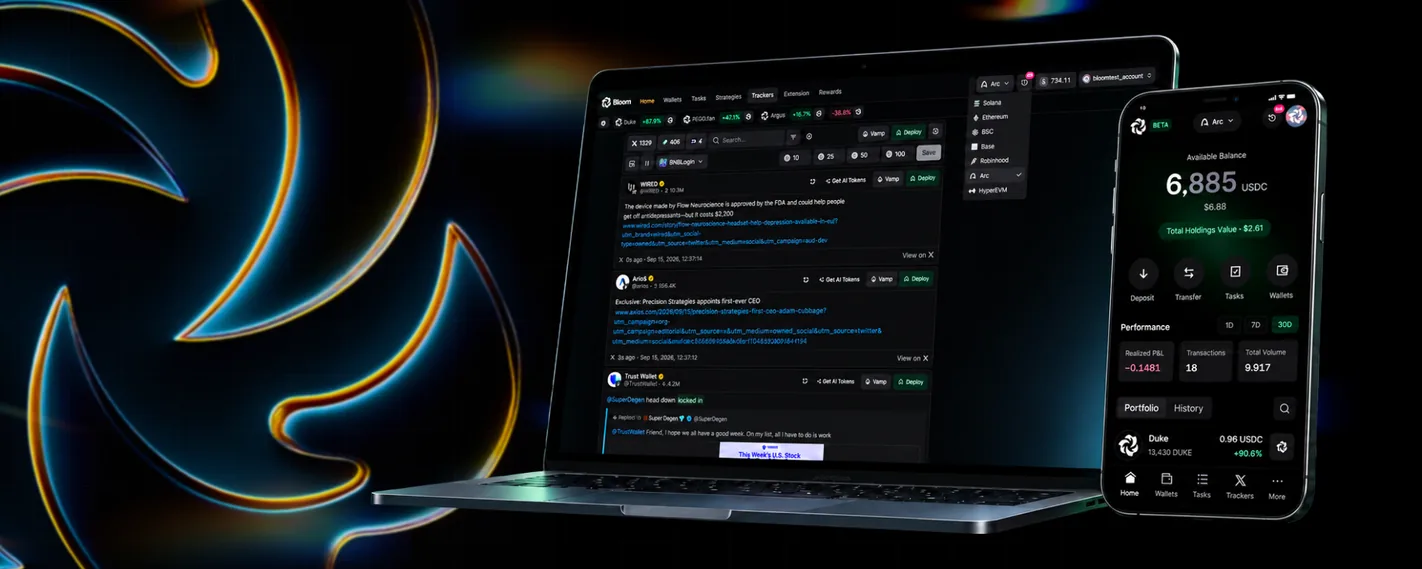
Three tools, one account: Telegram, Manager and Extension
Bloom started as a Telegram bot, then added Bloom Manager (manager.bloombot.app) as a web version and Bloom Extension for Chrome. You log in to Manager with the same Telegram account you use for the bot, so wallets, tasks, pending orders and settings stay in sync across all three.
Manager has these pages: Home (PnL, tokens held, trade history), Wallets, Tasks (copy trade, AFK, sniper, social), Auto Orders, Tracker, Extension, Rewards and Settings. Since September 17, 2026 Manager has a mobile version: open it in your browser, log in and choose Add to Home Screen to use it like an app.
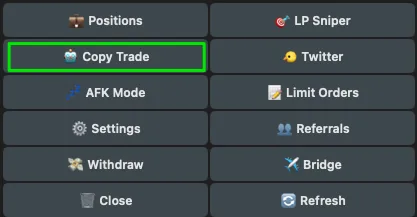
Telegram bot: main menu and fast trading
Bloom has its own bots for Solana (two instances running in Germany and the US, with the same features; use the other one when one is overloaded) and a bot for the EVM chains. The main menu has Positions, LP Sniper, Copy Trade, Twitter, AFK Mode, Limit Orders, Settings, Referrals, Withdraw and Bridge.
Each item has a shortcut command: /copy, /sniper, /afk, /twitter, /wallets, /positions, /settings, /withdraw, /pnl. Type $ with a ticker (for example $BONK) to see quick token data.
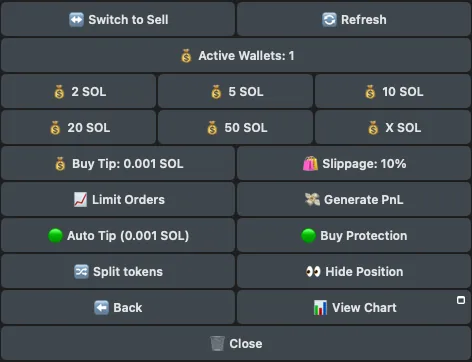
- BuyPaste a token address and pick a preset SOL amount (2, 5, 10…) or X SOL to enter another amount. Adjust Slippage and Buy Tip right in the menu.
- SellClick Switch to Sell to sell by % or by SOL amount; Initials sells enough to recover your initial investment, fees and tips; set limit, take profit and stop loss.
- Buy ProtectionWhen on, orders only go through MEV-protected (anti-sandwich) routes; Auto Tip picks the suggested Jito tip for you.
- Degen ModeTurn it on in Settings: paste an address and the bot buys right away using the amount and the market cap and liquidity filters you set.
Copy trade: automatically follow another wallet
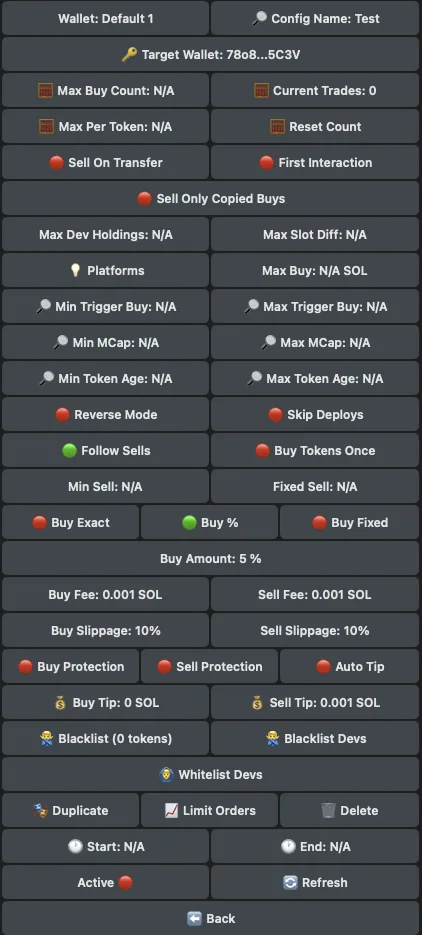
On Telegram, go to Copy Trade (or /copy), click Add new config, enter the wallet address you want to copy and give it a name. In Manager, go to Tasks, the Copy Trade tab, and open the Create Copy Trade Task panel. Each config is a separate task that you can turn on or off, duplicate or schedule independently; Mass Create creates many tasks at once.
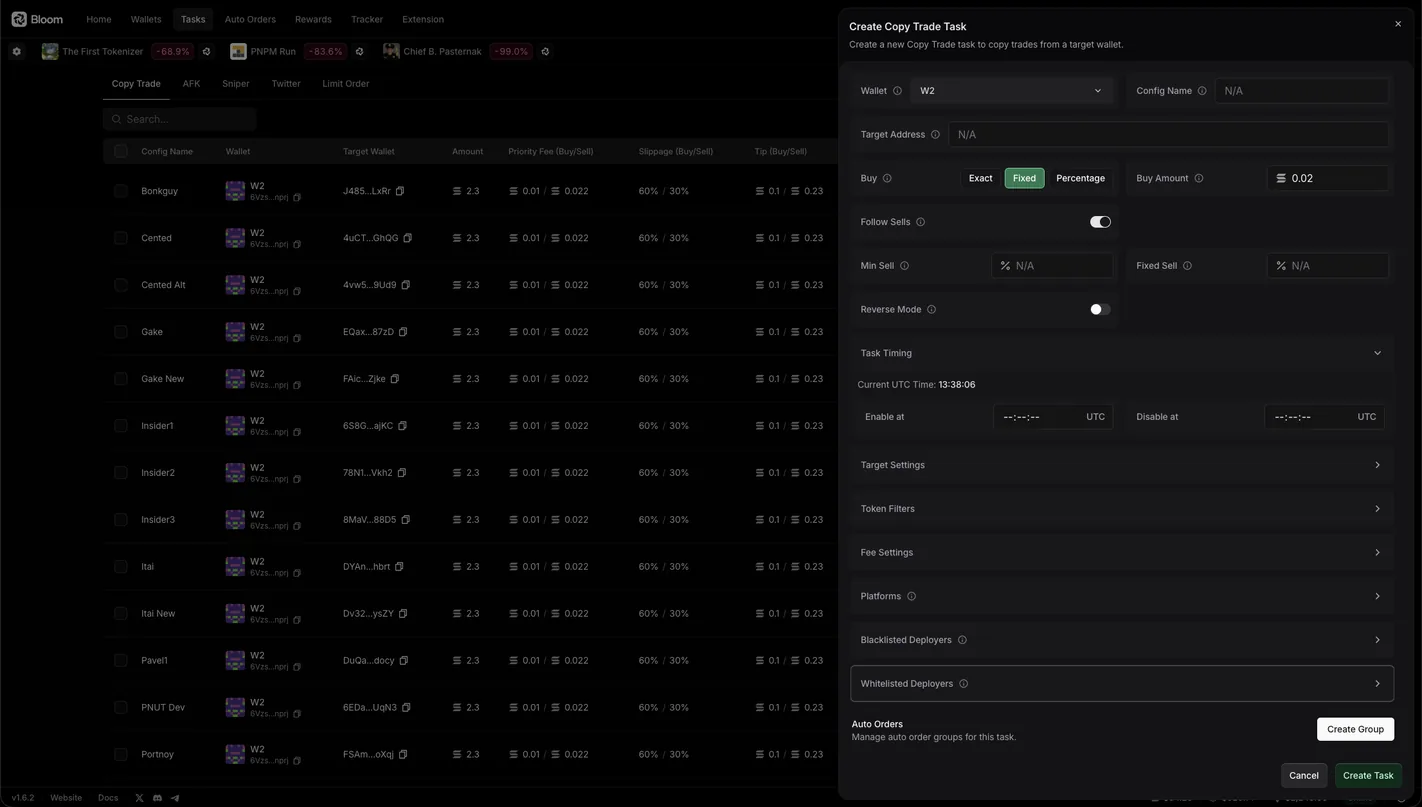
- How it buysBuy Exact: buy the same amount the source wallet buys. Buy %: buy a percentage of the source wallet's trade (over 100% buys more). Buy Fixed: a fixed SOL amount per trade. Max Buy caps each trade.
- How it sellsFollow Sells: the source wallet sells 50%, you sell 50%. Sell On Transfer: sell when the source wallet transfers the token out instead of selling it. Reverse Mode: buy only when the source wallet sells.
- FiltersMinimum and maximum buy size of the source wallet to trigger, market cap, token age, % held by the dev, buy only the first time the source wallet touches a token (First Interaction), buy each token once, skip tokens the source wallet created itself, a list of blocked or allowed devs.
AFK Mode: auto-buy new tokens by filter
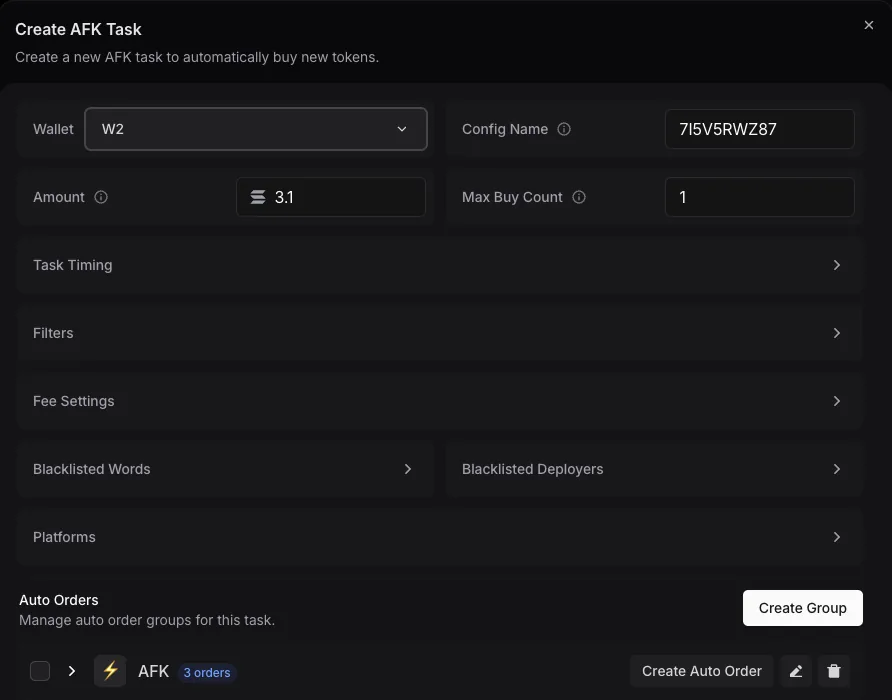
AFK Mode watches for new tokens on the launchpads you choose (Pump.fun, LaunchLab, Raydium…) and automatically buys the ones that pass your filters, even when you're away from your computer. You can run several configs at once to test different strategies.
Filters include: how much SOL the dev spent buying their own token, how many tokens the dev has created and taken to a DEX, maximum tax, words the name or ticker must contain, blocked words, blocked devs, and the trading pair (SOL, USDC or stock tokens). Safe Deployer uses an outside service to filter out suspicious devs; Bloom states clearly it isn't 100% accurate.
LP Sniper: buy the moment a pool opens
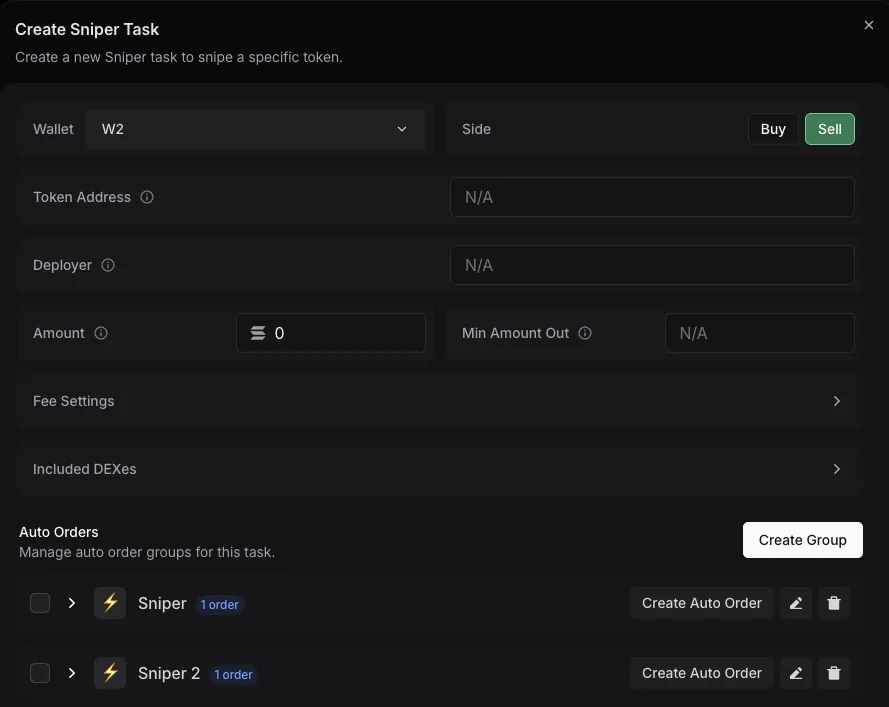
LP Sniper is for when a token goes live in a liquidity pool: enter the token address (and the dev address if you want; type -1 to skip), the SOL amount, the minimum tokens you must receive (Min Amount Out), priority fee and tip, and pick the DEX. When the pool opens, Bloom sends the buy as fast as it can.
Switch Side to Sell for Insta Dump mode: instantly sell the percentage of tokens you choose as soon as the pool goes live. You can attach Auto Orders to take profit automatically after the snipe.
Limit orders, Auto Orders and take-profit strategies
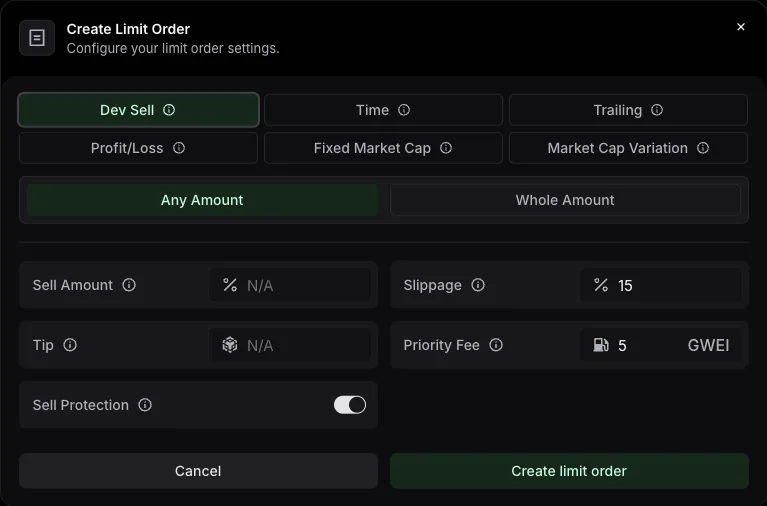
Limit Orders buy or sell when the price or market cap hits your level; up to 1,000 pending orders, 10 per config. Auto Orders are sell orders created automatically after each buy: you set up a group, add strategies to it, then attach that group to manual buys, copy trade, AFK, sniper or social tasks.
- Profit/LossTake profit and stop loss in %: +100% sells when the price doubles, -50% sells when you've lost half.
- TrailingA stop loss that follows the price peak and sells when the price pulls back far enough.
- Dev SellSells immediately when the dev sells their tokens.
- TimeSells after a set time, for example 30M, 1H, 1D.
- By market capFixed Market Cap sells at a given market cap; Market Cap Variation sells when market cap rises or falls by the amount you set.
Wallets, multi-wallet and PnL tracking
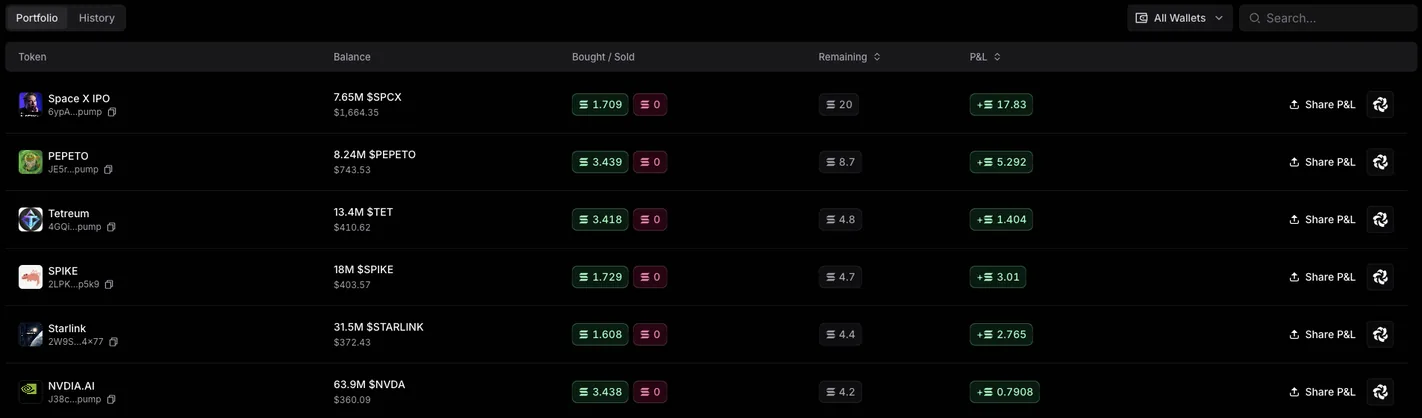
The Wallets section lets you create new wallets, import existing ones and assign roles: default wallet, copy trade wallet, spot wallet, sniper wallet. Click Active Wallets to select several wallets, and one buy or sell order will run on all of them; copy trade, AFK and sniper tasks can also each be given their own wallet.
Split / Consolidate in Manager splits a token across several wallets (evenly, randomly, by custom %, or privately through Houdini Swap) or gathers it back into one wallet. Positions and the Home page show tokens held, bought and sold and PnL; PnL Calendar (/pnl) shows your results day by day and creates a summary image to post on X.
Tracker: follow X, Pump.fun and Fomo
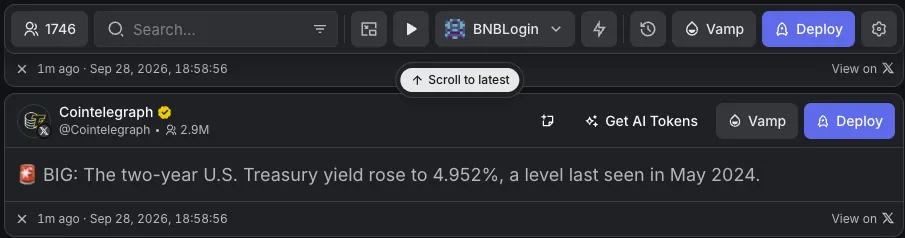
Tracker in Manager is a real-time feed from the X accounts, Pump.fun callers and Fomo users you follow. When they post a token address, the post appears with a quick-buy button. Bloom comes with a default list of accounts; you can add accounts one by one, several at once or import a CSV file.
The settings include translating tweets into English or Chinese, a warning when a post has an outside link, and quick-buy amounts. Each post also has Deploy and Vamp buttons to create a token (see the Deploy section below).
Chrome Extension: Bloom orders right on your terminal
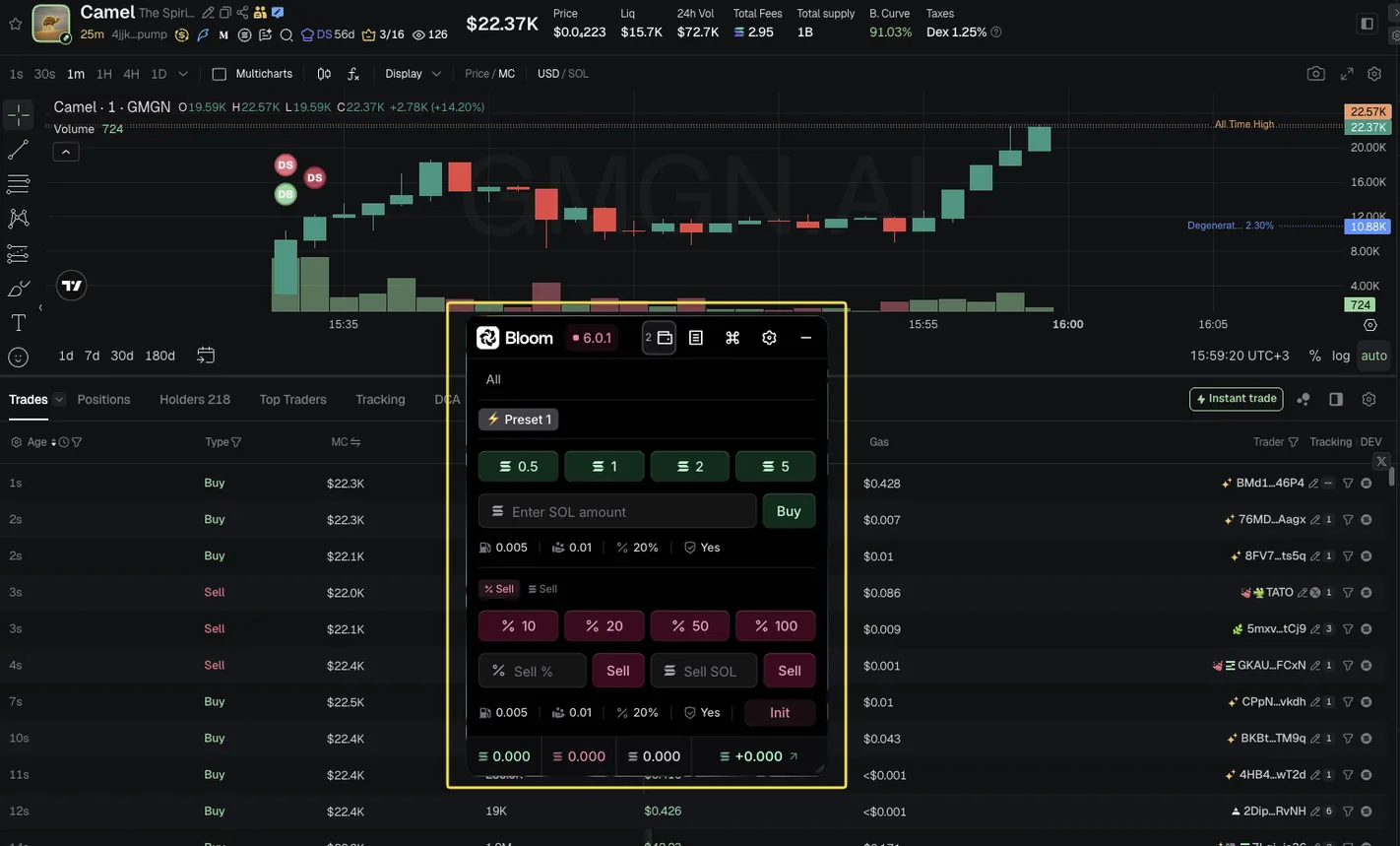
Bloom Extension adds an order panel (Trade Panel) on top of more than a dozen terminals you may already use, such as Axiom, GMGN, Photon, BullX and DEX Screener. Trades go through Bloom's infrastructure, not the terminal's buttons; the chain is detected from the token you have open.
The Trade Panel has preset amounts, your wallet list, pending orders, an Init button (sells back exactly your initial investment) and Dev Sell. Shortcuts: CTRL+B shows or hides the panel, hold Space + Q…I to buy, Space + A…K to sell. AutoBuy watches an open Discord or Telegram Web channel and buys as soon as a token address is posted.
Deploy and Vamp: create tokens right in Bloom
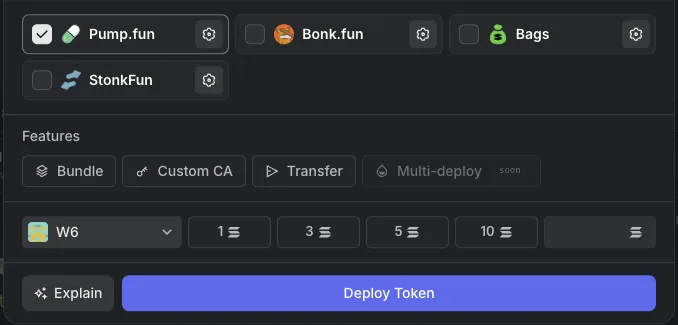
Deploy creates a new token from Tracker: pick the creator wallet, set the name, ticker and image (from a tweet, your library or an AI image), attach an X post link, choose Pump.fun, Bonk.fun or Bags as launchpad (one, two or all three), enter the amount and click Deploy Token. The creator wallet makes the first buy.
With Vamp you paste the address of an existing token, and Bloom fills in that token's name, ticker, image and description for the new launch. There are modes for bundling early buys across several wallets.
Bridge: move funds between chains
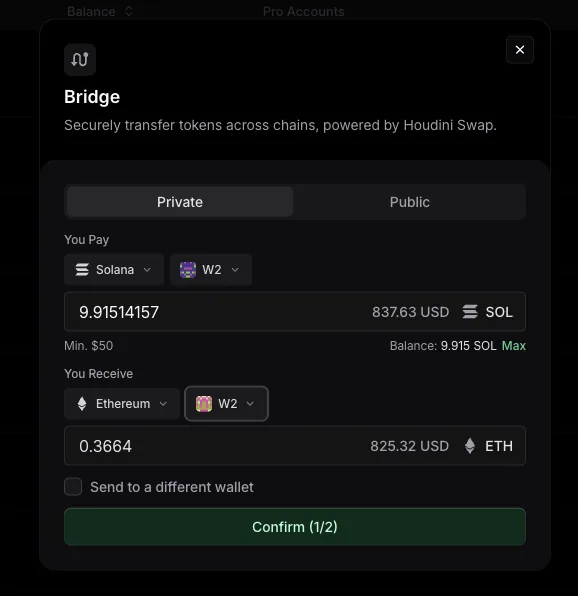
The Bridge button on each wallet (in Manager, or the Bridge menu on Telegram) moves funds between Solana, Ethereum, Base, BNB Chain, Arc and Robinhood, running through Houdini Swap.
Private mode sends privately, so neither the recipient nor anyone else can trace the sending wallet; Public is a normal transfer, with a separate deposit address each time. You can send to another wallet with the Send to a different wallet box.
Bloom API for developers
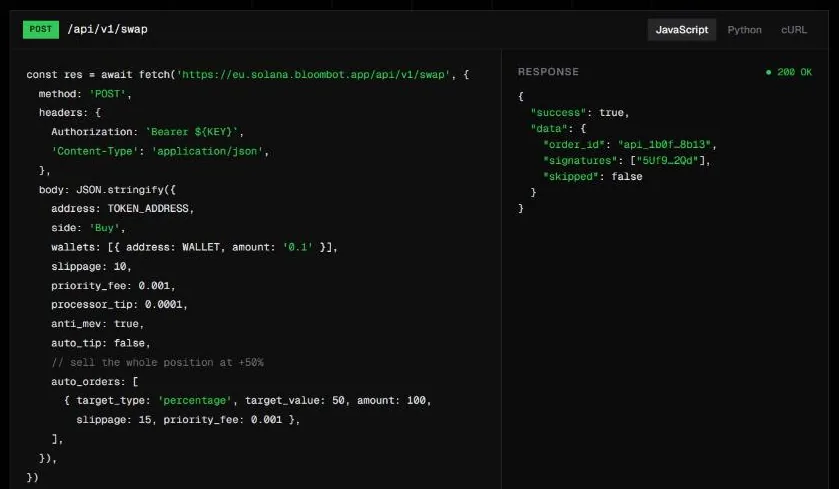
Bloom offers a REST API that uses the same order engine as the bot: /swap buys and sells on 1 to 20 wallets with take profit, stop loss and trailing attached; /deploy creates tokens on pump.fun, Bags and Bonk (Solana only); /wallets reads your wallet list; /ping checks the connection. Create a key in Manager: click your account name, choose API Keys, pick the chain and click Create API Key.
Rewards: cashback and referral commission
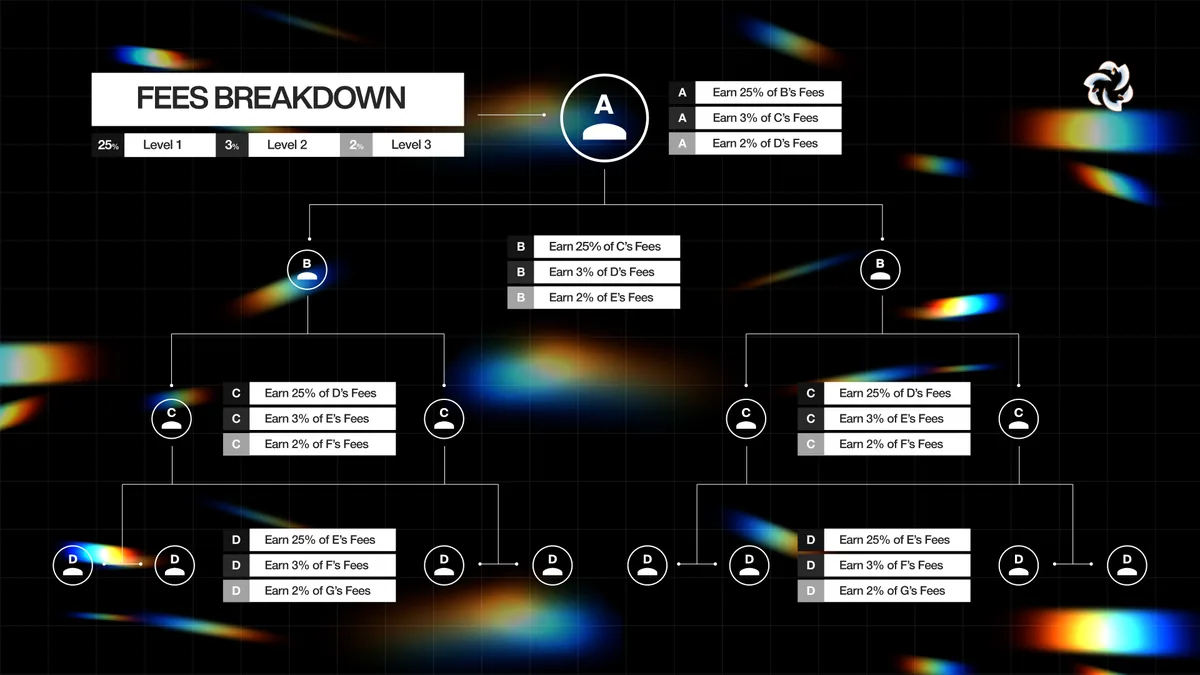
Join Bloom through a referral link and you get 10% of your trading fees back, so you pay 0.9% instead of 1%. Referrers earn a three-tier commission on the 1% fee: 25% from people they invite directly, 3% at tier two and 2% at tier three.
Cashback and commissions collect in Referrals (Telegram) or Rewards (Manager) and can be withdrawn every 6 hours once the balance passes a threshold, for example 0.1 SOL, 0.01 ETH on Ethereum and Base, 0.05 BNB.
Fees and safety
Bloom charges 1% on every buy and sell, or 0.9% if you sign up through a referral link. On top of this fee you pay network fees, priority fees and Jito tips (on Solana), which you set yourself in the settings.
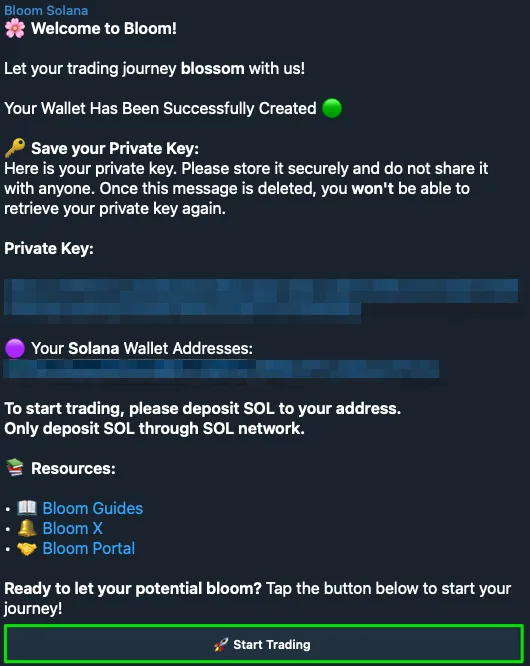
- The first time you open the bot, Bloom sends you the private key of your new wallet: store it somewhere safe and delete that message. Never give your private key to anyone.
- Lock your withdrawal address (address locking). Unlocking to change the address takes 24 hours, so even if your account is taken over, an attacker can't change the address right away.
- Use only the official links: bloombot.app, manager.bloombot.app, docs.bloombot.app and the Telegram bots listed in the docs.
- Turn on Buy/Sell Protection to reduce the risk of being sandwiched.
- Deposit on the right network; keep only the funds you plan to trade with in the bot wallet, and move profits to your own wallet.
On October 26, 2026 Bloom reported a security incident: an attacker exploited a remote code execution (RCE) vulnerability in a third-party module and took about 9,408 SOL (about 947,000 USD) from 49 wallets belonging to 9 users. Bloom said no private keys were exposed and other wallets were not affected. As a precaution, Bloom shut down its whole system and said that when it reopens, everyone will have to log in to Bloom Manager and the Extension again.
Also on October 26, Bloom confirmed it had refunded 100%, a total of 9,408 SOL, to all 9 users, with a Solscan link for each transaction.
Get started with Bloom
- Open BloomGo through our link to get the fee reduced to 0.9%. If Bloom is still shut down, wait for the reopening announcement on its official X.bloom.tradewizbot.pro
- Start the bot, save the private keyOpen the Telegram bot, read the terms and click Continue. Save the private key of the new wallet, delete the message and click Start Trading. To use the web, log in to manager.bloombot.app with the same Telegram account.
- Deposit a little, start smallDeposit SOL (or ETH, BNB… on the right network) into the wallet, lock your withdrawal address, then try one buy or one copy trade task with a small amount before adding more.
Screenshots taken on October 28, 2026; the interface may change. Not investment advice: memecoins are high-risk, only use money you can afford to lose.
Social Tasks: trade on X and Pump.fun activity
Social Tasks (still the Twitter menu on the Telegram bot, formerly called Twitter Tasks) trade automatically based on social media activity. There are six modes: