
What is Trojan? Main features and how to use it
Trojan is a Solana token trading platform from the team behind the Trojan on Solana Telegram bot. You can use the Trojan Terminal web app at trojan.com (it works on your phone too) or the familiar Telegram bot; both have copy trade, limit orders, DCA and anti-MEV.
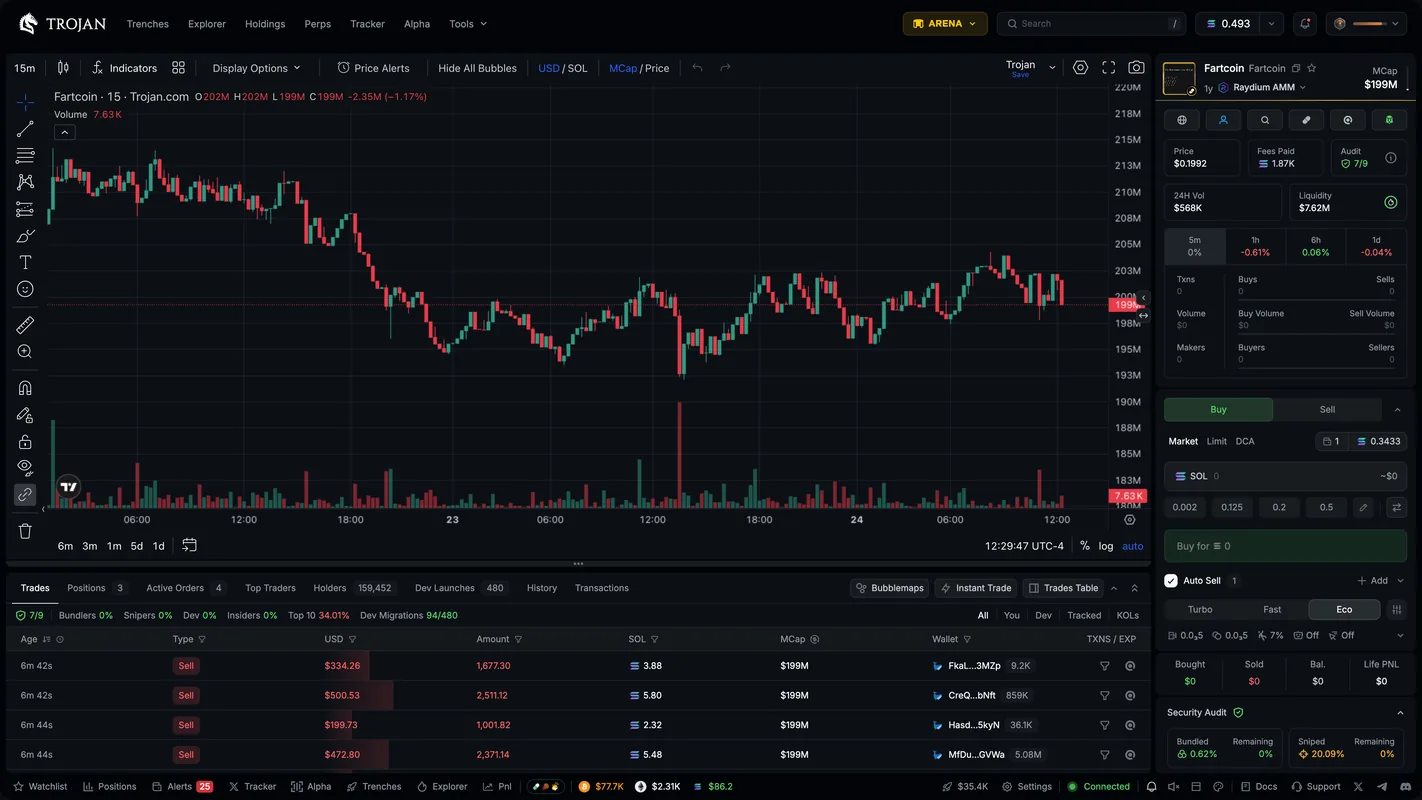
Trojan Terminal: the web trading page
The main Trojan Terminal page has a chart in the middle, an order table below and the Trade Panel on the right. The chart has a full set of drawing tools, Fibonacci, indicators such as RSI and MA, and a Bubblemaps integration to view clusters of related wallets. You can turn on "bubbles" that mark trades right on the candles: your own, the dev's, tracked wallets', snipers' and bundlers', KOLs', and even the moment the token was called in a Telegram or Discord group.
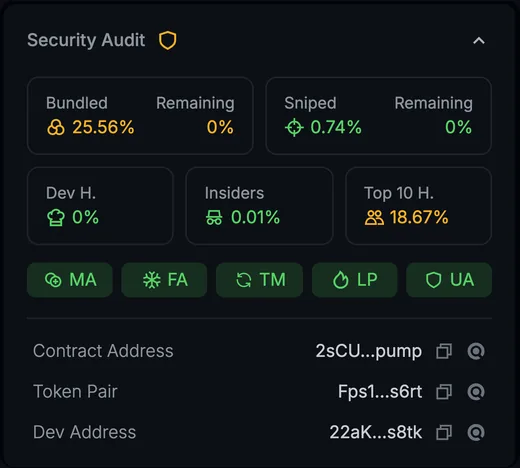
The Trade Panel starts with the token card (copy the address, add to watchlist, social links, whether DEX Screener has been paid). Right below is the Security Audit: the share held by bundled wallets, snipers, the dev, insiders and the top 10 holders, and the contract's permissions.
The expandable sections below include HolderScan (are holders selling or buying more), Dev Scanner (which tokens this dev has launched before), Similar Tokens (tokens with the same name, often copycats), Holder Analytics and Performance (how far it is from its peak). The Fees Paid box shows the total fees paid on the token; compare it with volume to spot tokens launched with bundled buys.
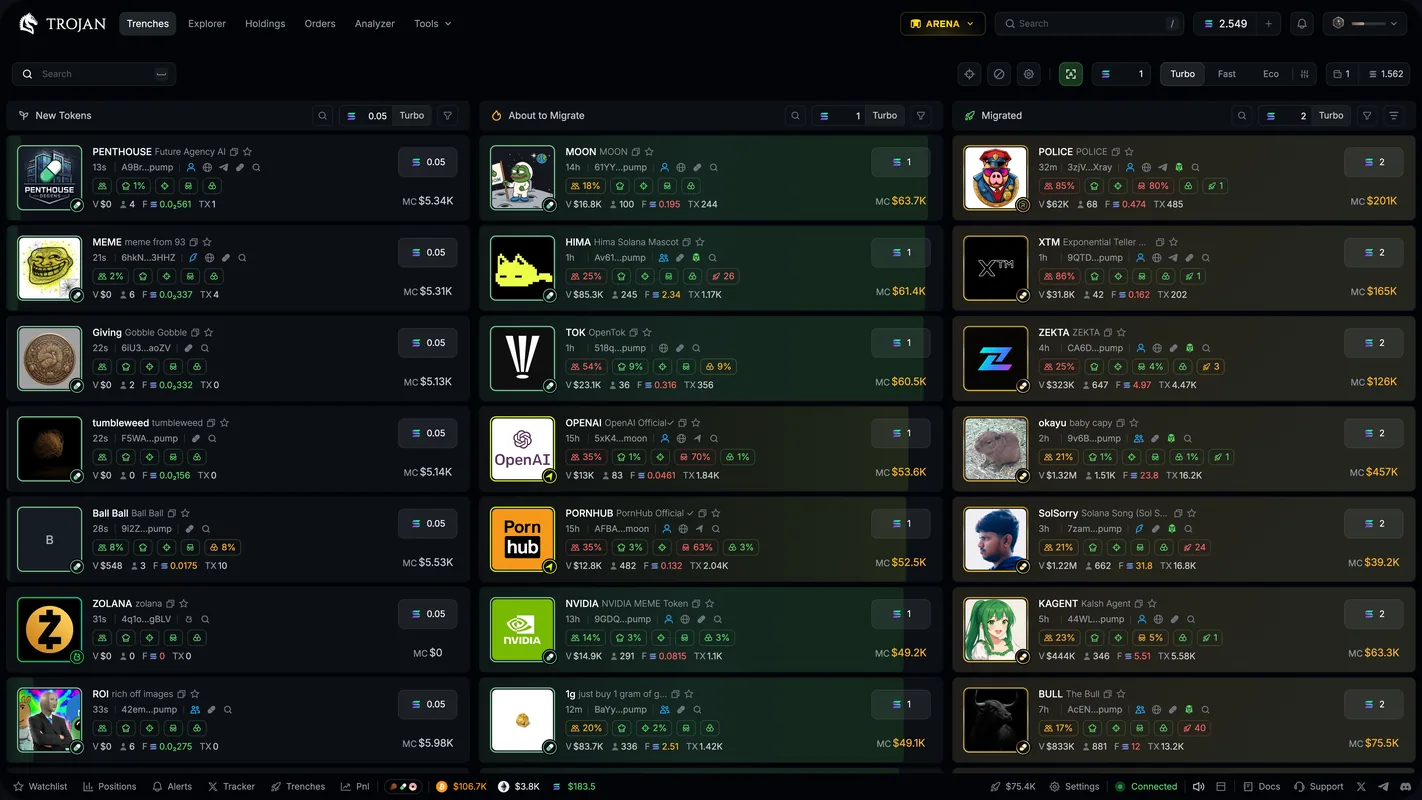
Trenches: new tokens by stage
Trenches splits new tokens into three columns: New Tokens (just created on a launchpad), About to Migrate (bonding curve almost full, with icons to sell or snipe when the token starts migrating) and Migrated (already in a DEX pool). The card's background color works as a progress bar: the fuller it is, the closer the token is to moving to a DEX.
Each column has its own quick buy amount, and you can add a second button to quick sell by percentage. Filters include launchpad, tokens with socials, DEX Screener paid, livestreaming, dev, sniper, insider and top 10 holder share, market cap, liquidity, volume and token age. Hover over a card and hold the X key to preview the token's X account; the blacklist can be exported and imported.
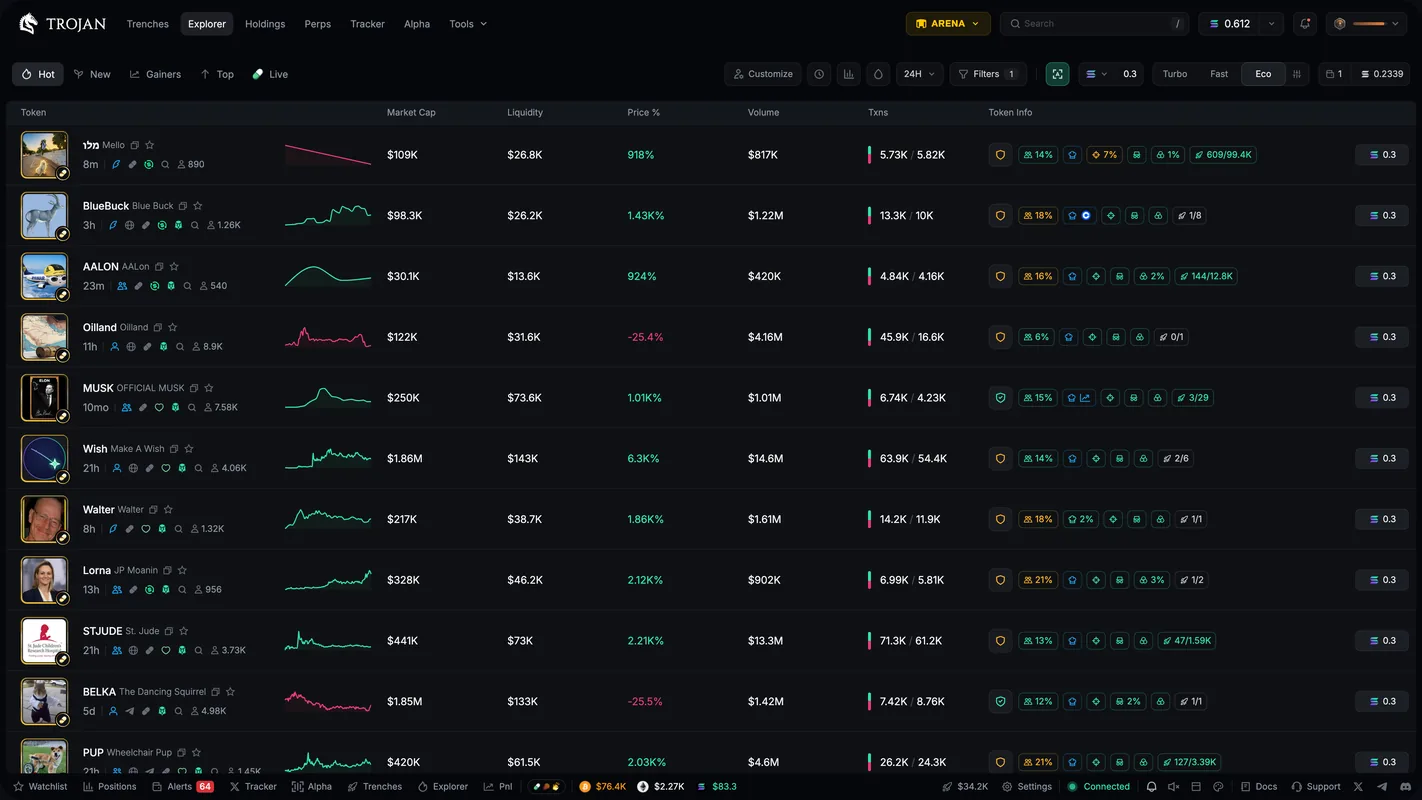
Explorer: find tokens that are moving
Explorer is a token table with five pages: Hot (ranked by a score Trojan calculates from volume, liquidity, number of trades and number of trading wallets), New (the newest tokens), Gainers (rising fast), Top (by market cap, volume or number of trades) and Live (tokens livestreaming).
Quick filters cover token age, volume, liquidity and timeframes from 5 minutes to 24 hours. The Safe search button hides tokens that fail the safety checks; Trojan states clearly that this is for reference only, not a guarantee. You can also filter by DEX and by dev, sniper, insider and top 10 holder share.
Trading: Market, Quick Buy, Instant Trade
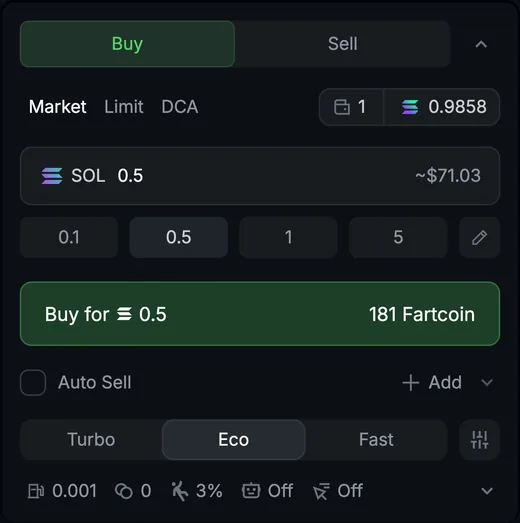
- MarketChoose Buy, enter an amount or click a preset, then click Buy. Select several wallets at once and each wallet buys that exact amount. To sell, choose a percentage, or click Sell Init to take back exactly your initial investment.
- SOL, USD1, USDCTrade with SOL or the stablecoins USD1 and USDC. Network fees are still paid in SOL, so always keep a little SOL.
- Quick Buy, Instant TradeQuick Buy buys in one click right on the token card. Instant Trade is a floating window with preset buy and sell buttons, with optional hotkeys.
- Clipboard BuyWhen you copy a token address, Trojan shows a quick buy button for that token at the top of the page, with no need to paste it into search.
- Trade SettingsThree editable settings profiles: priority fee, Bribe (the tip paid when anti-MEV is on), slippage, Spam Buy (splits an order into up to 10 small transactions) and anti-MEV (MEV Protection).
Limit orders, DCA and Auto-Sell
- LimitSet a trigger by price or market cap. A sell at a positive level is a take profit (T/P), at a negative level a stop loss (S/L). Hover over the chart and click the + on the price line to place an order or price alert right there.
- DCASplit an order by interval and duration, for example 0.25 SOL every 5 minutes for 25 minutes means 5 buys. Turn on MCap Range to fill only when market cap is within the range you choose.
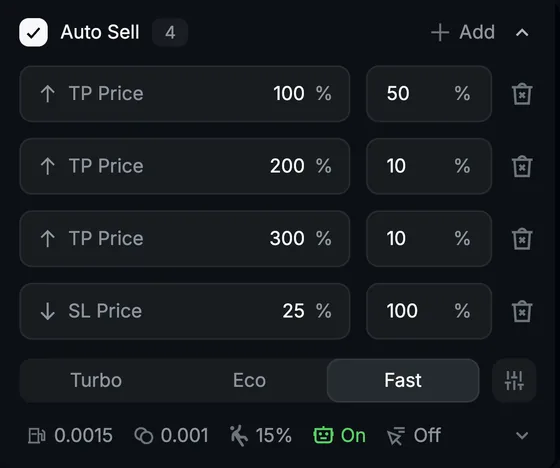
- Auto-SellMust be turned on before you buy. Once you buy, Trojan automatically places take profit and stop loss orders based on your entry price, for example sell 50% at 2x and sell everything at a 25% drop.
- OrdersThe Orders page groups orders into three tabs Limit, DCA, Event; cancel them one by one or with Cancel All.
Copy trade: automatically follow good wallets
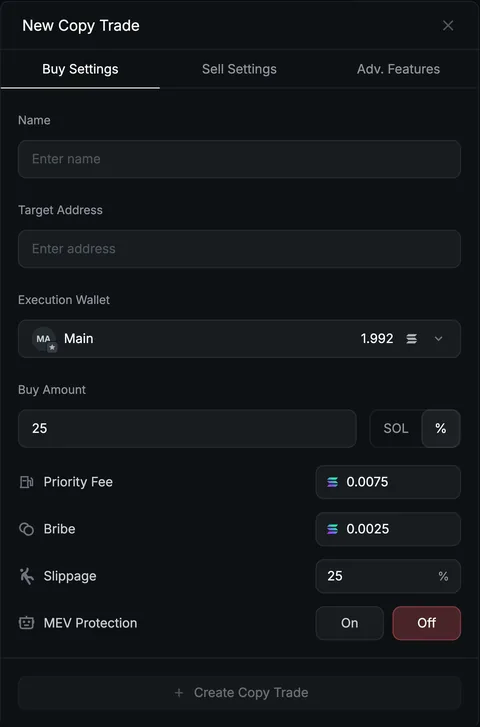
Go to Tools → Copy Trading and click + New Copy Trade. The settings panel has three tabs: Buy Settings, Sell Settings and Adv. Features. The copy list lets you pause and resume single wallets or all of them, and click Edit to change settings.
- How it buysEnter the address of the wallet to copy (Target Address), choose which of your wallets pays, then buy as a % of the source wallet's trade (10% means if they buy 10 SOL, you buy 1 SOL) or a fixed SOL amount.
- How it sellsCopy Sell: you sell the same % the source wallet sells. Auto Sell: preset take profit and stop loss. Leave both empty to sell yourself.
- FiltersMarket cap range, minimum liquidity, maximum spend per trade, skip tokens still on a launchpad's bonding curve, don't rebuy tokens you already hold.
- Fees and anti-MEVBuys and sells each have their own priority fee, Bribe, slippage and anti-MEV setting.
Wallet Tracker and Analyzer
Wallet Tracker follows any wallet: click Add Wallet, enter the address, give it a name and pick an emoji. That emoji shows on the chart every time the wallet trades the token you're viewing. Each wallet has its own notification toggle and sound, and can be put in a group; dev wallets are labeled right on the token card in Trenches.
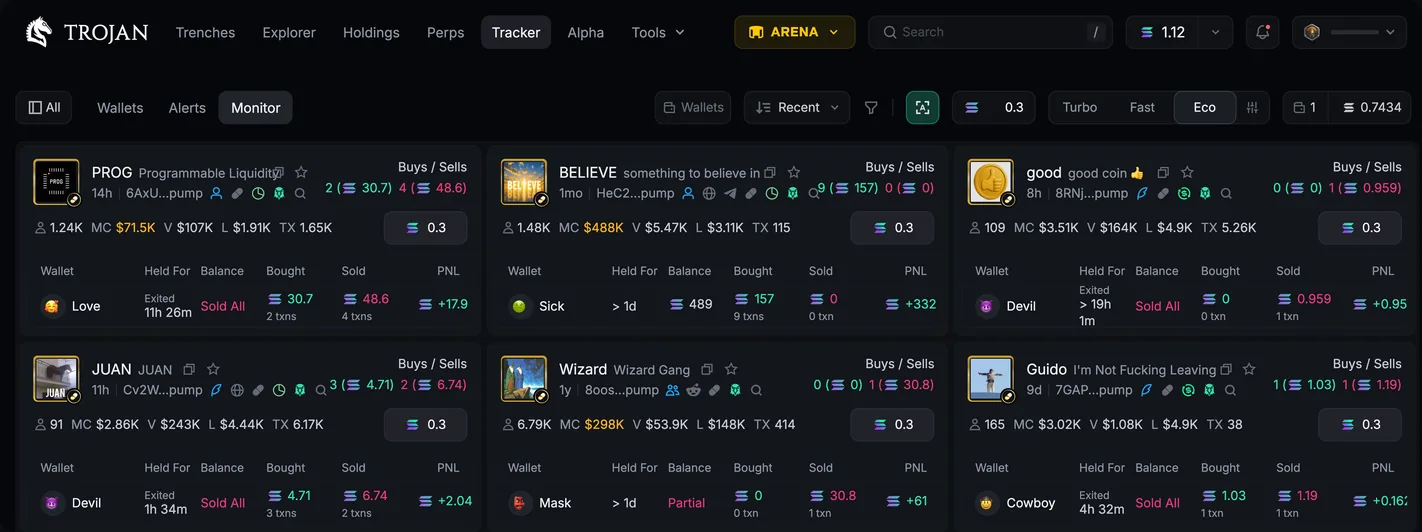
The Alerts tab lists the wallets' trades, filterable by first buy, buying more, partial sell, full sell, transfer and token creation. The Monitor tab groups by token: which wallets bought, how much they sold, how long they held.
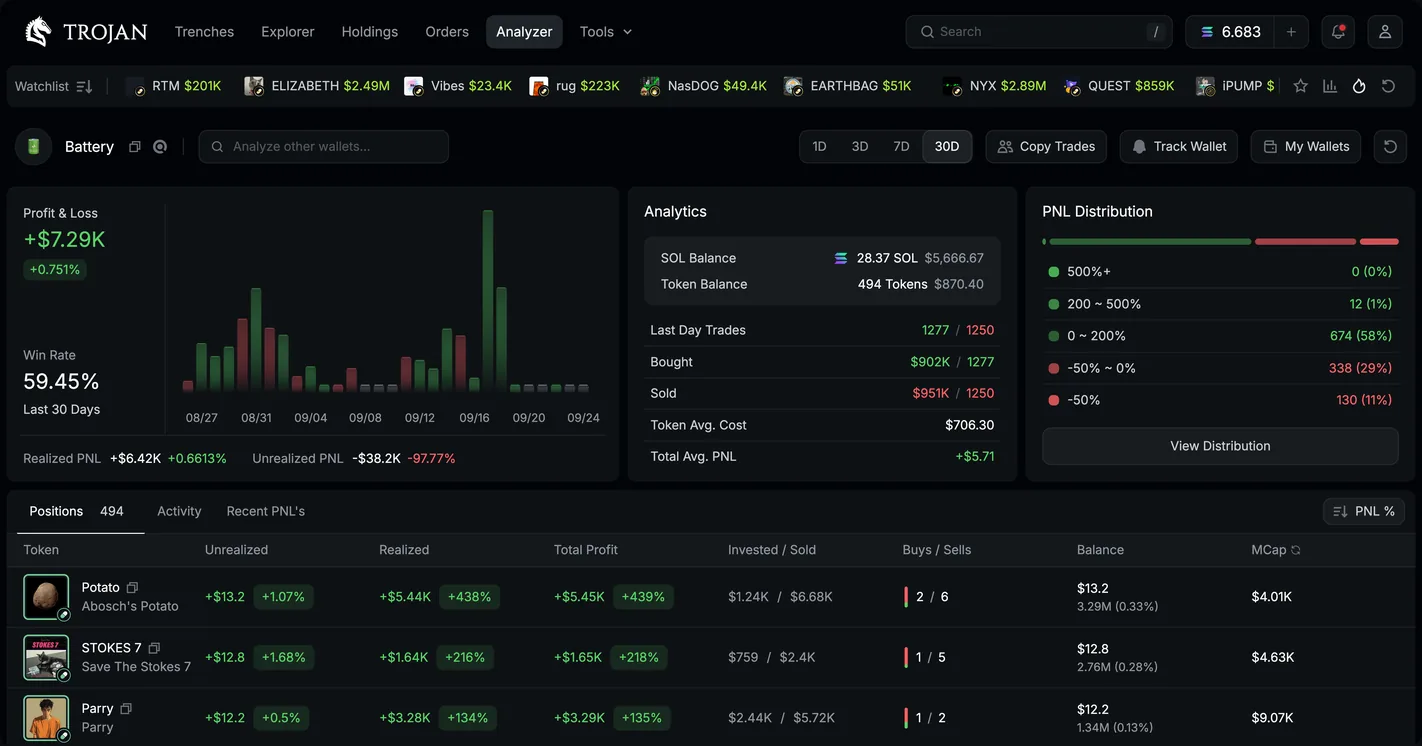
Analyzer scores a wallet: realized and unrealized PnL, win rate, a PnL chart, PnL distribution (winning from one big trade or steadily), trade history and current holdings. If you like a wallet, click Copy Trade to send it to copy trading, or Track Wallet to follow it.
X Tracker and Alpha: news from X and calls from group chats
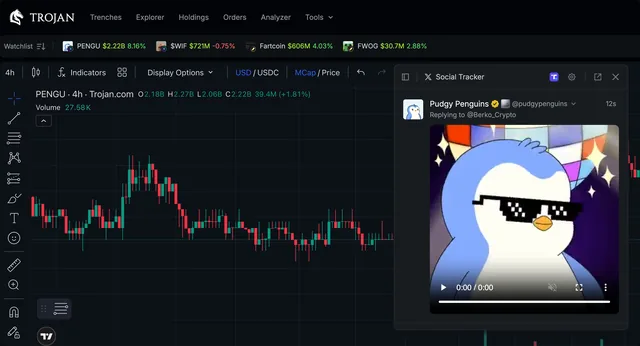
X Tracker is a real-time feed of posts on X. Cashtags and token addresses are highlighted: click an address to open that token's trading page. In the settings you choose the accounts, the sound alert, and whether to include replies, reposts, quotes and posts on Truth Social.
Alpha brings calls from your Telegram and Discord groups into the terminal, powered by the TokenScan bot. Add @tokenscan to your group, make it an admin, type /connect, then click Connect to Trojan. The Ranked tab ranks groups, calls and callers by performance; groups that haven't agreed to be public show as anonymous, and each group is capped at 40 calls a day to prevent spam.
Perps: leveraged long and short
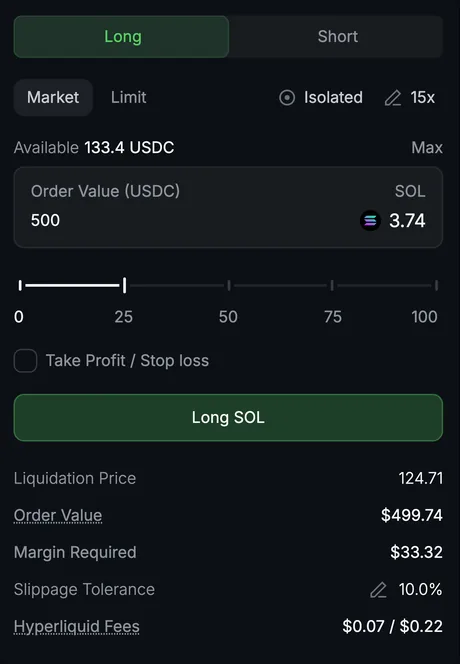
The Perps page runs on Hyperliquid. First click Transfer to move funds into your Perps Wallet; margin is in USDC.
Pick an asset, choose Long (profit when the price rises) or Short (profit when the price falls), drag the leverage slider (the maximum depends on the asset), choose Market or Limit, pick Cross (shared) or Isolated (separate for each position) margin, and add TP/SL if needed. The table below shows open positions with liquidation price, pending orders and history; above it are funding, 24-hour volume and open interest.
Holdings and wallet management
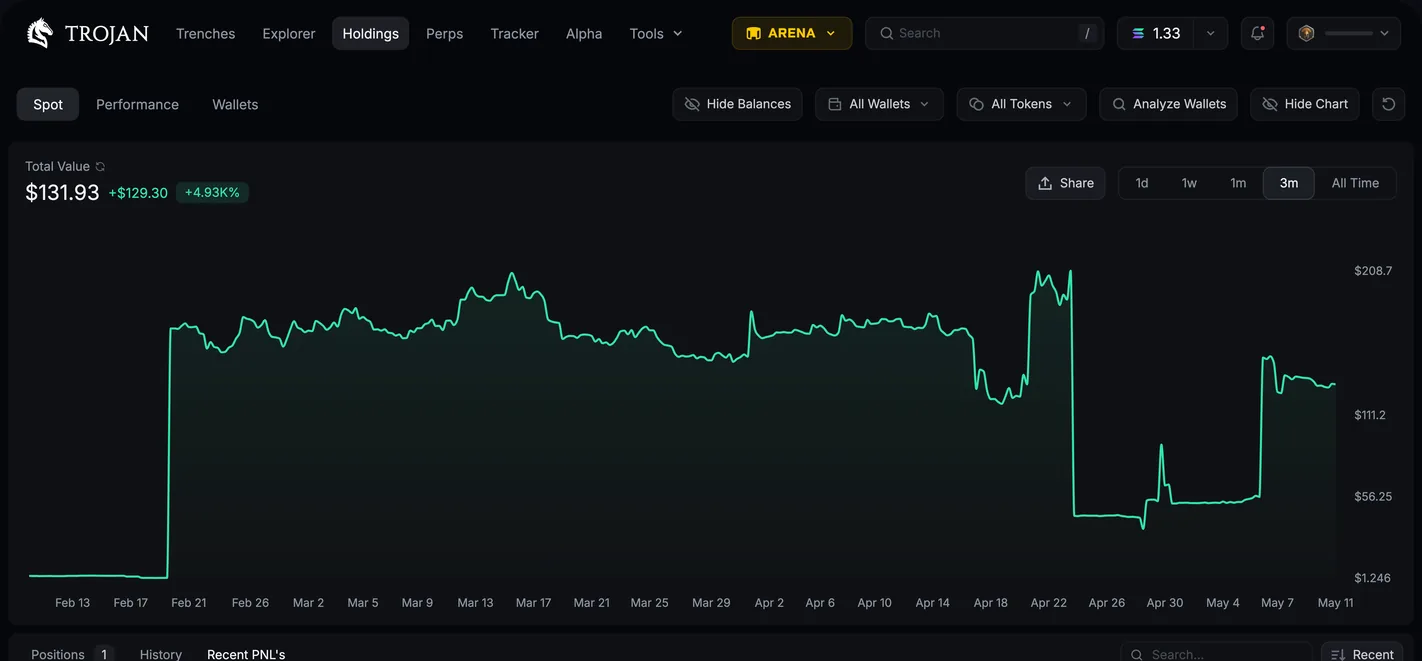
Holdings has three tabs: Spot (tokens you hold, with an option to hide dust balances and spam tokens), Performance (a daily and monthly PnL calendar) and Wallets. The chart shows the value of one or more wallets over time; click PNL to download a PnL card in Pro or Meme style, or with your own image.
Under Wallets you can have up to 10 active wallets (archive some to create more). Deposit by address or QR code, from your login wallet, buy SOL by card through MoonPay, or bridge from another chain through deBridge. There are Withdraw, Consolidate (sweep into one wallet), Distribute (spread across wallets), wallet import by private key and private key export.
The Trojan on Solana Telegram bot
Before the terminal existed, Trojan was the Trojan on Solana Telegram bot, and the bot still runs alongside it. Type /start to open the main menu; your Solana wallet address is right at the top of the menu, and once you deposit SOL there you can trade.
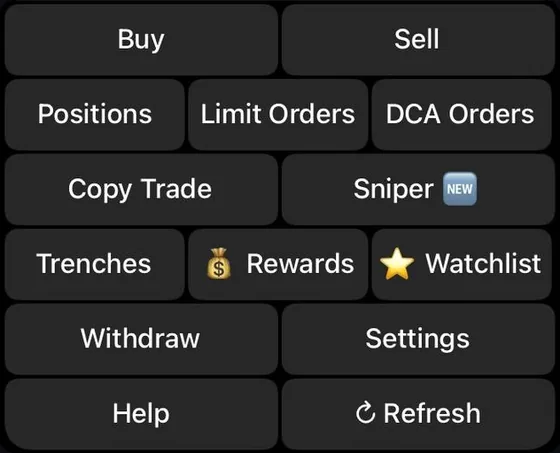
The menu has Buy, Sell, Positions, Limit Orders, DCA Orders, Copy Trade, Sniper, Trenches, Rewards, Watchlist, Withdraw, Settings and Help (24/7 support group). The fastest way to buy: paste a token address or link into the chat, choose a SOL amount and click Buy.
- Advanced and SimpleThe bot opens in Advanced mode with every feature. Simple is leaner for people who just buy and sell, but hides copy trade, watchlist and many other sections. If a button is missing, check whether you switched to Simple by accident.
- Confirm TradesWhen on, you have to click Buy or Sell to send the order; when off, clicking an amount sends the order right away.
- Priority feeFast 0.0015 SOL, Turbo 0.0075 SOL or a custom amount. This fee goes to the network even if the transaction fails.
- Several backup botsTrojan has a main bot and backup bots that share the same wallets and settings, to spread the load when traffic is high.
Copy trade on the Telegram bot
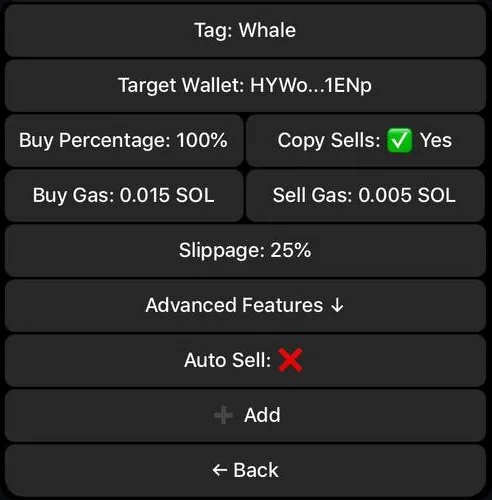
Click Copy Trade, then + New. Set a Tag (a name to remember it by), paste the Target Wallet, and choose a Buy Percentage (50% means if they buy 1 SOL, you buy 0.5 SOL) or a fixed SOL amount. Turn on Copy Sells to sell the same % the source wallet sells, or use your Auto Sell profile. Set the fees for buys and sells and the slippage, then click Add.
Advanced Features include: a maximum buy per trade, whether to rebuy tokens already bought or only buy the first time, copy only renounced tokens, skip Pump.fun tokens still on the bonding curve, minimum and maximum liquidity and market cap, a minimum buy size for the source wallet, a token block list and the number of retries on failure. Pause All stops every copy at once.
Sniper: Auto Sniper and Migration Sniper
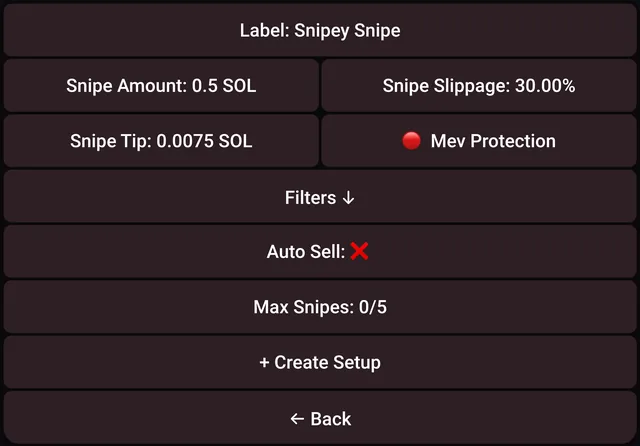
Auto Sniper automatically buys newly launched tokens that match your filters. Click + New Setup, set a name, the SOL amount per buy, slippage and a tip so your order gets priority. Filters cover the launch platform, mint and freeze authority, whether it has socials, keyword or dev wallet allow and block lists, liquidity, the share of supply in the pool and the share the dev holds. Max Snipes sets how many buys to make before it stops.
Migration Sniper buys or sells the moment a token moves from the bonding curve to a DEX pool. You set the amount, slippage, tip and maximum tip. The list of tokens about to migrate is under Trenches → Migrating so you can set up snipes quickly.
Limit, DCA and other tools on Telegram
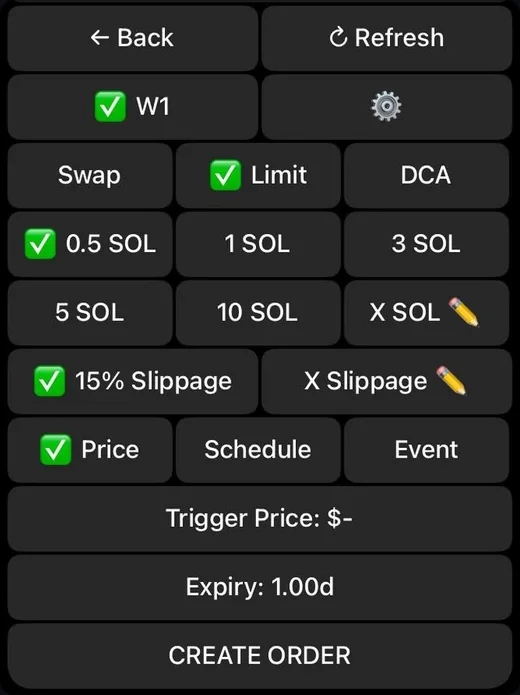
- Limit OrdersTrigger by price, market cap or % change; by event (the token moves to a DEX or the dev sells); or on a schedule. Orders have an expiry, and there's a trailing stop loss that moves up with the price peak.
- DCA OrdersA total amount split by interval and duration, with a minimum and maximum price range.
- Auto Buy, Auto SellAuto Buy buys as soon as you paste a token address. Auto Sell automatically sets take profit and stop loss for every buy.
- Bundle BuysChoose up to 10 wallets to buy at the same time.
- Trenches, WatchlistTrenches has New Pairs, Igniting Engines (about to move to a DEX), Graduated and Migrating. Watchlist saves tokens to view their charts and buy quickly.
- Withdraw, BridgeWithdraw SOL, tokens or ETH; bridge between ETH and SOL through deBridge, which takes about 18–35 minutes.
- Burn, reclaim SOLBurn dead tokens and close empty token accounts to get back about 0.002 SOL each. Burned tokens can't be recovered.
Arena: Gold, cashback, Jackpot and referrals
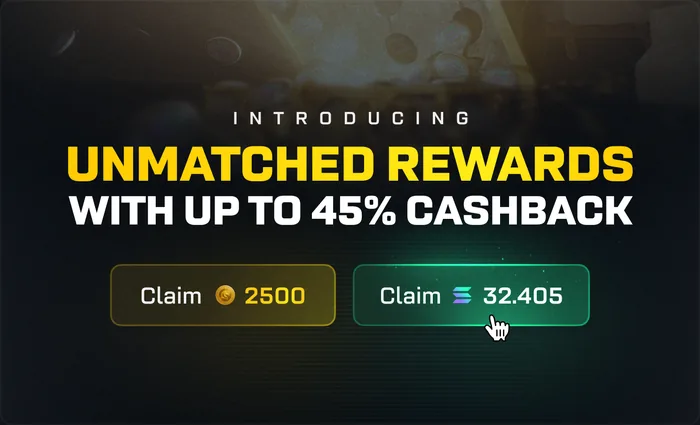
Arena is Trojan Terminal's rewards program. You earn Gold based on your trading volume, on streaks of consecutive trading days and for completing daily and seasonal quests. The more Gold, the higher your rank: Degen gets 10% of fees back, Warrior 15%, Gladiator 20%, Commander 25%, Titan 35%, paid in SOL. Import your old Telegram bot wallet into the terminal to get a Gold multiplier right away.
The Jackpot draws every 48 hours; the prize is 10% of Trojan's fees, and one winner takes it all. You put in Gold to enter. The referral program counts 5 tiers, with Honors levels I to IV earning a total of 27.5% to 47.5% of the fees of people you invite.
Fees and safety
Trojan charges 1% per successful buy and sell order, on both the terminal and the Telegram bot; failed trades don't pay this fee. The cashback described in the Arena section lowers your real cost. On top of that you pay Solana network fees: the priority fee, the Bribe when anti-MEV is on, and about 0.002 SOL to open a token account the first time (returned when you sell everything). Some launchpads charge their own extra fee, and Token-2022 tokens may have taxes.
- Never give your private key to anyone. Trojan admins and support will never ask for it.
- Only use the bots on the official list at trojanonsolana.com/links; the main bot is @solana_trojanbot.
- On the Telegram bot, set a Secure Action Password so that withdrawals and key exports require a password. This password can't be recovered, so set a hint with it.
- Turn on Sell Protection so the bot asks again when you sell more than 75% of your tokens.
- Only deposit SOL and tokens on the Solana network. Treat the bot wallet as a hot wallet: keep little in it, and move profits to your own wallet.
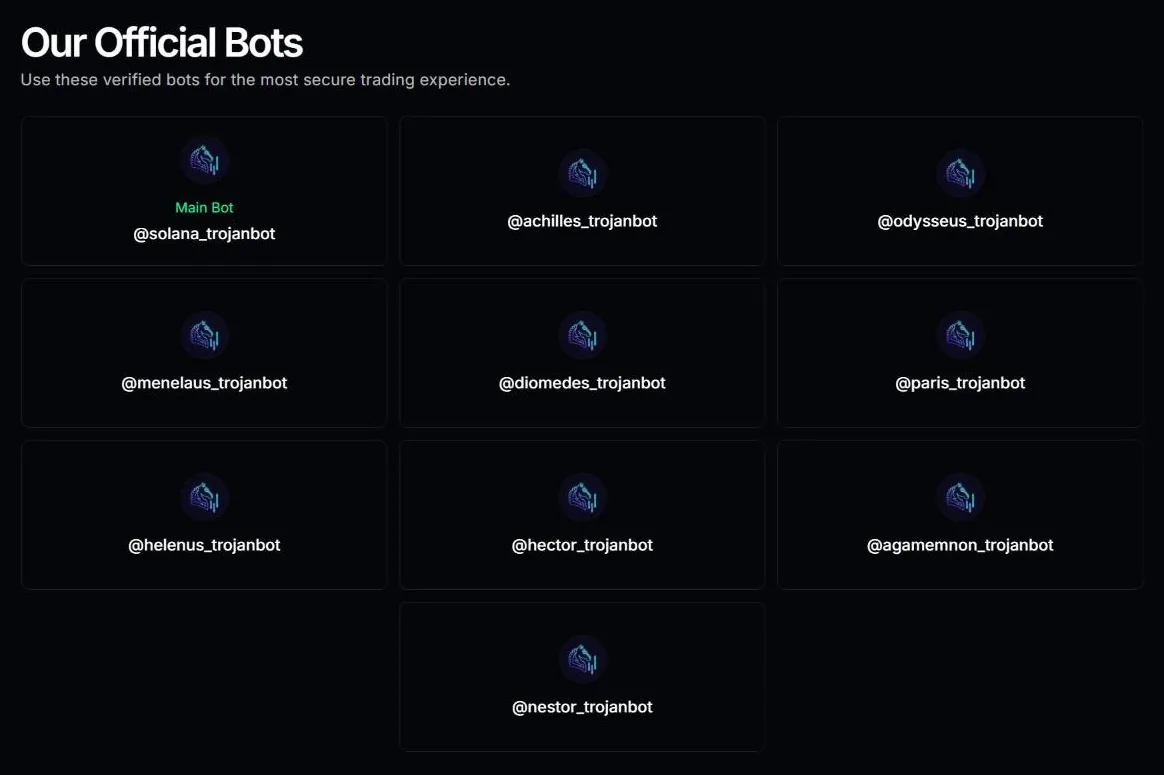
When we checked, there had been no confirmed hack involving Trojan.
Get started with Trojan
- Open TrojanGo through our link, at no extra cost.trojan.tradewizbot.pro
- Log in or open the botOn the web, log in with a Solana wallet (such as Phantom), a Passkey or Google, then choose a username (which is also your referral link). On Telegram, click Start and the bot creates a wallet for you.
- Deposit a little SOL, start smallDeposit SOL into your Trojan wallet, set up Auto-Sell, and try a small buy or copy a wallet with a small amount before adding more funds.
Screenshots taken on October 28, 2026; the interface may change. Not investment advice: memecoins are high-risk, only use money you can afford to lose.