Solana Copy Trading for Beginners: Step-by-Step Guide 2026
 2026-08-2410 min read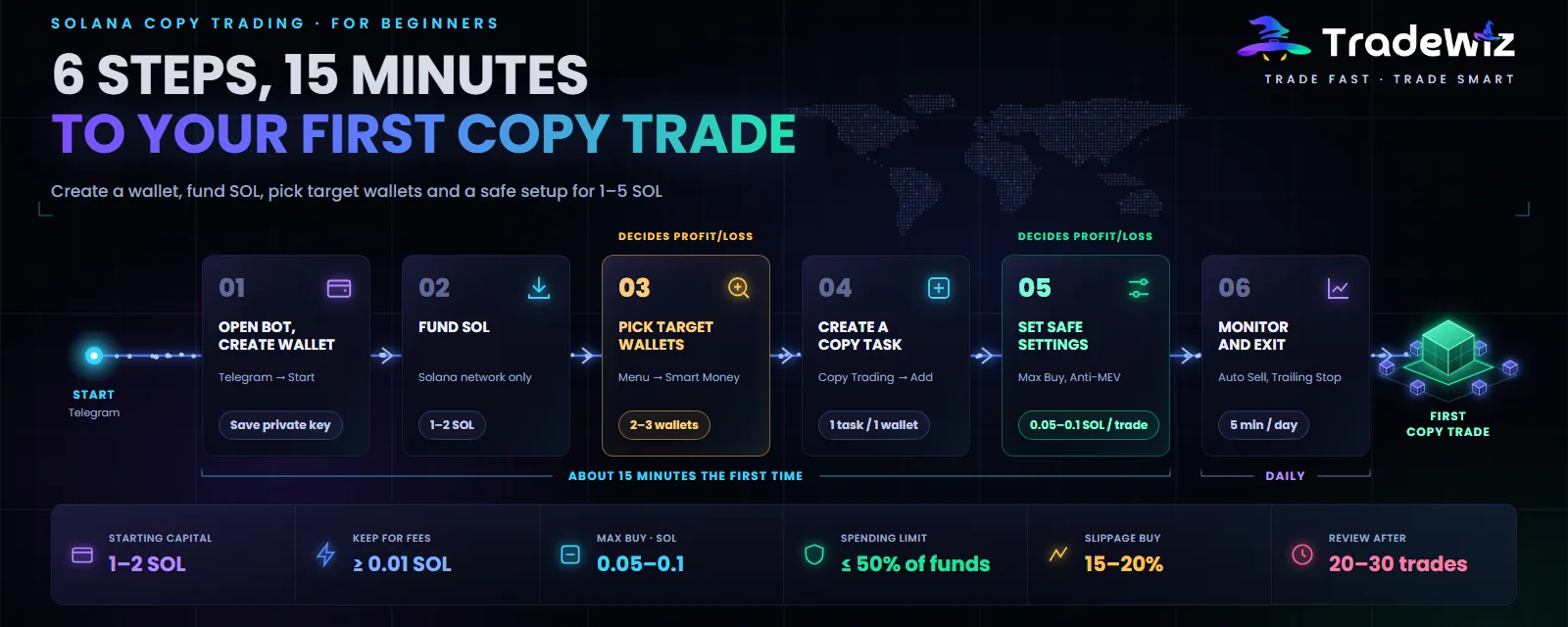
On-chain copy trading sounds complicated: wallets, private keys, slippage, gas, MEV. In practice, the whole process from opening the bot to your first copy trade landing on-chain takes about 15 minutes. The hard part isn't the clicking. It's two decisions: which wallet to copy and how to set it up so you don't blow your account in the first week.
This post follows the exact order you'll work in. If you don't know what copy trading is yet, read What Is Copy Trading and What to Know first.
Quick summary
- Start with 1–2 SOL. Below 1 SOL, network fees and tips eat almost all of your profit.
- The target wallet decides most of your results. Spend the most time on this step.
- Always set a total SOL limit for each copy task. That's the most you can lose on that wallet.
- After your first 20–30 trades, stop and review before adding more funds.
What you need
- A Telegram account.
- Some SOL on an exchange or in a Phantom wallet. 1–2 SOL is recommended to start.
- 15 uninterrupted minutes for your first setup.
No computer, no software to install. Everything works on your phone.
Step 1: Open the bot and create a wallet
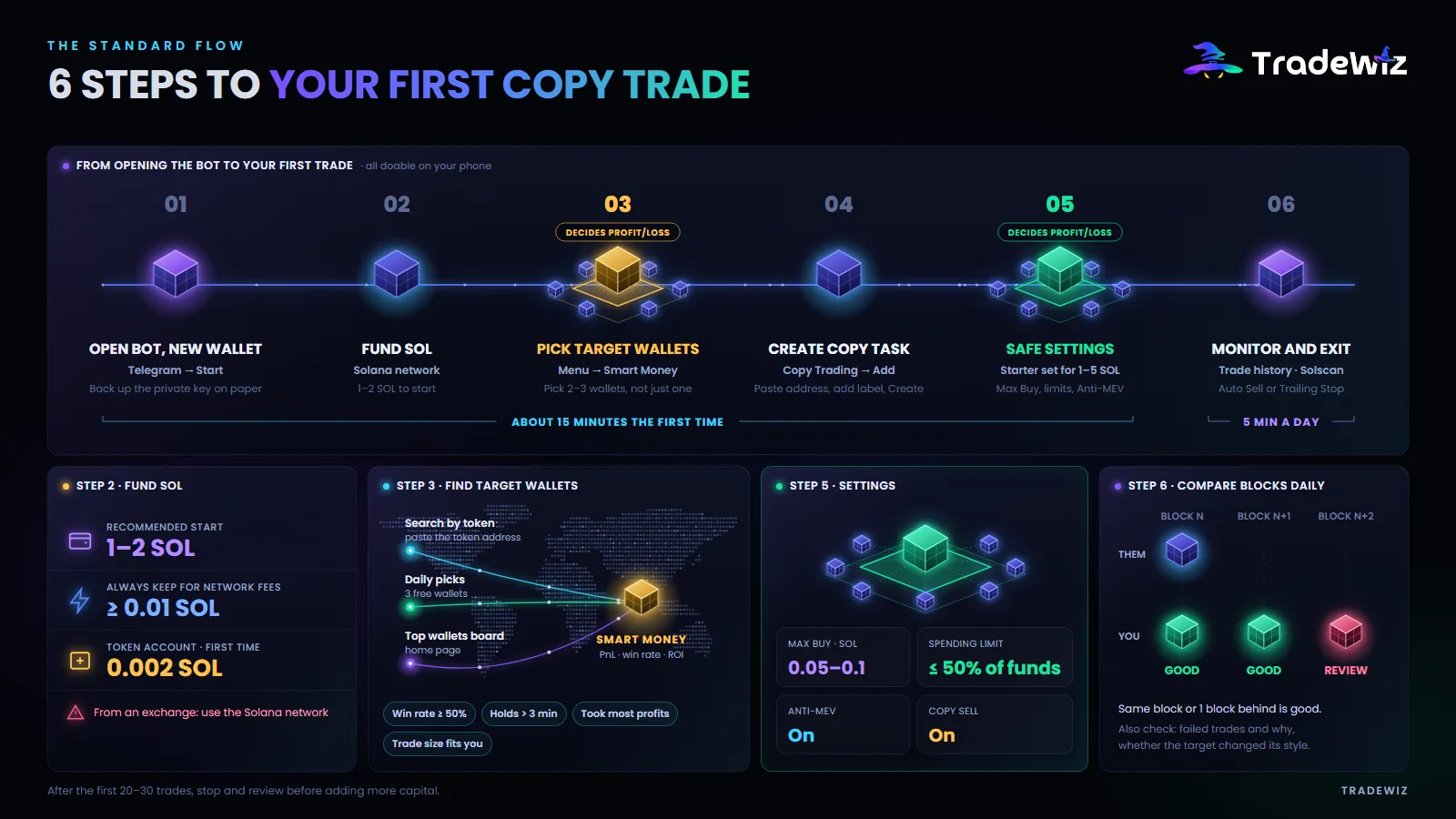
Open TradeWiz on Telegram and tap Start. The bot automatically creates a new Solana wallet for you. The wallet address shows up right in the first message.
Two things to do right away:
- Back up your private key. Go to Wallet, choose Export private key, write it down on paper and keep it somewhere safe. No screenshots, and don't save it in a notes app or in the cloud.
- Make sure it's the right bot. Only use links from the tradewizbot.pro homepage or the official Telegram group. Fake bots usually have near-identical names.
If you already have your own wallet and want to use it, choose Import wallet and paste the private key. For beginners, though, it's better to use the new wallet the bot creates and only fund it with money set aside for copy trading.
Step 2: Fund it with SOL
Send SOL from an exchange or your personal wallet to the bot wallet address. Keep in mind:
- Choose the Solana network when withdrawing from an exchange. Withdrawing over another network means losing the funds.
- Always keep at least 0.01 SOL in the wallet for network fees. Without it, trades fail with an insufficient balance error.
- The first time you buy any token, the Solana network charges 0.002 SOL to create the account that holds that token. This is a network fee, not a bot fee.
Step 3: Pick target wallets
This is the most important step. No bot is fast enough to save a bad target wallet.
Three ways to find wallets in TradeWiz:
- Look up by token. Go to Menu, choose Smart Money and paste the address of a hot token. The bot returns a list of the most profitable wallets that bought that token. Tap each wallet to see total PnL, win rate, ROI per token and trade history.
- Get daily suggestions. Smart Money has a wallet suggestion section where you get 3 addresses with high profit and win rate for free every day.
- Check the featured wallets board on the homepage.
For each wallet, check at least four things: a win rate of 50% or higher, most of the profit already realized, a holding time above 3 minutes, and a trade size that isn't too large compared with your capital. How to read each metric in detail, plus the list of wallet types to avoid, is in How to find smart money wallets worth copying.
Pick 2–3 wallets instead of one. No wallet wins forever.
Step 4: Create a copy task
- Go to Menu and choose Copy Trading.
- Tap Add.
- Paste the target wallet address.
- Give it a memorable label, for example "Scalp A" or "Hold B".
- Tap Create.
Each task maps to one target wallet with its own settings. You can turn each task on and off independently.
Step 5: Set safe settings
This is where beginners go wrong the most, usually by leaving the defaults or copying someone else's settings without understanding them. Below is a starter set for 1–5 SOL of capital.
Capital and risk
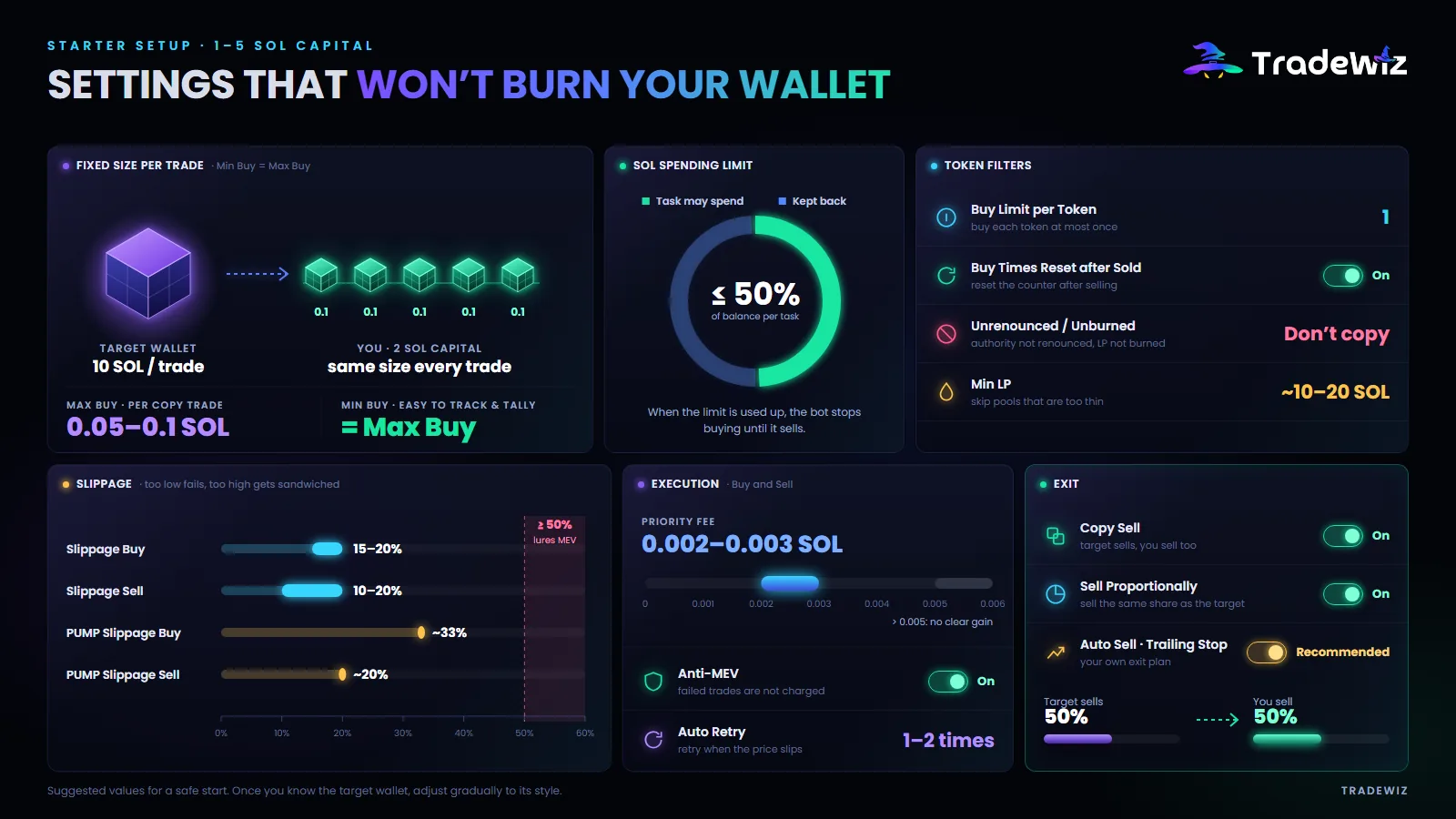
| Setting | Starting value | What it does |
|---|---|---|
| Max Buy | 0.05 – 0.1 SOL | The maximum SOL per copy trade |
| Min Buy | Same as Max Buy | Set them equal so every trade has a fixed size that's easy to track |
| Sol Spending Limit | Max 50% of your balance | The total SOL this task is allowed to spend. Once it's used up, the bot stops buying until a sell comes in |
| Buy Times per Token | 1 | Only buy a token once, even if the target wallet buys it several times |
| Buy Times Reset after Sold | On | After you've sold, the counter resets, ready for next time |
| Unrenounced / Unburned | Don't copy | Skip tokens where ownership hasn't been renounced or liquidity hasn't been burned |
| Min LP | Set a minimum, for example a pool worth 10 – 20 SOL | Don't copy tokens with very thin pools. Check the unit the bot shows when you set it |
Why set Min Buy equal to Max Buy? By default the bot copies as a percentage of the target wallet's trade. If the target trades 10 SOL per trade and you have 2 SOL, that ratio is very hard to get right. A fixed amount per trade makes it easier to control risk and work out fees.
Execution and exits
| Setting | Starting value | What it does |
|---|---|---|
| Priority Fee (Buy and Sell) | 0.002 – 0.003 SOL | Priority fee to get your trade processed early. Above 0.005 SOL the extra benefit isn't noticeable |
| Anti-MEV (Buy and Sell) | On | Protects against sandwich bots. Failed trades with Anti-MEV on aren't charged a fee |
| Slippage Buy / Sell | 15–20% / 10–20% | Too low and trades keep failing, too high and you're easy to sandwich |
| PUMP Slippage Buy / Sell | Around 33% / 20% | Just for Pump.fun tokens, where prices swing very hard |
| Copy Sell | On | When the target wallet sells, you sell too |
| Sell Proportionally | On | The target wallet sells 50%, you sell 50% of what you hold |
| Auto Retry | 1 – 2 times | Automatically retries when a trade fails due to slippage |
One important note on PUMP Slippage: on Pump.fun, the number of tokens you receive is fixed while the SOL you pay goes up if the price rises. Setting 33% means you accept paying up to 33% more SOL than expected. That's why a trade sometimes spends more than Max Buy. That's how Pump.fun works, not a bot bug.
Step 6: Monitor and exit
Copy trading isn't set and forget. Spend 5 minutes a day:
- Open your trade history and compare your block with the target wallet's block on Solscan. Same block or 1 block behind is good.
- Check failed trades and why they failed: slippage, limit used up, or timeout.
- Watch whether the target wallet changes style. A wallet that was trading 0.5 SOL suddenly trading 20 SOL is a sign to be careful.
And most important: don't rely entirely on the target wallet to exit. They may hold longer than you can stomach. Turn on Copy Trade Auto Sell with your own take profit and stop loss, or use a Trailing Stop to lock in profit when the price turns.
7 common beginner mistakes
- Depositing too much right away. Deposit 1–2 SOL, run it for a week, review, and only then add more.
- Copying a single wallet. Split your capital across 2–3 wallets with different styles.
- No Sol Spending Limit. It's your only safety brake when the target wallet trades nonstop.
- Slippage too high "to make sure it fills". Slippage of 50% or more is an invitation for MEV bots to sandwich you.
- Copying someone else's settings. Each target wallet needs its own settings based on its trade size and speed.
- Turning off Copy Sell "to decide for yourself". Without your own exit plan, you'll hold the token until it goes to zero.
- Replying to DMs from "support". The TradeWiz team never DMs first. Anyone who messages you first is a scammer.
When to add more capital
Only add more when all three of these hold for at least 2 weeks:
- Net profit after all fees is positive.
- You enter in the same block as the target wallet, or 1 block behind, on most trades.
- You understand why each losing trade lost and you don't see anything unusual with the target wallet.
Scale up step by step, for example from 2 SOL to 5 SOL, then 10 SOL, running each step for at least a week.
FAQ
Do I need as much SOL as the target wallet?
No. You buy as a ratio or a fixed amount that you set. The target wallet can trade 50 SOL per trade and you can still copy with 0.1 SOL.
Why wasn't one of the target wallet's trades copied?
Usually one of your filters blocked it: market cap, liquidity, token age, number of buys. Or your SOL limit ran out. Less often, the Solana network was congested or the token's pool wasn't ready yet because the token had just migrated from Pump.fun to its main pool.
How do I withdraw?
The bot currently only supports withdrawing SOL. If you still hold other tokens, sell them for SOL first, then withdraw to your personal wallet or an exchange.
Key takeaway
Copy trading isn't a money printer, but it's the most sensible way for a beginner to get into the memecoin market without watching charts all day. Success comes down to three things: picking the right wallets, setting risk limits, and having your own exit plan.
Start with TradeWiz on Telegram, 1–2 SOL and the settings above. Every setting is explained in detail in the Copy Trading guide.
Trade Fast. Trade Smart.