Memecoin Take Profit: Auto Sell, Trailing Stop or Limit Order?
 2026-10-019 min read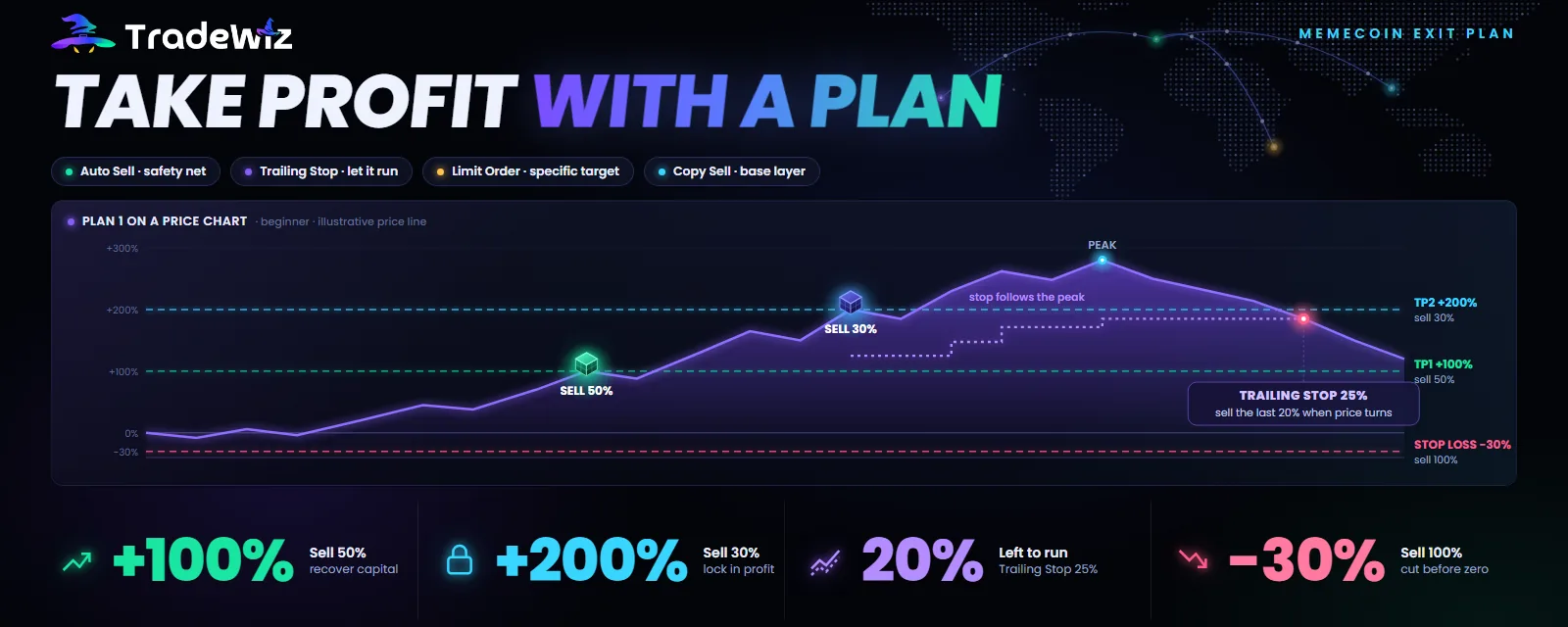
Everyone remembers the token that was once up 5x and then went to zero because they were "waiting a little longer". Few remember that at the time they had no exit plan at all, just hope. In the memecoin market, getting in right is half the job. The other half is getting out according to a plan set in advance, running automatically, free of emotion and not fully dependent on the target wallet.
This post explains the four exit tools in TradeWiz, when to use which, and three sample plans you can use right away.
Quick summary
- Auto Sell is the default protection for every trade: take profit in steps, cut losses automatically.
- Trailing Stop is for the part you "let run": ride the full move, exit automatically when it turns.
- Limit Order is for a specific price you've decided in advance, including buying when the price breaks higher.
- Copy Sell keeps you in sync with the target wallet, but don't let it be your only plan.
Four tools, four different jobs
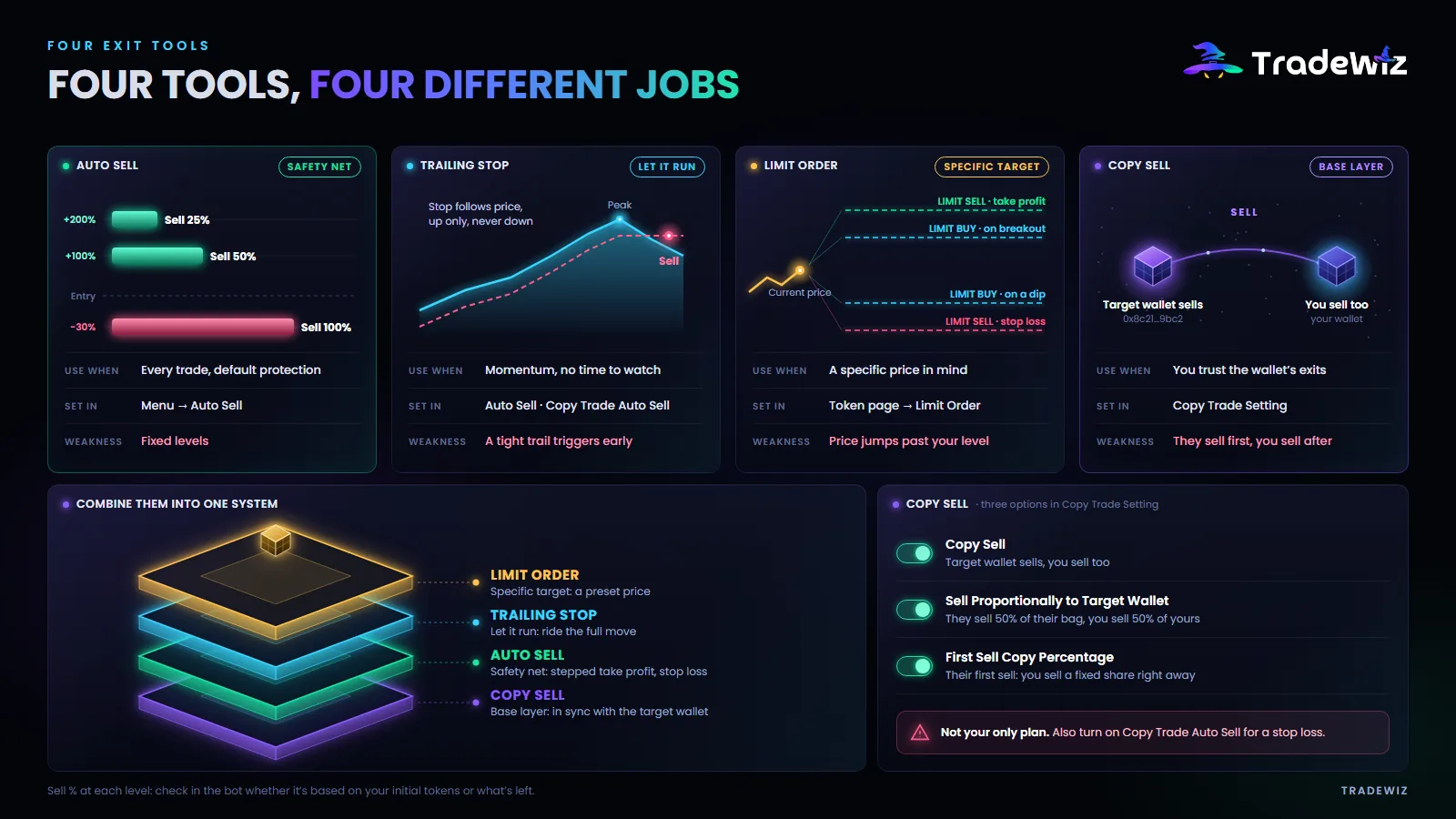
| Tool | How it works | Use it when | Where to set it |
|---|---|---|---|
| Auto Sell | Once you've bought, the bot sets levels automatically: price up X%, sell Y%; price down Z%, sell everything | Every trade | Menu → Auto Sell |
| Trailing Stop | The stop loss follows the price, always a fixed percentage below the most recent high | The token has momentum and you want to ride it without watching | Auto Sell, or Copy Trade Auto Sell |
| Limit Order | Set a buy or sell price in advance, as an exact price or a percentage from the current one | You have a specific price in mind | Token page → Limit Order |
| Copy Sell | When the target wallet sells, you sell too | You trust the target wallet's exits | Copy Trade Setting |
Auto Sell: the safety net for every trade
Auto Sell automatically creates take profit and stop loss orders as soon as you buy a token. You set them in advance: on the left is the price rise or drop threshold, on the right is the share of tokens to sell at that threshold.
How to set it up:
- Go to Menu and choose Auto Sell.
- On the left, set the price rise and drop thresholds as percentages.
- On the right, set the matching sell percentages.
- Turn on the switch so the settings take effect. Many people set it up and forget to turn it on.
Copy trading needs one more step: turn on Auto Sell in the copy task settings, and also set it up and turn it on in Menu → Auto Sell. Miss either one and Auto Sell won't run for copy trades.
A basic set of levels:
| Threshold | Sell | What it means |
|---|---|---|
| +100% | 50% | Take back your entire initial capital. From here on you're playing with profit |
| +200% | 25% | Lock in more profit |
| -30% | 100% | Cut the loss before the token goes to zero |
Note: check in the bot whether the sell percentage at each level is calculated on your initial token amount or on what's left, then adjust the numbers to match what you want. The plans in this post assume it's calculated on the initial amount.
Strength: runs while you sleep, no emotion. Weakness: fixed levels. If the token does 10x, you've already sold 75% at 2–3x. That's why you need the next tool for the rest.
Trailing Stop: ride the full move
A Trailing Stop is a moving stop loss. You set a distance, for example 5%. The stop level always sits exactly that distance below the most recent high. Price goes up, the stop gets pulled up with it. Price goes down, the stop stays put. Price hits the stop, the bot sells.
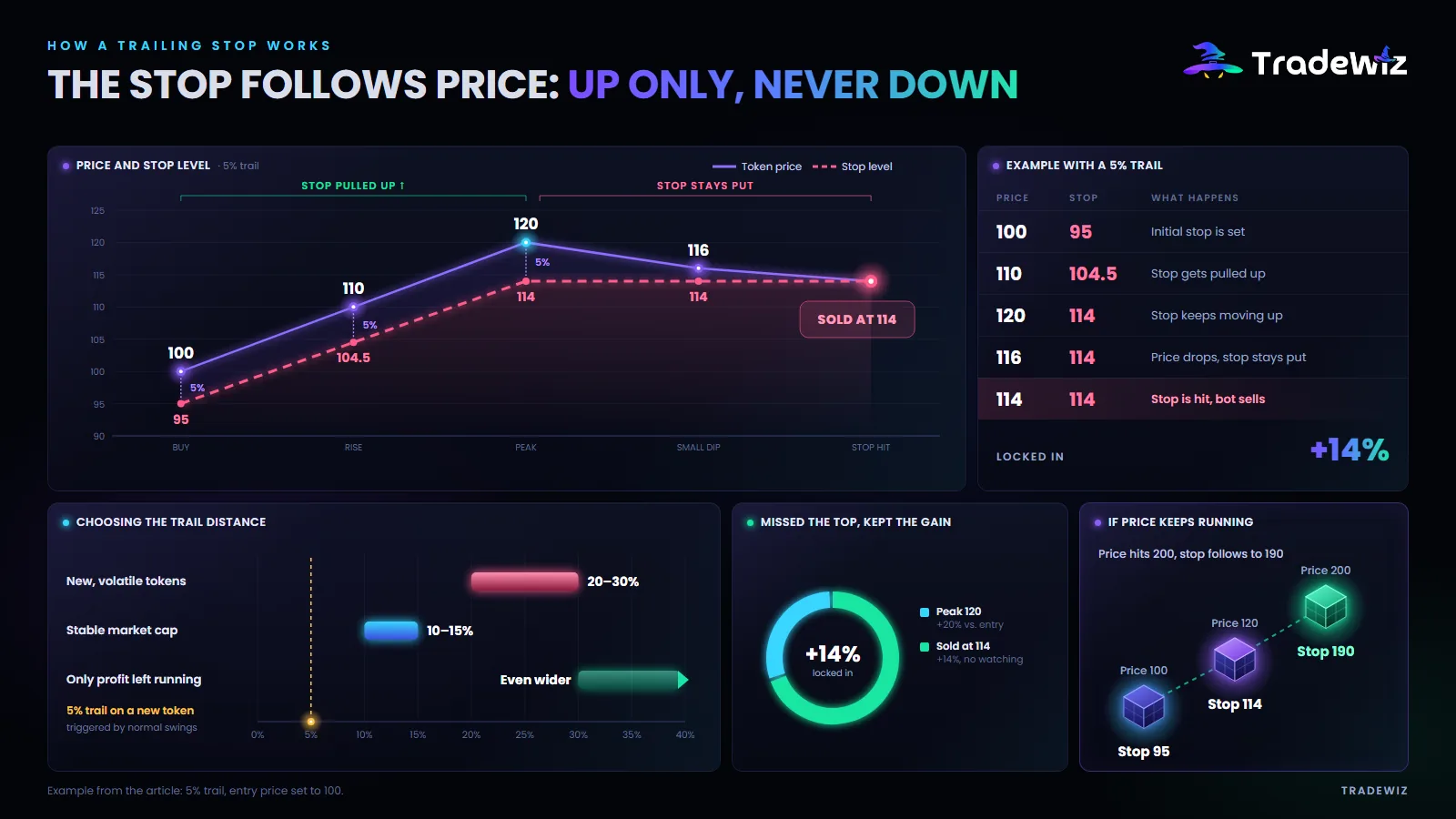
Example with a 5% trail:
| Price | Stop level | What happens |
|---|---|---|
| 100 | 95 | Initial stop is set |
| 110 | 104.5 | Stop gets pulled up |
| 120 | 114 | Stop keeps moving up |
| 116 | 114 | Price drops, stop stays put |
| 114 | 114 | Stop is hit, sell |
Result: you sell at 114 instead of the 120 top, but you lock in +14% without watching. If the price had kept going to 200, the stop would have followed up to 190.
Choosing the trail distance:
- New, highly volatile tokens: 20–30%. A tight trail gets triggered by normal swings.
- Tokens with a more stable market cap: 10–15%.
- Once your capital is back and only profit is running: you can go even wider, since all you have left to lose is profit.
In TradeWiz, Trailing Stop lives in two places: in Auto Sell for manual buys, and in Copy Trade Auto Sell for copy trades.
Limit Order: a specific price, no emotion
A Limit Order is a pending order at a price you set in advance. Unlike many exchanges, limit orders in TradeWiz work in both directions:
- Limit sell can be set above the current price (take profit at a target) or below it (stop loss at a specific level).
- Limit buy can be set below the current price (buy when the price drops into your zone) or above it (buy when the price breaks a level, confirming the move).
How to place a limit sell: go to Holdings, tap the token name, choose Limit Order then Limit Sell, pick the sell percentage, set the target as an exact price or a percentage from the current price, and tap Create Order. You have to be holding the token to place a sell order.
When to use it: you have a specific number in mind. For example, you want to sell when the token hits a $5 million market cap. Work out the percentage difference between the current market cap and $5 million, and set the limit sell at that percentage.
Weakness: if the price jumps past your level within a single block, the order may not fill at the right price, especially on thin-liquidity tokens.
Copy Sell: stay in sync with the target wallet
With copy trading you get the extra option of selling along with the target wallet. Three important options:
- Copy Sell: turn it on to sell when the target wallet sells. Turn it off and selling is up to you.
- Sell Proportionally to Target Wallet: the target wallet sells 50% of its holdings, you sell 50% of yours. Turn it off and the amount sold is their amount multiplied by your copy ratio.
- First Sell Copy Percentage: the first time the target wallet sells any amount, you sell a fixed percentage of what you hold. Useful when you want to get part of the way out early instead of waiting for them to dump everything.
Copy Sell should be the base, not your only plan. Two reasons: they sell first and you sell after, so your exit price is always lower, and they may hold longer than you can stomach. Always turn on Copy Trade Auto Sell as well, with your own stop loss.
Three sample plans
Plan 1: Beginner, capital preservation first
- Auto Sell: +100% sell 50%, +200% sell 30%, -30% sell 100%.
- The remaining 20%: Trailing Stop at 25%.
- Copy Sell on, Sell Proportionally on.
Goal: get your capital back at 2x, and never let a trade go to zero.
Plan 2: Ride the momentum, accept volatility
- Auto Sell: +150% sell 40%, -40% sell 100%.
- The remaining 60%: Trailing Stop at 30%.
- First Sell Copy Percentage at 30%: when the target wallet starts selling, you exit 30% immediately.
Goal: keep most of the position for the 5–10x runners, accepting that you give back some profit when the price turns.
Plan 3: A specific target
- Limit sell 50% at the target market cap you've worked out in advance.
- Auto Sell stop loss at -35%, sell 100%.
- The rest: Trailing Stop at 20%, which you turn on yourself after the first limit order fills. The bot doesn't switch from one tool to another on its own.
Goal: stick to the number you set, and don't move the target when the price rises.
Four common exit mistakes
- Setting up Auto Sell but not turning it on. Check the switch after setting it up.
- A trail that's too tight for a new token. A 5% trail on a token that swings 30% a minute gets triggered right away, and you sell at the exact bottom of the pullback.
- No stop loss because "memecoins always bounce back". Most don't.
- Moving the target as the price rises. Make the plan with a clear head, execute it while the price runs. Never the other way around.
FAQ
Can I use Auto Sell and Trailing Stop together?
Yes, and you should. Auto Sell handles the fixed levels and the stop loss, Trailing Stop handles the rest.
What slippage and gas do automatic sells use?
They use the sell settings in the matching section: Auto Sell has its own slippage, copy trading has its own Sell Gas Fee and Sell Slippage, and the sniper uses the sell settings in the sniper config. Set sell slippage wide enough, 10–20%, so your exit can fill while the token is dropping.
How do I sell when a token hits a certain market cap?
Work out the percentage difference between the current market cap and your target market cap, then place a Limit Sell at that percentage.
Key takeaway
Exiting isn't a single decision, it's a system set up in advance. Auto Sell protects your capital. Trailing Stop locks in the move. Limit Order executes the target you set. Copy Sell keeps you in sync with someone better. Use all four for the right jobs and you'll never again have to remember the token that "was once up 5x".
Detailed how-to guides: Auto Sell, Trailing Stop, Limit Orders. All of it is available in TradeWiz.
Trade Fast. Trade Smart.